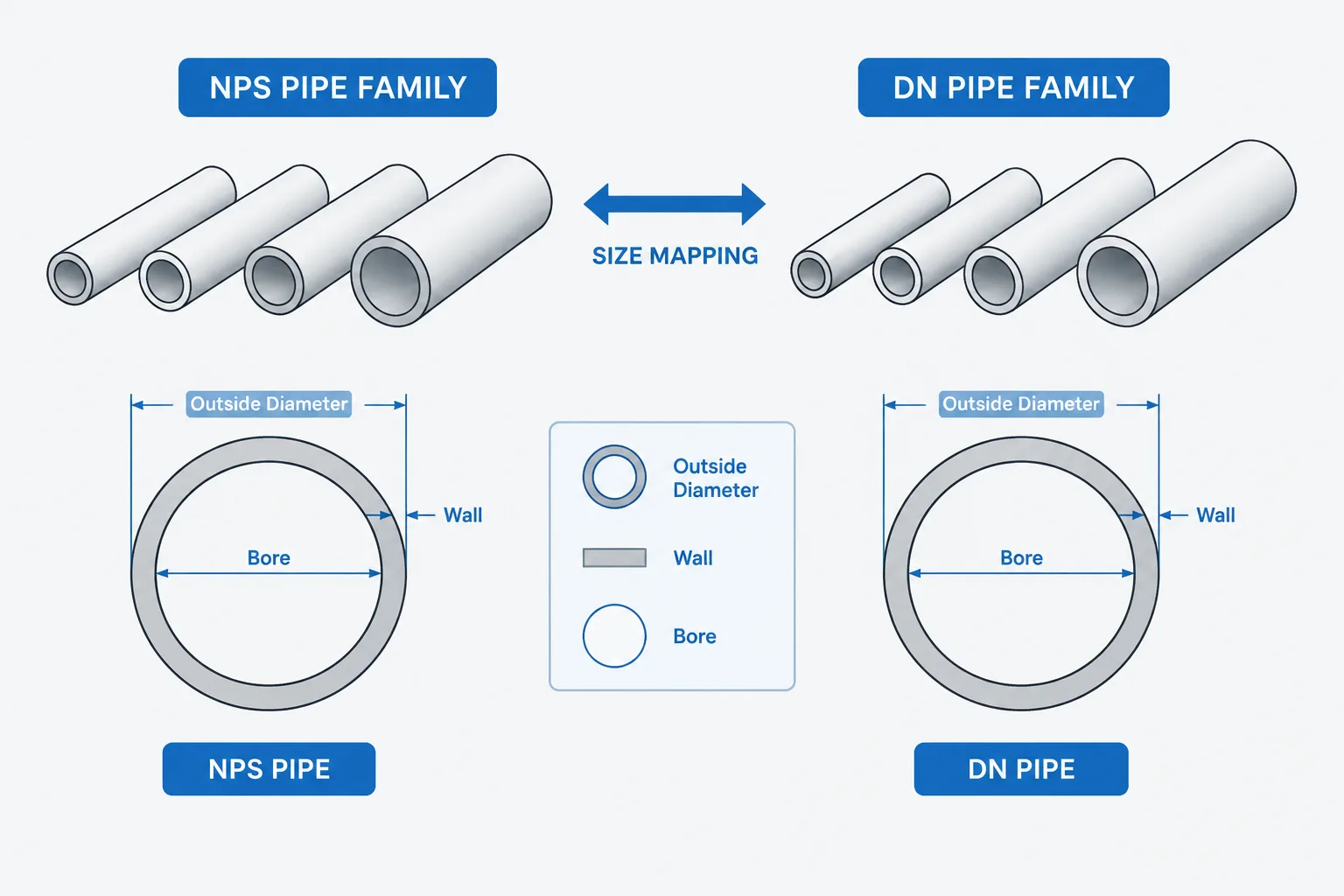
NPS to DN conversion is a designation lookup, not a calculation of physical diameter. The mapped labels identify corresponding nominal-size families, while actual pipe and component geometry must be obtained from the applicable dimensional reference, wall designation, pressure system, and product data.
This distinction is important when preparing piping specifications, reviewing vendor documents, selecting connecting components, or building CAD catalogs. A correct nominal-size match is a useful starting point, but it does not establish bore, outside diameter, flange drilling, fitting takeout, or valve face-to-face dimensions.
NPS to DN conversion is often presented as though it were an ordinary conversion between inches and millimeters. That shortcut is convenient, but it can create serious confusion in piping work. Nominal Pipe Size (NPS) and Diameter Nominal (DN) are standardized size designations. They identify compatible families of pipe, fittings, flanges, and valves; they do not directly state a component’s measured outside diameter, inside diameter, or wall thickness.
For example, NPS 2 is commonly associated with DN 50. This does not mean the pipe measures exactly two inches or exactly 50 millimeters across every relevant feature. The two labels identify corresponding nominal-size families within different notation systems. Actual geometry must come from the applicable dimensional standard, component specification, schedule, and manufacturer data.
What NPS and DN Actually Identify
NPS is the nominal pipe-size notation commonly encountered in United States piping practice and in standards organized around inch-based designations. DN is the corresponding nominal designation used in many international and metric-oriented documents.
Neither designation should be treated as a complete dimensional description. A nominal size normally answers a classification question: which size family does this component belong to? It does not independently answer any of the following:
- What is the pipe outside diameter?
- What is the pipe inside diameter?
- What is the selected wall thickness?
- What is the flange outside diameter or bolt-circle geometry?
- What is the valve face-to-face dimension?
- What is the fitting center-to-end dimension?
Those values depend on additional information. For pipe, schedule or another wall designation is usually required. For fittings, the fitting type, end connection, dimensional family, and wall designation may matter. For flanges and valves, the governing standard family and pressure designation are also essential.
Why Arithmetic Conversion Gives the Wrong Impression
A unit converter changes a measured quantity from one unit to another. Nominal-size mapping does something different: it matches one standardized label to another standardized label. The DN number is therefore not obtained reliably by converting the NPS label as though NPS were a measured diameter.
The paired designations may look approximately related, but the DN series uses nominal numbers selected for identification and standardization. They are not promises of exact millimeter geometry. Rounding the result of an inch-to-millimeter calculation may happen to produce a familiar DN label in some cases, but that is not a dependable engineering method.
| Task | Correct approach | Unsafe shortcut |
|---|---|---|
| Identify the corresponding nominal family | Use a verified NPS-to-DN mapping | Apply arithmetic conversion and round |
| Determine pipe outside diameter | Use the applicable pipe dimension reference | Read the NPS or DN label as a measured diameter |
| Determine pipe inside diameter | Use outside diameter and the specified wall information | Assume it equals the nominal size |
| Select mating flanges | Check nominal size, standard family, pressure designation, facing, and drilling | Match only the NPS or DN label |
| Create CAD geometry | Drive geometry from verified dimensional data | Scale a component according to the ratio of nominal labels |
Nominal Size Does Not Define Pipe OD or ID
A common source of error is the assumption that a DN value is the pipe outside diameter in millimeters. Another is the assumption that an NPS value always equals the pipe outside diameter in inches. Both assumptions ignore how nominal pipe systems developed and how their dimensional series are organized.
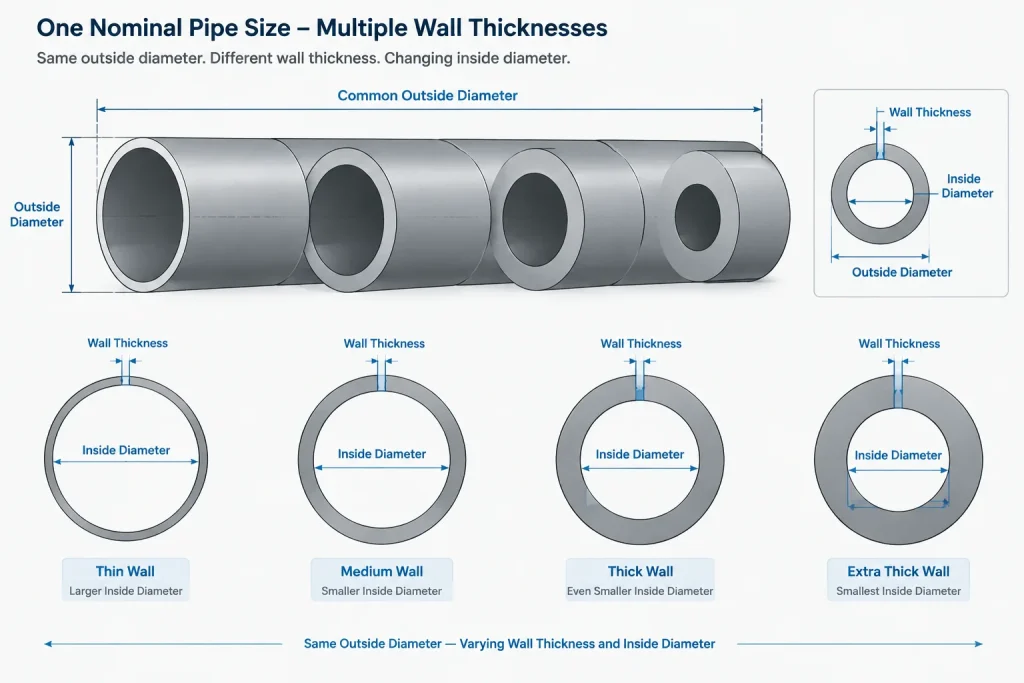
Within a given nominal pipe size, changing schedule commonly changes wall thickness while the standardized outside diameter remains associated with the same size family. As the wall becomes thicker, the available bore becomes smaller. Consequently, two pipes carrying the same NPS or DN designation can have different inside diameters.
This distinction matters in several workflows:
- Hydraulic calculations need an appropriate inside diameter, not merely a nominal-size label.
- Clearance and routing studies need the actual pipe or insulation outside envelope.
- Weld preparation and bore matching may require selected wall information.
- Weight calculations need actual section geometry and material data.
- CAD catalogs need verified component dimensions rather than label-based scaling.
NPS-to-DN Mapping Does Not Convert the Entire Component
Mapping a nominal size does not automatically translate every other designation attached to a component. This is especially important when documents from different standards systems are combined.
A flange described with an NPS designation and pressure class cannot be fully converted by replacing the size with DN and changing the pressure label to a superficially similar metric designation. Flange outside diameter, thickness, bolt drilling, facing, bore, and allowable service conditions remain controlled by the selected flange standard and material rules. Pressure class and PN designations are not interchangeable merely because their numbers appear comparable.
The same principle applies to valves and fittings. A valve may have a recognizable nominal-size correspondence while its face-to-face length, end geometry, pressure-temperature basis, operator arrangement, or bore differs between product families. A DN label establishes a size category, not universal interchangeability.
A Better CAD and Data Workflow
Piping CAD systems and component databases should separate the displayed size label from the geometry that creates the model. A robust catalog record can contain several distinct fields rather than embedding every assumption in one text description.
Keep the nominal designation explicit
Store NPS and DN as designations, including their prefixes where they appear in reports or user interfaces. This reduces the chance that a bare number will be mistaken for an inch or millimeter measurement.
Use a controlled size-map key
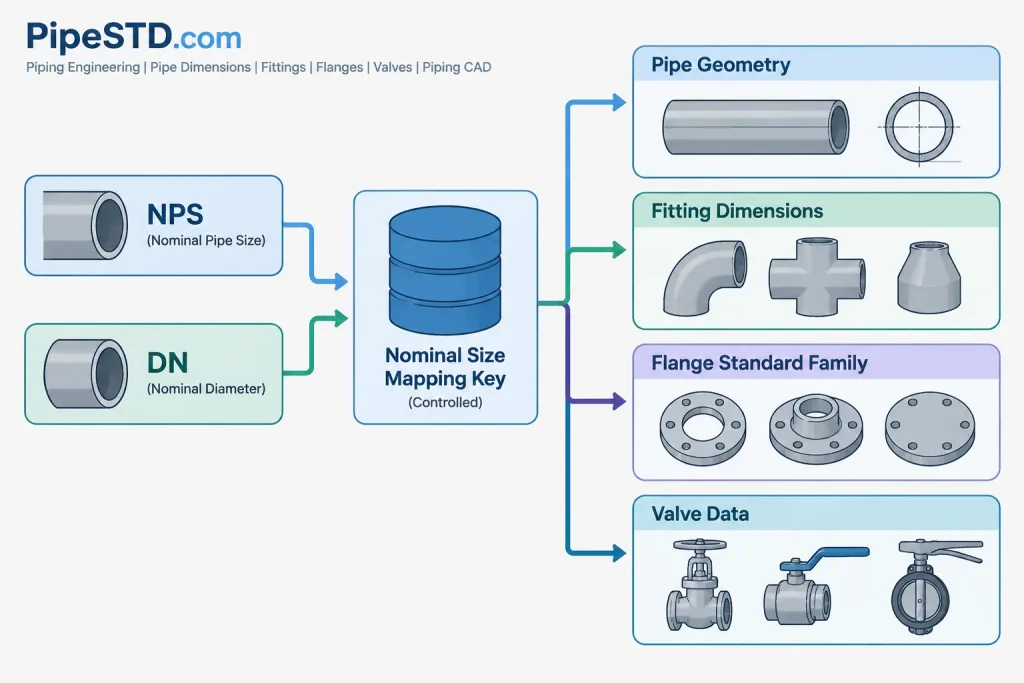
A database may use an internal nominal-size key that connects the recognized NPS and DN labels. That key should point to a reviewed mapping table rather than an equation that performs unit conversion and rounding.
Store geometry independently
Outside diameter, wall thickness, bore, fitting takeout, flange dimensions, and valve face-to-face length should be stored or referenced as separate verified properties. Geometry should be selected using all necessary catalog criteria, including component type and governing dimensional family.
Preserve the source standard family
Do not normalize unlike components into a generic size merely because they share a nominal designation. The catalog should retain enough information to distinguish standard families, pressure systems, end connections, materials, and other attributes that control compatibility.
Avoid proportional block scaling
A larger DN or NPS label does not mean every feature grows by a constant factor. Pipe outside diameters, flange patterns, fitting takeouts, valve lengths, and operator sizes follow their own dimensional series. Select or generate geometry from verified data instead of scaling an existing block.
Handling Mixed NPS and DN Project Documents
Projects often receive equipment drawings, valve data sheets, line lists, and vendor models that use different notation systems. The goal should not be to erase the source terminology immediately. Instead, establish a controlled project convention and retain traceability to the original information.
- Define whether line identification and drawings will display NPS, DN, or both.
- Use a reviewed mapping table for nominal labels.
- Record the dimensional standard or product family separately from the nominal size.
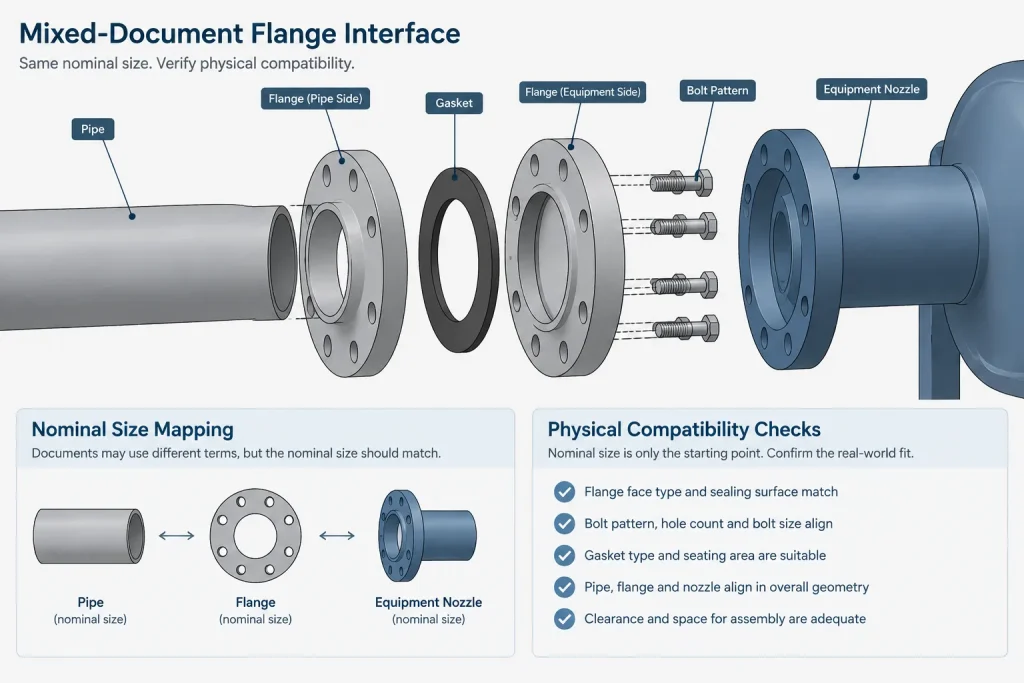
- Check actual connection geometry at equipment and vendor interfaces.
- Flag unfamiliar or conflicting size labels instead of forcing an automatic conversion.
- Make BOM and material takeoff outputs consistent with procurement terminology.
If an equipment nozzle is labeled in DN while the connected piping specification uses NPS, the nominal mapping is only the first check. The designer must still verify flange drilling, facing, pressure designation, bore, gasket arrangement, and interface dimensions. A matching nominal family does not prove that the physical joint will assemble correctly.
Common Documentation Mistakes
Several recurring errors can be prevented by treating NPS and DN as identifiers rather than measurements:
- Adding an inch mark after an NPS value, which can make the designation look like an exact dimension.
- Adding “mm” after a DN value, implying that it is a measured millimeter diameter.
- Calculating DN with a unit-conversion formula instead of using a mapping.
- Using nominal size as the CAD cylinder diameter.
- Assuming identical nominal labels guarantee flange or valve interchangeability.
- Changing NPS to DN while silently changing the component’s standards basis.
- Using nominal size alone for flow-area or velocity calculations.
Practical Rule for Designers and Drafters
Use NPS-to-DN conversion only to identify the corresponding nominal-size family. Use verified dimensional references to create geometry, check interfaces, calculate bore or flow area, and prepare fabrication information.
In short, NPS and DN tell you what size category to investigate. They do not, by themselves, tell you what to draw, fabricate, purchase, or connect. Keeping nominal designation, actual dimensions, wall selection, and standards family as separate pieces of data produces clearer drawings, safer catalogs, and more reliable piping coordination.
How to Apply the Mapping in Practice
A controlled workflow treats nominal designation and dimensional geometry as separate data. First, use a reviewed mapping to identify the corresponding NPS and DN family. Then verify the properties that control the specific engineering task.
- For pipe: confirm the dimensional family and wall designation before using outside diameter, inside diameter, or wall thickness.
- For fittings: check fitting type, end connection, dimensional basis, and applicable wall information.
- For flanges: verify the standard family, pressure designation, facing, bore, and drilling rather than relying on nominal size alone.
- For valves: confirm end geometry, pressure basis, bore arrangement, and face-to-face requirements for the selected product family.
- For CAD: use the nominal mapping as a catalog key, then generate or select geometry from verified component dimensions.
Mapping, Conversion, and Compatibility Are Different Checks
These terms should not be used interchangeably. A unit conversion expresses the same measured quantity in another unit. A nominal-size mapping relates recognized NPS and DN labels. A compatibility check determines whether actual components can be connected and used as intended.
Completing the mapping does not complete the compatibility check. Documents should retain the original standards basis and enough component information to review the physical interface. This is especially important at vendor connections and at boundaries between different piping specifications.
Recommended Drawing and Database Practice
Show the NPS or DN prefix wherever omission could make the value look like a measured dimension. In data systems, keep nominal size, dimensional standard, wall selection, pressure designation, end connection, and actual geometry in separate fields. This structure improves traceability and prevents an automated label change from silently altering the engineering basis of a component.
Frequently Asked Questions
Is DN the pipe outside diameter in millimeters?
No. DN is a nominal size designation. The actual outside diameter must be obtained from the applicable pipe dimensional reference.
Can NPS be converted to DN with an inch-to-millimeter formula?
No. Use a verified nominal-size mapping. Arithmetic conversion and rounding can create a familiar-looking label, but that does not make it a dependable selection method.
Does the same NPS or DN always have the same inside diameter?
No. Inside diameter depends on actual outside diameter and the selected wall thickness. Pipes in the same nominal family can therefore have different bores.
Does a matching NPS-to-DN pair prove that two flanges are compatible?
No. Nominal size is only one part of flange selection. The standard family, pressure designation, facing, drilling, bore, gasket arrangement, and interface geometry must also be checked.
Should CAD geometry be scaled from an NPS or DN label?
No. Nominal labels are catalog identifiers, not scale factors. CAD geometry should be created from verified dimensions for the exact component family and configuration.
How should mixed NPS and DN documents be handled?
Use a controlled project convention while retaining the original designation and standards basis. Map the nominal size, then independently verify the dimensions and connection details needed at each interface.