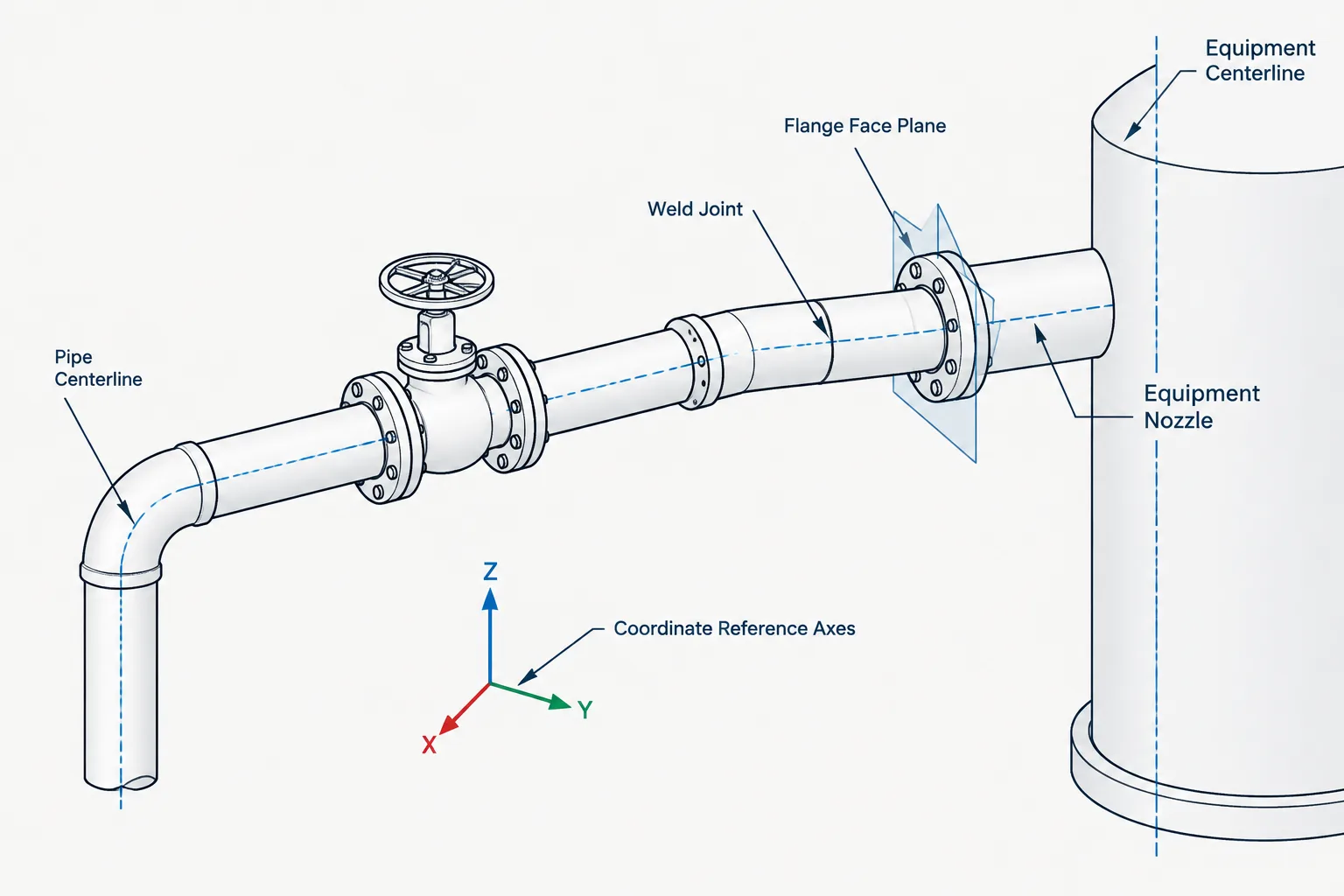
Piping CAD datums are the controlled references behind routing, component placement, dimensions, and equipment connections. A model may look complete while still relying on ambiguous insertion points, decorative edges, or disconnected coordinate systems. Understanding which datum governs each task helps designers distinguish theoretical routing geometry from physical connection geometry.
This guide explains how centerlines, face planes, weld locations, and equipment interfaces work together. It also shows why stable reference geometry matters when calculating connecting pipe, replacing components, reviewing drawings, or coordinating piping with equipment and structural models.
A piping model may contain accurate component geometry and still produce unreliable drawings if its reference points are poorly controlled. Centerline intersections, flange face planes, weld lines, equipment nozzle locations, and plant coordinates are all useful datums, but they do not represent the same physical location or serve the same purpose.
For drafters and designers, the practical issue is not simply where a component appears on screen. It is whether the model preserves the reference geometry needed to position the component, calculate connecting pipe, coordinate with equipment, and communicate fabrication dimensions. A clear datum strategy also makes component replacement and design revisions less disruptive.
What Is a Datum in Piping CAD?
A datum is a defined reference used to locate or measure geometry. It may be a point, line, plane, axis, coordinate system, or established equipment reference. Some datums correspond to physical surfaces, while others are theoretical construction references.
Common piping CAD datums include:
- Pipe centerlines and their intersections
- Flange gasket-contact face planes
- Butt-weld end planes or weld lines
- Threaded, socket, or grooved connection reference points
- Valve and fitting ports
- Equipment centerlines and nozzle face locations
- Structural grid lines and floor elevations
- Plant, area, or model coordinate origins
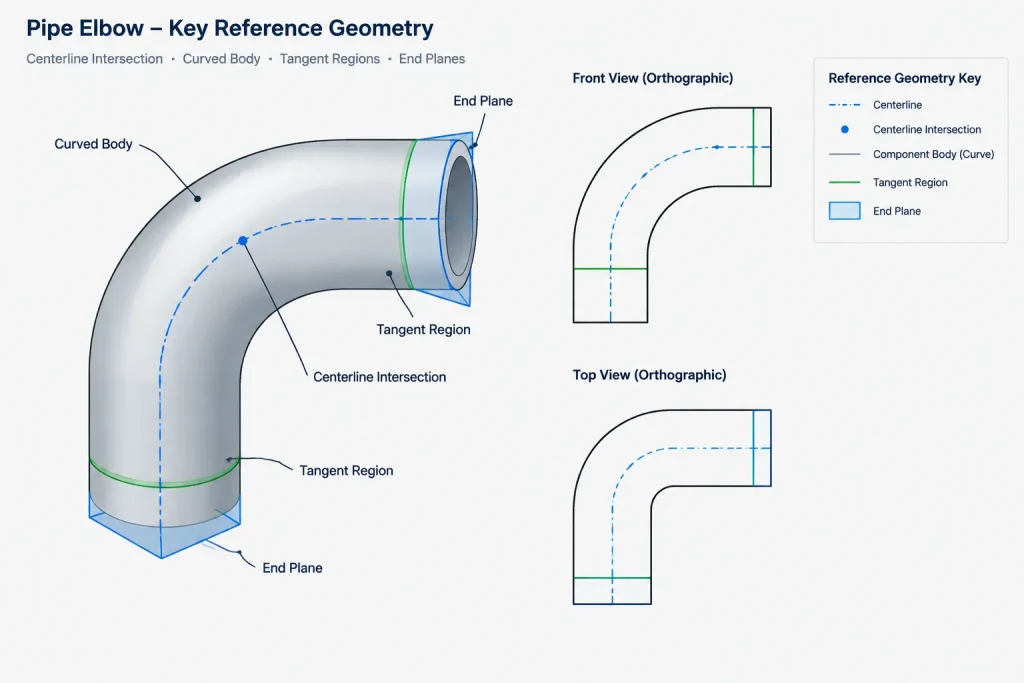
A component can have several valid datums at once. An elbow, for example, may be positioned from the theoretical intersection of its connecting centerlines, while its physical ends are represented by separate end planes. A flanged valve may have a body origin, two port axes, and two flange face planes. Selecting the correct datum depends on what the dimension or coordination task is intended to control.
Four Datum Types Commonly Used in Piping Layout
Pipe centerlines and theoretical intersections
Pipe centerlines define routing direction and are convenient for controlling elevations, offsets, slopes, and branch orientation. The theoretical intersection of two centerlines is particularly useful when laying out elbows and tees. It provides a stable routing reference even though the physical fitting does not extend all the way to that intersection.
Centerline geometry should not automatically be treated as fabrication geometry. Pipe cut lengths usually depend on the actual component end locations derived from fitting takeoff, engagement, weld preparation, or joint configuration.
Component face and end planes
A face or end plane represents the axial boundary where a component connects to another item. Examples include a flange face, a butt-weld end, or a plain pipe end. These planes are central to axial stack-up because they define where one component ends and the next joint begins.
Face planes are especially important at equipment nozzles, valves, inline instruments, strainers, and other components whose installed lengths affect connected piping. When a model uses only a body center point and approximate graphics, the true interface locations can become difficult to verify.
Weld lines and joint locations
A weld line identifies a joint location for fabrication, inspection, spool planning, or field installation. For a butt-weld connection, the joint is associated with the mating component ends, but the displayed weld symbol or graphical line may be offset or exaggerated for drawing clarity.
The weld line must therefore be distinguished from an arbitrary seam in a CAD solid. A modeled edge is not necessarily a controlled joint datum. If weld maps, isometrics, and spool drawings depend on the joint, it should be represented by intentional connection data rather than inferred from appearance alone.
Equipment and project coordinate datums
Equipment interfaces are often controlled by nozzle centerlines, nozzle face locations, equipment centerlines, base elevations, or vendor-defined reference points. These local datums must be related to the project coordinate system so that piping, structural, civil, and equipment models remain coordinated.
A nozzle face can be correct relative to the equipment model but wrong in the plant if the equipment origin, rotation, or elevation is incorrect. Interface verification should therefore cover both local component geometry and global placement.
Datum Comparison for Common CAD Tasks
| CAD or drawing task | Typical controlling datum | Common mistake |
|---|---|---|
| Route a pipe run | Pipe centerline and direction | Using the outside surface as the routing reference |
| Locate an elbow | Centerline intersection plus verified fitting geometry | Dimensioning to a visible tangent or edge without defining it |
| Connect to equipment | Nozzle axis and connection face | Snapping to the equipment body or an approximate nozzle graphic |
| Calculate straight pipe between components | Opposing component end planes | Subtracting body-center coordinates instead of end locations |
| Locate a flange joint | Mating flange face planes and joint centerline | Treating the back of the flange or hub edge as the interface |
| Define a fabrication weld | Controlled joint or weld location | Assuming every solid edge represents a weld |
| Coordinate model placement | Project coordinates, grids, and established elevations | Mixing local and plant coordinate systems |
Why Visible Edges Are Poor Default Datums
CAD users naturally snap to visible edges because they are easy to select. In piping work, however, many visible edges are not stable design references. A flange hub profile may change when a different component is selected. A valve body outline may vary by manufacturer even when its required connection locations remain compatible. Insulation, lining, simplified graphics, and display settings can also create edges that have no role in fabrication.
Reference geometry should survive reasonable component substitutions. If a valve is replaced, its connection faces and port axes are more meaningful than the midpoint of its body casting. If an elbow representation changes from simplified to detailed, its centerline intersection and verified end planes should remain usable.
Datum Control and Pipe Cut Length
One of the most consequential datum errors occurs when straight pipe length is measured between the wrong points. The distance between fitting center points is not normally the same as the required pipe cut length. Component takeoff, socket or thread engagement, joint preparation, field allowances, and fabrication practices may all affect the result.
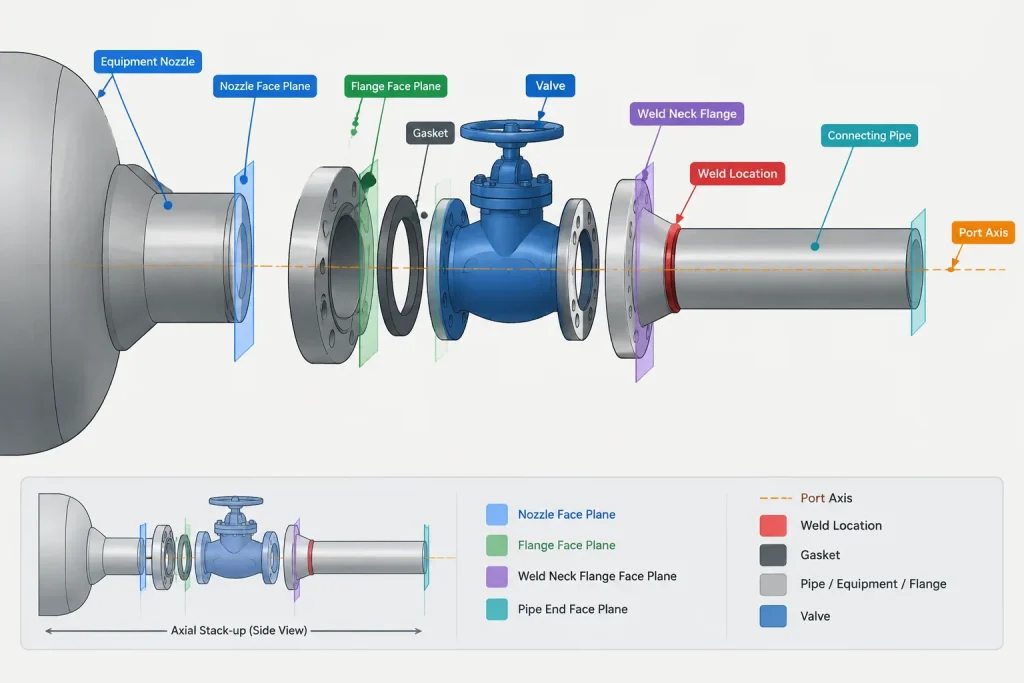
A reliable model should make it possible to identify:
- The design routing points
- The physical or defined connection ends
- The joint type at each end
- The length occupied by adjoining components
- Any allowance that must be controlled outside the nominal CAD geometry
Where the required fabrication value depends on project specifications, manufacturer data, or shop procedure, the model should not imply that a generic geometric subtraction is automatically final.
A Practical Datum Workflow
1. Establish the coordinate framework
Confirm the project origin, orientation, grid relationship, and elevation convention before placing equipment or routing pipe. Document any local coordinate systems and the transformation used to relate them to the plant model.
2. Place equipment from approved interface information
Locate equipment using controlled reference points rather than visual alignment. Verify nozzle axes, face locations, orientations, and connection descriptions against the current equipment information.
3. Route from centerlines
Use centerlines to define the intended path, elevation, slope, and direction. Keep the routing skeleton understandable so that offsets and branch locations can be checked independently of detailed solids.
4. Resolve physical connection planes
Insert components using verified dimensional data appropriate to the design stage. Confirm that connection ports and end planes align with the routing centerlines and with adjacent component interfaces.
5. Check the axial stack-up
Review the sequence of faces, ends, joints, and straight pipe segments along the run. This is particularly important around equipment nozzles, flanged assemblies, inline valves, and compact piping arrangements.
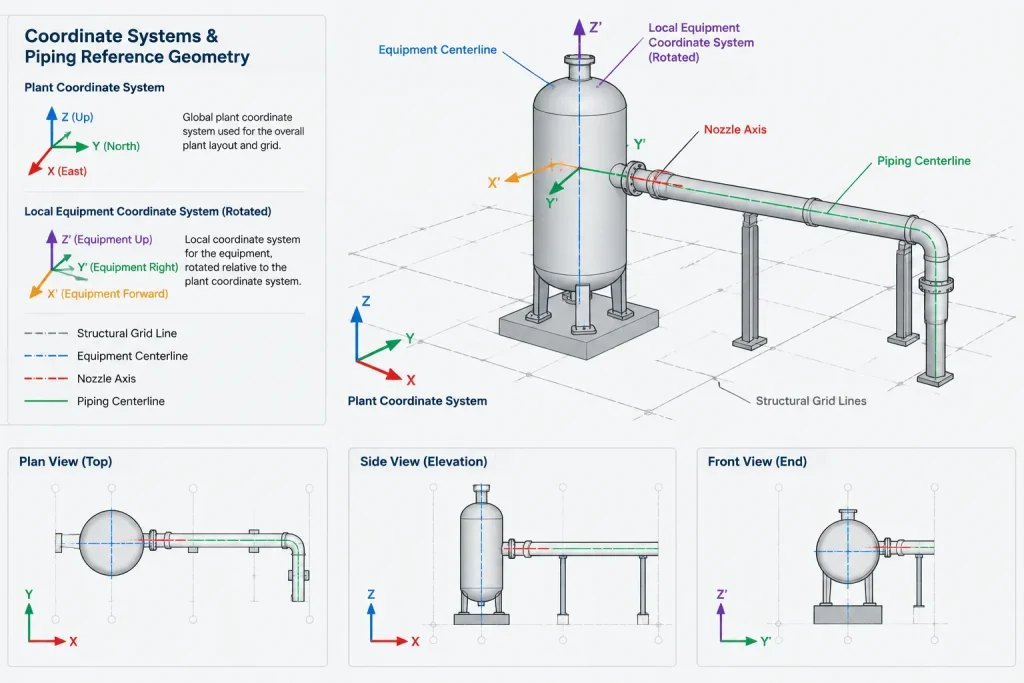
6. Dimension to named references
Drawings should make the dimension origin clear. Labels such as centerline, face of flange, equipment centerline, weld, grid line, or finished floor are more useful than an unexplained extension line pointing toward crowded geometry.
7. Test component replacement
Where practical, replace or revise a component and observe what moves. If unrelated pipe, dimensions, or annotations shift because they were constrained to decorative body geometry, the datum scheme needs improvement.
Managing Simplified and Detailed Models
A simplified component can still be useful if its datums are accurate and its limitations are understood. Conversely, a visually detailed component can be unreliable if its insertion point and ports are undefined. Model quality should therefore be judged by both graphical representation and reference behavior.
For library components, useful control data may include a defined origin, port axes, end planes, nominal connection information, orientation indicators, and a clear distinction between envelope geometry and connection geometry. Manufacturer-specific outlines should not be substituted for generic components without checking the dimensions that affect the project.
Drawing and Review Checks
Before issuing a layout, isometric, or spool-related drawing, reviewers can ask:
- Are dimensions tied to recognizable and stable datums?
- Are centerline intersections being confused with component ends?
- Do equipment nozzle faces agree with the current interface data?
- Are weld locations intentionally defined rather than inferred from solid edges?
- Can straight pipe lengths be traced to the correct adjoining end planes?
- Are local coordinates clearly related to the project coordinate system?
- Would a component substitution preserve the intended connection locations?
These checks do not replace dimensional verification, applicable specifications, or fabrication review. They help ensure that the CAD model communicates the references from which those verifications can be performed.
Key Takeaway
Piping CAD datums form the control framework behind the visible model. Centerlines establish routing, face planes establish interfaces, weld lines identify joints, and equipment or project datums establish location. Treating these references as interchangeable can create incorrect dimensions, cut lengths, and connection locations. A disciplined datum hierarchy makes models easier to revise, drawings easier to interpret, and interfaces easier to verify.
Applying a Datum Hierarchy in a Working Model
A useful datum strategy assigns each reference a defined role rather than allowing whichever point is easiest to select to control the model. Project coordinates establish global location, equipment references establish interface placement, pipe centerlines establish routing, and component end planes establish physical connections. Joint references then support fabrication and installation communication.
This hierarchy also clarifies which team or information source controls a reference. Equipment interface geometry should be traced to approved equipment information. Component ports and end planes should come from verified library or manufacturer data. Project origins, grids, and elevation conventions should remain under coordinated model control.
Use explicit datum names
Names such as pipe centerline, nozzle axis, flange face, component end, and weld location reduce uncertainty during review. A generic label such as connection point may be insufficient when the model contains several references near the same joint.
Separate control geometry from display geometry
Control geometry should drive placement, dimensions, and connectivity. Display geometry communicates the component shape or envelope. Keeping those functions distinct prevents body outlines, insulation surfaces, hub profiles, and simplified graphics from becoming accidental design references.
Record datum assumptions at external interfaces
Connections to equipment, vendor packages, existing facilities, and separately modeled areas deserve particular attention. The handoff should identify the controlling axis, face, elevation reference, orientation, and coordinate basis without assuming that another discipline interprets the visible model in the same way.
How to Audit Datum Behavior
A datum audit is more informative than a visual check alone. Select a component and determine what controls its location, what defines each port, and which references drive nearby dimensions. Then review whether those relationships remain valid when the component moves, rotates, or is replaced.
- Confirm that routing remains attached to intended port axes rather than body edges.
- Check that dimensions reference named centerlines, faces, ends, grids, or elevations.
- Verify that joint records correspond to intentional connection data.
- Review whether equipment movement updates connected piping in a predictable way.
- Identify manually entered offsets that are not tied to controlled geometry.
- Confirm that local model coordinates are correctly related to the project coordinate framework.
Any fabrication or installation value produced from the model should still be checked against current project requirements, component data, joint definitions, and applicable shop practices. Datum control makes that verification traceable; it does not replace it.
Frequently Asked Questions
Is a pipe centerline a physical surface?
No. A pipe centerline is theoretical reference geometry used to define routing, alignment, elevation, slope, and direction. Physical connection and cut locations depend on component ends, joint details, and other verified requirements.
Is a flange insertion point always the flange face?
No. A CAD component may use a body origin, center point, or another library reference as its insertion point. The flange face should be represented by a distinct and identifiable connection plane when it controls the interface.
Can a visible solid edge be used as a weld datum?
Only when the edge is intentionally defined and verified as the joint location. Solid edges may represent modeling seams, profile changes, or display details that have no fabrication meaning.
Which datum should control an equipment nozzle connection?
The nozzle axis and connection face normally define the immediate piping interface, while the equipment reference system and project coordinates establish its overall plant location. Both local and global relationships must be verified.
Why can center-to-center measurement give the wrong pipe cut length?
Center points describe component or routing locations, not necessarily the physical ends of the available straight pipe segment. Cut-length determination must account for the verified end planes, adjoining component geometry, joint configuration, and any controlled fabrication requirements.
Can simplified CAD components support reliable piping layout?
Yes, if their origins, port axes, connection planes, orientation, and relevant envelope are accurate and clearly defined. Visual detail alone does not determine whether a component is reliable for layout or coordination.
What should be checked when replacing a valve or fitting in the model?
Check the port axes, connection types, end planes, orientation, occupied length, adjoining joints, and dependent dimensions. Do not assume that a matching visual envelope preserves the required interfaces.