Reliable elbow geometry in piping CAD depends on using the correct reference for each task. Connection placement, routing dimensions, arc construction, fitting takeoff, and clearance review may involve different points or planes even when they appear close together in a drawing.
This guide distinguishes the key geometric references and explains how they affect component ports, pipe cut-length calculations, rolled-elbow placement, and drawing interpretation. The governing dimensions should always come from the applicable project catalog, component standard, or approved manufacturer information.
A piping elbow may look like a simple curved component, but several different reference points can be associated with its geometry. Confusing an end plane, tangent point, theoretical centerline intersection, or center of curvature can produce incorrect pipe cut lengths, dimensions, and connection locations.
Good elbow geometry in piping CAD begins with identifying what each point represents and which dimensions are controlled by the applicable component standard, project specification, or verified manufacturer data. The visible outside surface alone is not a reliable basis for locating an elbow in a model.
The main geometric references of an elbow
An elbow changes the direction of a piping centerline. Its CAD definition normally combines connection references with an idealized centerline path and a physical body envelope. These are related, but they are not interchangeable.
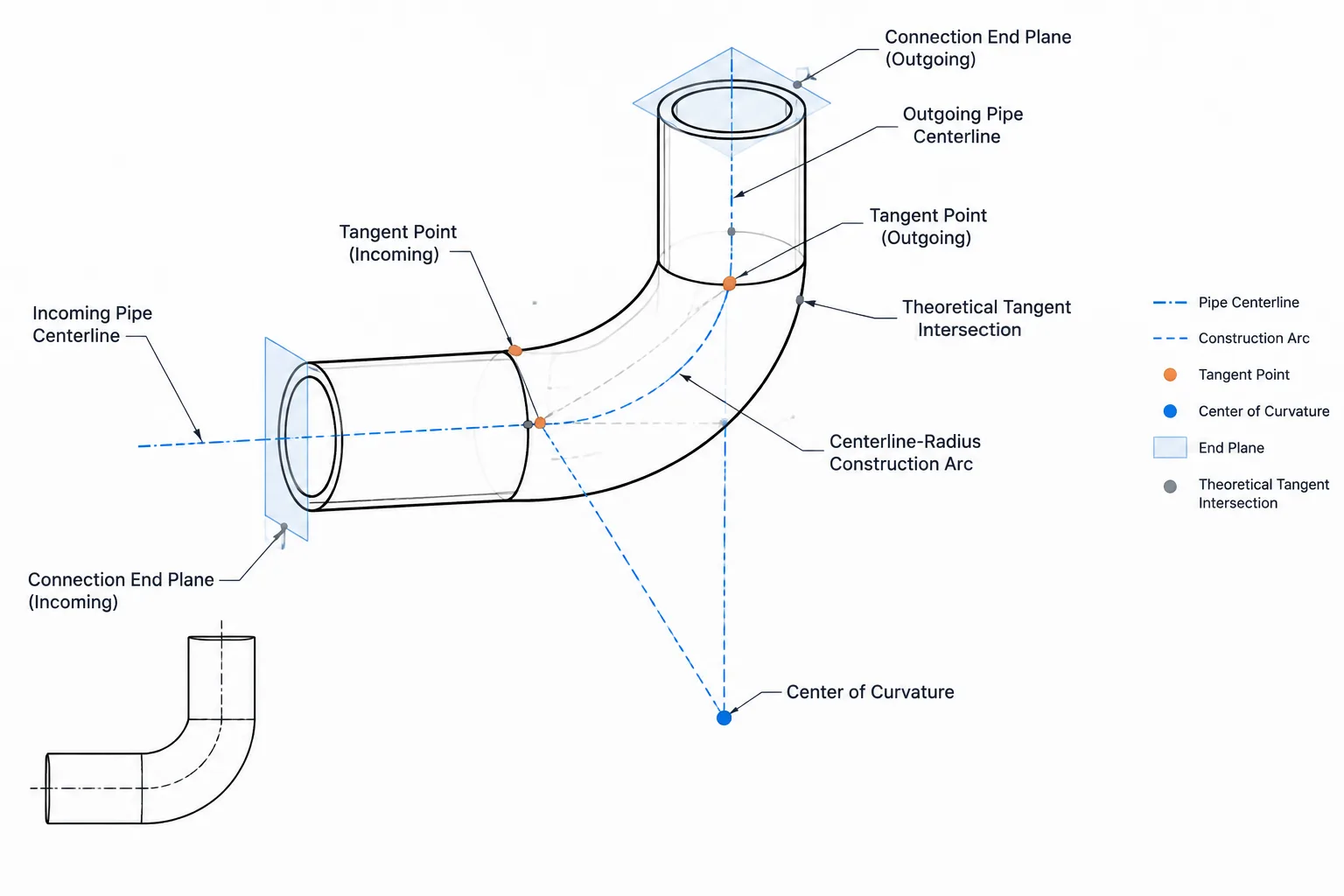
End plane
An end plane is the plane at a connection end of the component. Depending on the elbow type, it may represent a butt-weld end, socket-weld connection reference, threaded end, flanged face, or another defined interface.
The end plane is particularly important in a component catalog because it provides a repeatable location for connecting the elbow to another component. For a butt-weld elbow, the modeled port is commonly placed on the end centerline at the end plane. The actual bevel geometry may be simplified or omitted according to the project’s modeling level of detail.
End centerline and port axis
Each elbow end has a centerline axis normal to its connection plane. The two end axes define the incoming and outgoing pipe directions. Their angular relationship represents the elbow’s direction change.
A CAD port generally needs both a location and an orientation. A correct port position with an incorrect axis can cause the connected pipe to point in the wrong direction or can prevent automated connection checks from working properly.
Tangent point
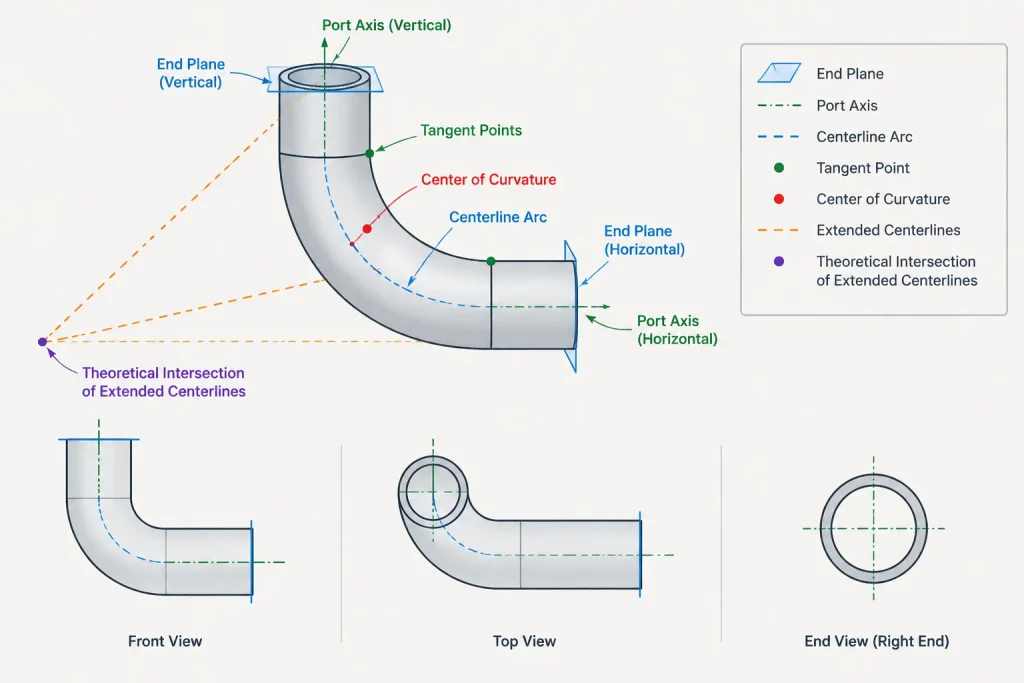
On an ideal centerline representation, a tangent point is where the straight centerline portion meets the circular arc smoothly. The tangent line and the arc have the same direction at that point.
In a simplified fitting symbol, the tangent point may appear to coincide with the end location. That should not be assumed for every component definition. Catalog geometry may be controlled by end dimensions rather than by a visibly modeled tangent transition, and real fittings include manufacturing details that are not represented by a perfect mathematical arc.
Center of curvature
The center of curvature is the center of the circle from which the elbow’s centerline arc is generated. The distance from this point to the centerline arc is the centerline radius.
The center of curvature is not a pipe connection point. It normally sits away from the elbow body and is mainly useful for constructing, checking, or explaining the curved geometry.
Theoretical intersection of centerline tangents
If the incoming and outgoing straight centerlines are extended, they intersect at a theoretical point. This point is often useful for routing and dimensioning because it represents the sharp corner that the elbow replaces.
For a right-angle change in direction, this theoretical intersection may be casually called the elbow center. That wording can be misleading because it is not the center of curvature and may not be at the physical center of the fitting. Drawings and CAD standards should use more specific terminology whenever the distinction matters.
| Reference | What it represents | Typical CAD use |
|---|---|---|
| End plane | Component connection interface | Port placement, end-to-end control, mating checks |
| End axis | Direction of connected pipe | Routing, orientation, automated connections |
| Tangent point | Transition between a straight path and ideal centerline arc | Geometric construction and path checks |
| Center of curvature | Origin of the centerline-radius circle | Arc construction and radius verification |
| Theoretical tangent intersection | Intersection of extended incoming and outgoing centerlines | Layout dimensions, routing grids, fitting takeoff |
Centerline radius does not define the whole elbow
Centerline radius describes the path of the nominal piping centerline through the elbow. It does not independently define the elbow’s wall thickness, outside envelope, end preparation, or complete manufacturing geometry.
Two elbow components can share a nominal centerline-radius category while differing in size, wall selection, end configuration, or manufacturer-specific envelope details. The CAD component therefore needs more information than a centerline arc alone.
The developed length of an ideal circular centerline arc can be found from the centerline radius multiplied by the direction-change angle expressed in radians. This is a geometric path length, not automatically a purchasing length, fitting takeoff, or fabrication cut length. A wrought elbow is normally treated as a component with controlled end locations rather than as a piece of straight pipe cut to the arc length.
How elbow takeoff relates to the theoretical intersection
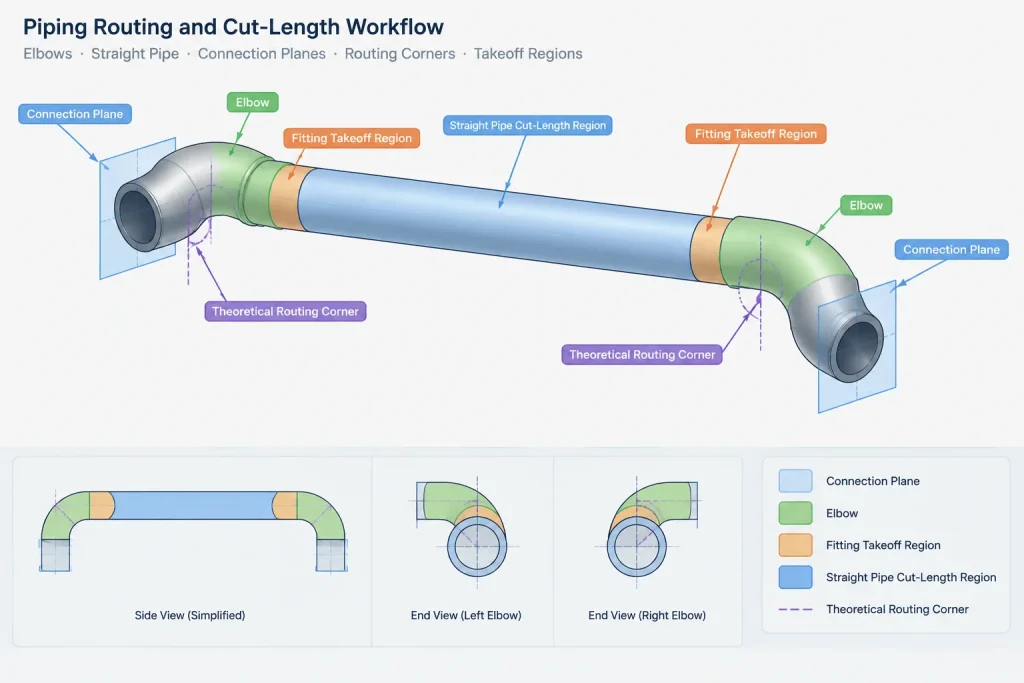
In layout work, fitting takeoff generally refers to the distance consumed by the fitting between a connection end and a routing reference. For many common elbow arrangements, the theoretical intersection of the end centerlines provides a convenient reference for that distance.
However, takeoff should come from the verified dimension applicable to the selected fitting. It should not be derived by measuring the outside edge of a generic CAD solid or by assuming that all elbow families use identical construction rules.
When calculating a straight pipe cut between two elbows, the relevant connection planes must be located first. The pipe length is then determined between those planes, with appropriate treatment of the selected connection type. Measuring between theoretical centerline intersections without subtracting the controlled fitting takeoffs will overstate the straight pipe length.
Rotated and rolled elbows
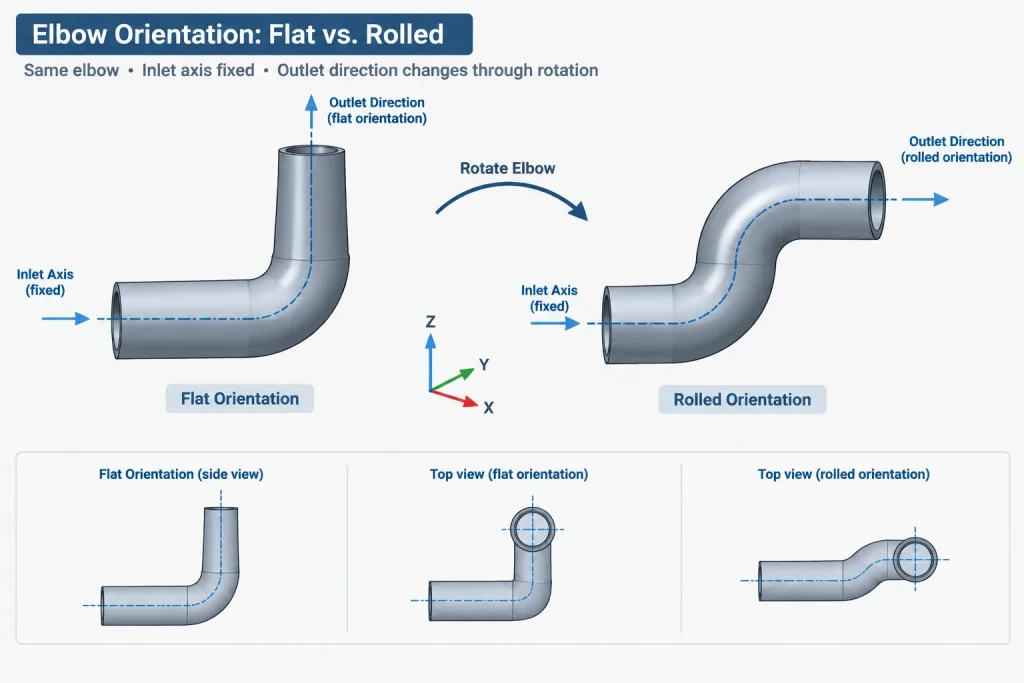
An elbow does not have to lie in a principal plan or elevation plane. A rolled elbow is rotated about the incoming pipe axis so that its outgoing axis points in another spatial direction. Its component dimensions do not change merely because its orientation changes.
The safest CAD workflow is to place the inlet port at the intended connection, align the inlet axis with the incoming pipe, and then rotate the component around that axis until the outlet points in the required direction. The outlet location should be checked against coordinates or routing geometry rather than judged only from an isometric view.
Common errors include rotating around the center of curvature, snapping the elbow body to an approximate corner, or using a screen-plane angle that does not represent the true three-dimensional direction change.
Centerline models and physical-envelope models
Different project stages require different elbow representations. A schematic routing model may use only intersecting lines and an arc. A coordination model may need the actual fitting envelope. A fabrication-oriented model may also carry connection preparation, weld references, material data, and item identifiers.
- Centerline representation: useful for early routing, direction changes, and conceptual dimensions.
- Catalog component representation: uses controlled ports, end dimensions, size data, and a recognizable body envelope.
- Detailed fabrication representation: may include additional end and weld geometry where required by the fabrication workflow.
Increasing graphical detail does not make an elbow dimensionally reliable unless its governing data is also correct. A simple component with verified ports can be more useful than a highly detailed solid built from unverified measurements.
A practical CAD checking workflow
- Confirm the component identity. Check nominal size, elbow type, direction change, wall or matching specification data, and connection type.
- Verify the dimensional source. Use the applicable standard, project catalog, or approved manufacturer information rather than a visually similar block.
- Inspect both end planes. Confirm that port origins sit at the intended interfaces.
- Check port axes. The axes should align with the connected pipe centerlines and point consistently according to the CAD system’s connection convention.
- Check the routing reference. Identify whether drawing dimensions refer to end planes, theoretical intersections, equipment datums, or plant coordinates.
- Review the physical envelope. Include insulation, nearby structures, adjacent lines, supports, and access requirements when relevant.
- Validate cut lengths separately. Calculate pipe pieces between actual connection references; do not use the displayed centerline arc as a substitute.
Dimensioning elbows clearly on drawings
An elbow dimension is useful only when its endpoints are identifiable. Dimensions to a vague curved surface are difficult to reproduce in the shop or field. Prefer established references such as pipe centerlines, component end planes, theoretical tangent intersections, or project coordinate datums.
If a drawing uses a centerline intersection as a layout point, show enough centerline extension to make that point understandable. If it dimensions to an elbow end, distinguish the end plane from the weld location or adjacent pipe end where those references are not the same in the project workflow.
Clear terminology prevents the word “center” from doing too much work. Naming the center of curvature, theoretical intersection, tangent point, and end plane explicitly helps designers, fabricators, and reviewers interpret the same geometry consistently.
Applying a reference hierarchy during model review
A useful review method is to separate connection references, routing references, and physical-envelope references. Connection references determine where adjoining components meet. Routing references define the intended centerline path and direction change. Envelope references describe the space occupied by the fitting body and any associated clearance allowance.
This separation helps explain why an elbow can look correctly positioned while still failing a connection or dimensional check. Its body may resemble the expected shape, but a port origin could be displaced from the controlled end plane, or its axis could be oriented incorrectly.
Check geometry in the component coordinate system
Before evaluating a rotated elbow in the plant model, inspect its ports and reference geometry in the component’s own coordinate system. Confirm that each port lies at its intended end interface and that its axis is normal to the corresponding end plane. The placed component can then be reviewed after rotation or other model transformations.
This approach is especially helpful for rolled elbows because an isometric view can hide small alignment errors. Coordinate, axis, and connection checks provide a more dependable assessment than visual appearance alone.
Separate dimensional validity from graphical detail
A smooth solid does not prove that its end locations, centerline radius, or connection definitions are correct. Conversely, a simplified elbow can be dimensionally useful when its ports and governing references are verified. Model acceptance should therefore consider both the data definition and the displayed body.
- For routing: verify the incoming and outgoing centerline directions and the intended theoretical intersection.
- For connectivity: verify port origins, end planes, axes, and compatible connection definitions.
- For fabrication dimensions: determine straight pipe lengths from the applicable connection references and verified fitting takeoffs.
- For coordination: review the physical envelope separately from the idealized centerline path.
- For drawing output: ensure dimension endpoints can be identified without relying on an ambiguous curved surface.
Questions to resolve before approving an elbow model
A reviewer should be able to identify which geometry controls the connection, which point supports the routing dimension, and which data defines the fitting envelope. If any of these answers depend only on measuring the displayed solid, the component definition requires further verification.
Consistent naming also matters. Terms such as elbow center should be replaced with the precise intended reference, such as center of curvature, theoretical tangent intersection, end centerline, or end plane.
Frequently asked questions about elbow geometry in CAD
Is the center of curvature a connection point?
No. It is the geometric origin of the circle used to construct the idealized centerline arc. Elbow connections are located at defined end interfaces rather than at the center of curvature.
Does an elbow tangent point always coincide with its end plane?
That relationship should not be assumed. A tangent point belongs to the ideal centerline construction, while an end plane defines a component interface. Their relationship depends on the verified component definition.
Why can an elbow look correct but fail a CAD connection check?
The visible body may be positioned convincingly even when a port origin or axis is incorrect. Automated connections generally depend on controlled port locations, orientations, and connection definitions rather than visual contact between solids.
Which reference should be used for straight pipe cut length?
Use the actual connection references for the selected components and connection type. Theoretical centerline intersections and displayed arc lengths should not replace verified end locations and fitting takeoffs.
Does rolling an elbow change its component dimensions?
No. Rolling changes the elbow’s spatial orientation, not its underlying component dimensions. The inlet alignment, rotation about the incoming axis, and resulting outlet direction should still be checked.
What does the term elbow center mean?
The term is ambiguous. It may be used informally for the theoretical intersection of extended centerlines, but it can also be confused with the center of curvature. Drawings and model documentation should name the intended reference explicitly.
Can the outside surface of a CAD elbow be used to establish takeoff?
Not reliably. Takeoff should come from verified dimensional data for the selected fitting. Measuring a generic or unverified solid can introduce errors because the displayed envelope is not necessarily the controlling dimensional reference.