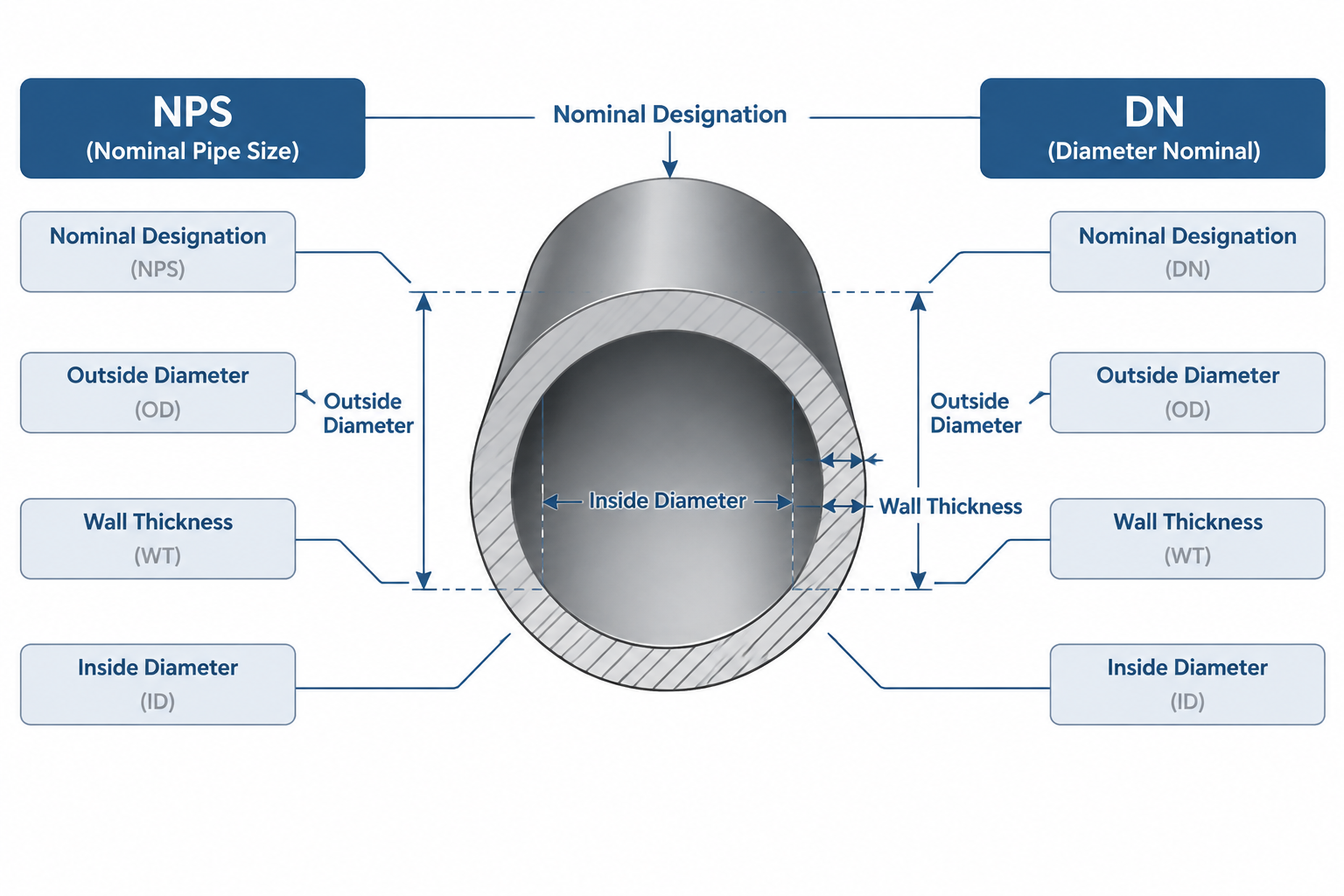
NPS vs. DN is a comparison between two nominal pipe-size designation systems, not a formula for converting a measured length. Both labels identify standardized size families, while actual pipe geometry must come from the applicable dimensional data.
This guide explains how to distinguish nominal labels from outside diameter, inside diameter, and wall definition. It also shows why that distinction matters in specifications, equipment catalogs, bills of material, and piping CAD workflows.
NPS and DN are two systems used to identify nominal pipe size. They help designers, manufacturers, fabricators, and operators refer to compatible size families without describing every physical dimension of the pipe. Although the systems are related, they are not simply inch and millimeter measurements of the same surface.
This distinction matters when reading pipe tables, selecting fittings, building CAD catalogs, preparing bills of material, or coordinating a project that uses both U.S. customary and metric terminology. Treating DN as an arithmetic conversion of NPS can produce incorrect labels, mismatched catalog records, and misleading dimensions.
What NPS Means
NPS stands for Nominal Pipe Size. It is a size designation widely used in North American piping practice. The number following NPS identifies a standardized pipe size family, but it should not automatically be interpreted as a measured outside diameter or inside diameter.
A complete pipe description normally needs more than NPS. Depending on the project, other required information may include:
- Pipe schedule or specified wall thickness
- Material specification and grade
- Manufacturing form or product specification
- End preparation
- Applicable dimensional standard
- Corrosion allowance or lining requirements
NPS establishes the nominal size family. It does not, by itself, establish the bore, wall thickness, pressure capability, or material.
What DN Means
DN means nominal diameter and is the metric-oriented designation used in many international piping documents. It is normally written as the letters DN followed by a nominal size number.
DN is also a designation rather than a measured diameter. The number should not be assumed to equal the pipe outside diameter or inside diameter in millimeters. Adding a millimeter unit symbol to a DN designation can therefore be misleading. A physical diameter may be stated in millimeters, but DN itself identifies a nominal size family.
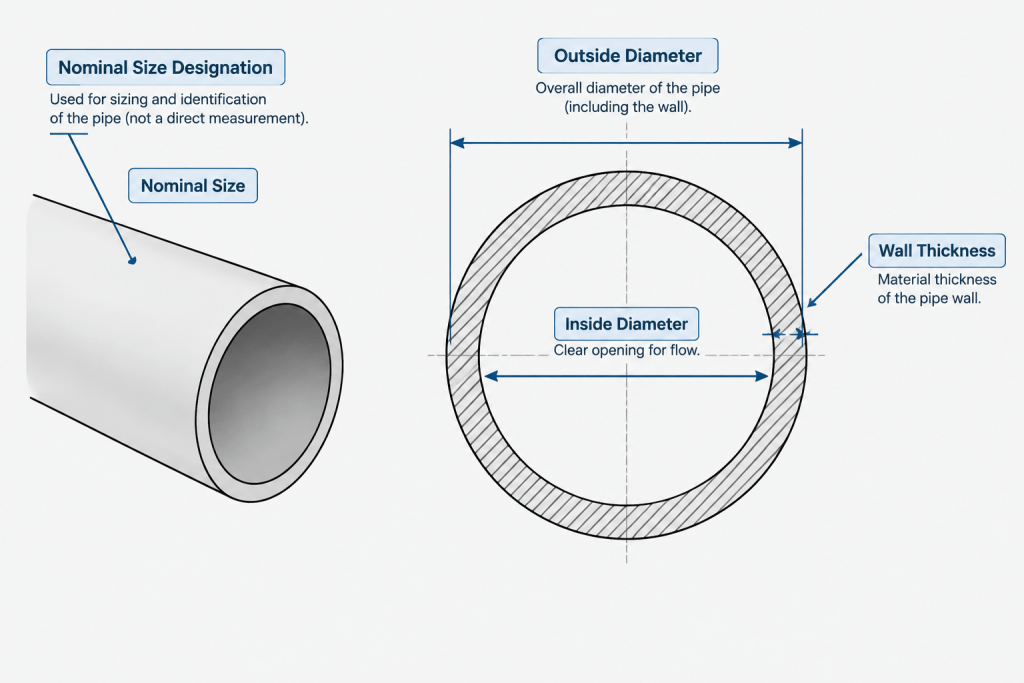
Like NPS, DN does not fully define the pipe. Wall series, schedule, material, component standard, and other specification data remain separate.
NPS vs. DN Is a Designation Comparison, Not a Unit Conversion
The safest way to relate NPS and DN is through a recognized nominal-size correspondence table applicable to the components and standards being used. Multiplying an NPS number by a unit-conversion factor does not reliably generate the proper DN designation.
The distinction can be summarized as follows:
| Item | NPS | DN |
|---|---|---|
| Purpose | Identifies a nominal pipe size family | Identifies a nominal pipe size family |
| Measurement system association | U.S. customary or inch-based practice | Metric-oriented practice |
| Actual outside diameter | Must be obtained from the governing dimension table | Must be obtained from the governing dimension table |
| Actual inside diameter | Depends on outside diameter and wall thickness | Depends on outside diameter and wall thickness |
| Correct cross-reference method | Use an established size correspondence, not arithmetic alone | |
This is why a calculated metric value may look plausible while still being the wrong DN label. The nominal systems were developed as standardized naming frameworks, not as a continuously calculated sequence of physical diameters.
Nominal Size Does Not Determine Outside Diameter
One of the most common reading errors is to treat the nominal number as the pipe outside diameter. In piping work, the actual outside diameter must be taken from the relevant dimensional reference.
For a given standardized pipe size, schedule changes generally affect wall thickness and inside diameter while the outside diameter remains associated with that size family. This allows fittings, flanges, supports, and other components to be organized around a consistent pipe envelope. However, the exact relationship must still be checked against the governing product and dimensional standards.
This principle also explains why a DN label is not enough to create accurate CAD geometry. A designer needs the verified outside diameter and the applicable wall data rather than a geometric interpretation of the DN number.
Nominal Size Does Not Determine Inside Diameter
Inside diameter is influenced by both outside diameter and wall thickness. Two pipes with the same NPS or DN designation may have different bores when their schedules or specified wall thicknesses differ.
Additional factors can affect the usable internal opening, including linings, internal coatings, manufacturing tolerances, and corrosion allowance conventions. For hydraulic calculations or clearance checks, the bore should come from verified project data rather than from the nominal size label.
How to Handle NPS and DN in CAD Data
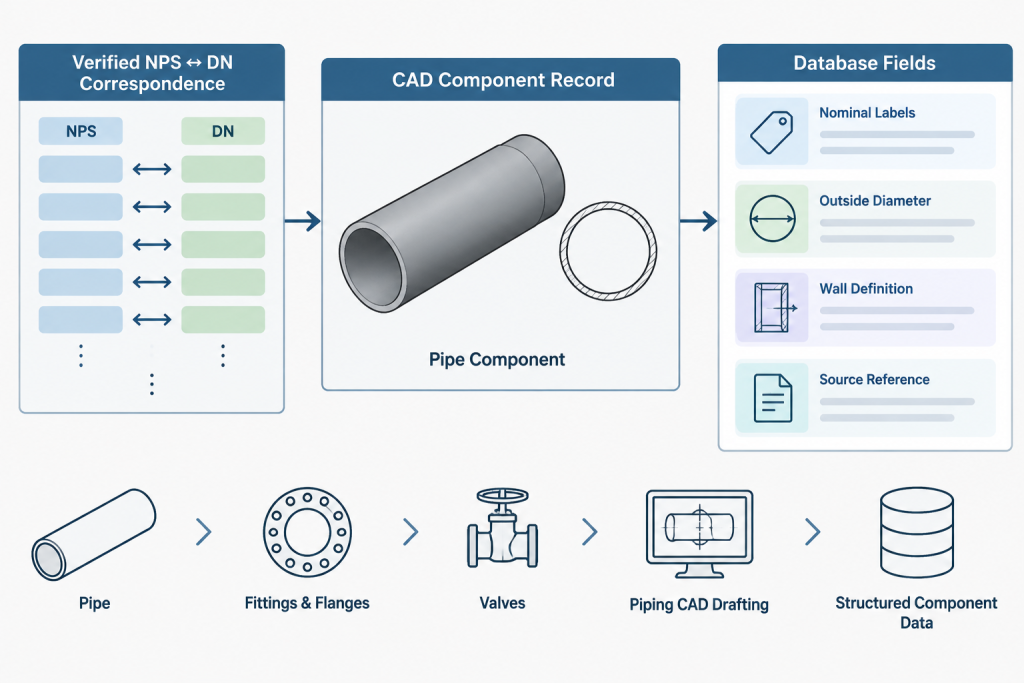
A well-structured CAD or plant-design catalog should keep nominal designations separate from physical dimensions. Using one field for every size-related value creates ambiguity and makes automated checks less dependable.
Recommended data fields
- Nominal size system: Identifies whether the primary project designation is NPS or DN.
- NPS designation: Stores the recognized NPS label where required.
- DN designation: Stores the corresponding DN label where required.
- Outside diameter: Stores the verified physical dimension with an explicit unit.
- Wall definition: Stores schedule, wall series, or specified wall thickness as appropriate.
- Inside diameter: Stores a verified or calculated value only when the workflow requires it and the calculation basis is controlled.
- Source standard or catalog: Records where the dimensional data originated.
Keeping these properties separate supports mixed-unit drawings without pretending that nominal designations are measured dimensions. It also allows the same physical component family to be displayed using the terminology required by different deliverables.
Mixed-System Project Workflow
Projects often receive documents from multiple organizations. A process document may use DN, a supplier catalog may use NPS, and a fabrication drawing may show physical dimensions in either inches or millimeters. A controlled workflow prevents these differences from becoming size changes.
- Identify the project’s controlling size convention. Determine which designation should appear on line lists, specifications, models, isometrics, and bills of material.
- Confirm the recognized correspondence. Use the project specification, governing standards, or verified manufacturer data to pair NPS and DN labels.
- Separate labels from dimensions. Do not generate outside diameter by converting the nominal number.
- Verify component compatibility. Confirm that pipe, fittings, flanges, valves, and specialty items use compatible dimensional families and end connections.
- Control display units. Drawing units may change how physical dimensions are displayed, but they should not silently rename nominal sizes.
- Preserve the source designation. When vendor information is received, retain the supplier’s original size label alongside the project mapping.
Common NPS and DN Mistakes
Converting the nominal number as if it were a length
A unit-conversion formula is appropriate for an actual measured diameter. It is not a dependable method for assigning a nominal DN or NPS label.
Using DN as the modeled outside diameter
This produces incorrect pipe envelopes and can affect clash detection, support geometry, insulation clearances, and fitting alignment. Model geometry should use verified physical dimensions.
Assuming equal nominal size means equal bore
Nominal size correspondence does not guarantee equal inside diameter. The wall definition must also be checked.
Changing only the drawing units
Switching a CAD file from one unit system to another does not resolve terminology, schedule mapping, catalog selection, or component-standard differences.
Omitting the designation prefix
A bare size number can be ambiguous on an international project. Including NPS or DN makes the intended naming system clear.
Practical Review Checklist
- Is every nominal size clearly identified as NPS or DN?
- Was the NPS-to-DN relationship taken from a verified reference?
- Are outside diameter and wall thickness stored as separate physical properties?
- Does the schedule or wall series match the piping material specification?
- Are valves, fittings, flanges, and pipe based on compatible standards?
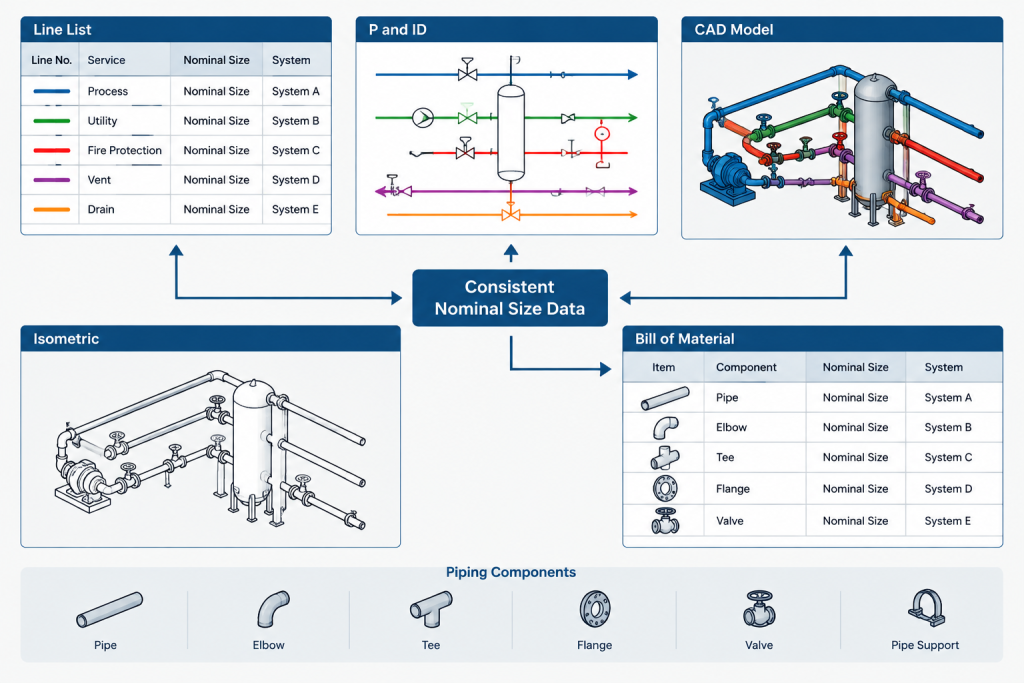
- Do line lists, P&IDs, models, isometrics, and bills of material use consistent labels?
- Are vendor designations preserved where they differ from project display conventions?
- Have mixed-unit exports been checked for unintended label or geometry changes?
The Key Distinction
NPS and DN answer the question, “Which nominal size family is this?” They do not independently answer, “What is the measured diameter?” Actual outside diameter, wall thickness, and inside diameter must come from verified dimensional data.
For drafting and engineering work, the reliable approach is to map NPS and DN through an established correspondence, retain both labels when useful, and drive CAD geometry from physical dimensions. That separation keeps nominal terminology, component selection, and modeled geometry consistent across unit systems.
How to Resolve Conflicting Size Information
When project documents appear to disagree, first determine whether each entry is a nominal designation or a physical dimension. A supplier may identify a component by NPS, a project line list may display DN, and a drawing may dimension the actual pipe geometry. Those entries can describe the same component while serving different purposes.
The governing project specification and verified component data should control the selection. If a nominal label conflicts with a stated outside diameter, wall definition, end connection, or component standard, the discrepancy should be resolved rather than corrected through an assumed unit conversion.
Keep the data hierarchy clear
- Nominal designation: Identifies the recognized NPS or DN size family.
- Physical dimensions: Define the geometry used for drafting, modeling, fabrication review, and clearance checks.
- Wall definition: Provides the schedule, wall series, or specified thickness needed to establish the bore.
- Component specification: Controls the relevant material, construction, end connection, and dimensional requirements.
- Display units: Determine how measured dimensions appear without automatically changing the nominal designation.
Why the Distinction Matters During Data Exchange
Nominal-size errors often enter a workflow when information moves between spreadsheets, plant-design catalogs, procurement systems, and drawings. A field intended for DN may be populated with a converted length, or a geometry field may be populated with a nominal label. Both practices remove the context needed to validate the component.
A reliable exchange format keeps NPS, DN, outside diameter, wall definition, and source reference in separate fields. Clear field names and explicit units make it easier to identify whether software has converted a physical dimension, mapped a nominal designation, or merely changed the displayed units.
Questions to ask during a discrepancy review
- Does the value represent a nominal family or a measured diameter?
- Is the designation explicitly identified as NPS or DN?
- Was the corresponding label obtained from an approved reference?
- Does the physical geometry agree with the selected component record?
- Are the pipe, fitting, flange, and valve records based on compatible requirements?
- Has a unit-setting change altered dimensions, labels, or both?
These checks help separate a terminology problem from a genuine component mismatch. They also create a clearer record for engineering review, procurement coordination, and future catalog maintenance.
NPS vs. DN Frequently Asked Questions
Is DN the metric conversion of NPS?
No. DN is a metric-oriented nominal designation, but it should be paired with NPS through a recognized size correspondence rather than calculated as a direct length conversion.
Does an NPS or DN number equal the pipe outside diameter?
Not necessarily. The actual outside diameter must be obtained from the governing dimensional reference for the selected pipe or component family.
Can NPS and DN identify the pipe inside diameter?
No. Inside diameter depends on the verified outside diameter and wall definition. Linings, coatings, tolerances, and project allowances may also affect the usable bore.
Should DN be written with a millimeter symbol?
DN is a nominal designation rather than a measured diameter. A unit symbol should be reserved for an actual physical dimension stated in that unit.
Can CAD software derive pipe geometry from a DN label?
Only when the software uses a verified catalog or dimensional mapping. Treating the DN number itself as a modeled diameter can create incorrect geometry.
Does changing drawing units convert NPS labels to DN labels?
No. Changing display units affects measured dimensions. Mapping nominal designations is a separate data-management task that must follow the project specification and approved references.
What should appear in a bill of material?
The bill of material should use the project’s required nominal designation and include the additional specification details needed to identify the component. The nominal size alone is not a complete purchasing description.
What should be checked when NPS and DN records disagree?
Check the source standard or catalog, verified outside diameter, wall definition, component type, end connection, and project size convention. Do not resolve the difference by converting the nominal number as though it were a measured length.