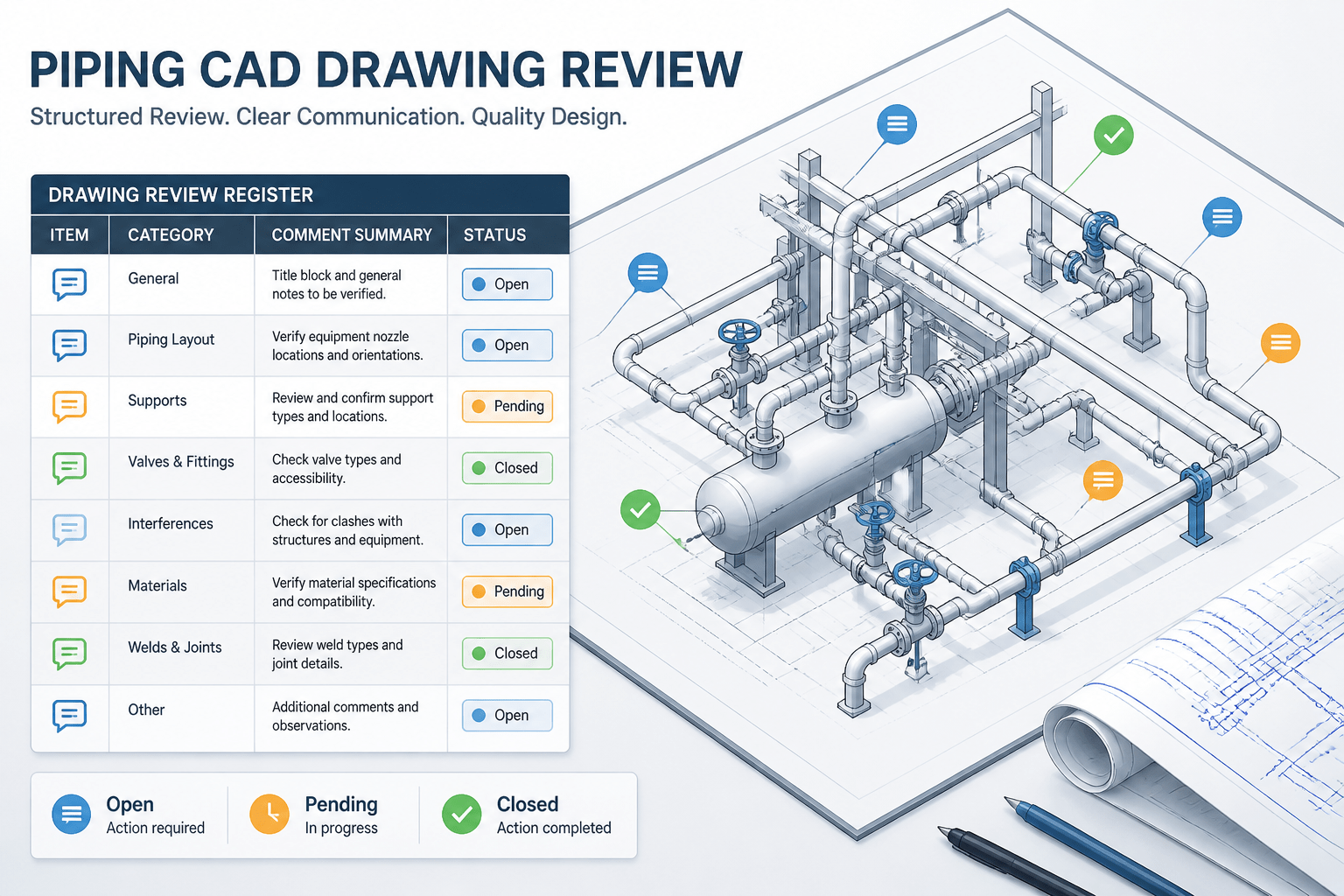
Piping CAD design review comments are most valuable when they help a project team make a clear decision and prove that the decision reached the correct deliverable. A markup may identify a routing concern, a data discrepancy, an unclear drawing note, or an unresolved interface, but the annotation itself is not the complete review record.
This guide presents a practical comment-management approach for piping designers, engineers, CAD reviewers, and document-control teams. It explains how to write comments that can be located, classify them consistently, connect them to the governing information source, and verify closure without losing the relationship between the original observation and the final result.
Why piping CAD review comments need a structured workflow
Piping drawings and models rarely become reliable through geometry checks alone. A review may identify an access problem, an unclear specification break, an incorrect tag, a missing support interface, or a mismatch between the model and the project documents. Each observation is useful only if it is assigned, resolved, verified, and recorded clearly.
Uncontrolled markups create a familiar problem: the drawing appears heavily reviewed, but nobody can tell which comments changed the design, which were rejected, which remain open, or whether the final model reflects the agreed decision. A structured comment workflow turns review markup into project information instead of leaving it as disconnected annotation.
This guide explains a practical method for managing piping CAD design review comments. It focuses on classification, ownership, resolution evidence, and final closeout rather than on any particular CAD platform.
What a useful design review comment contains
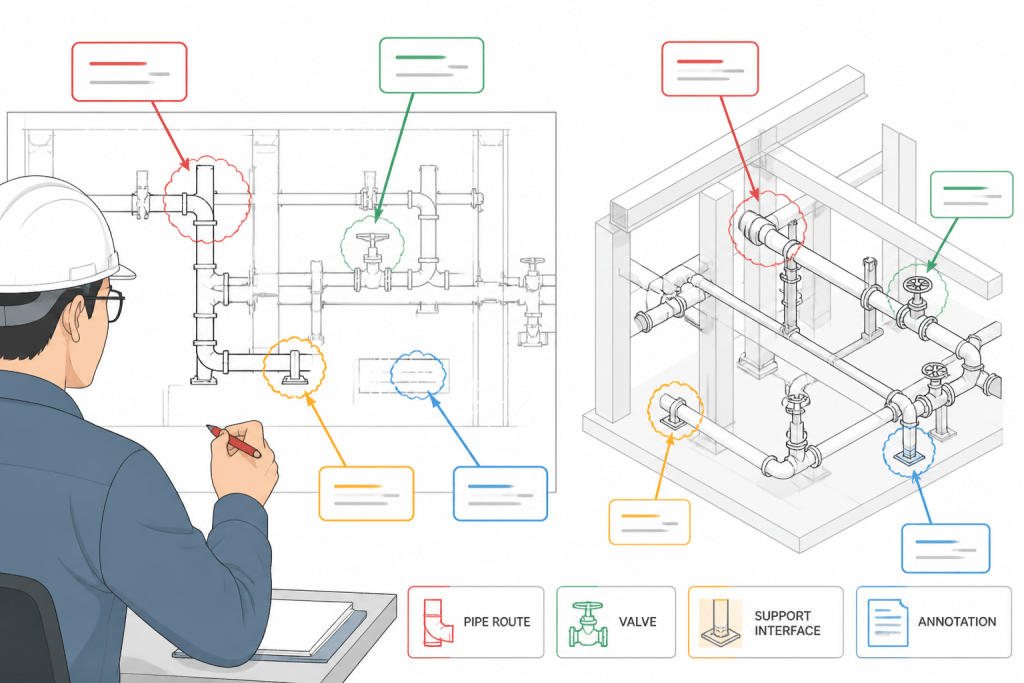
A good comment identifies a condition that another person can locate and evaluate. It should not depend on the reviewer remembering a conversation or interpreting a vague arrow on a crowded drawing.
- Location: Identify the drawing area, view, line, component, grid reference, model object, or related document.
- Observation: Describe what is visible or missing without immediately mixing the observation with an unsupported conclusion.
- Concern: Explain why the item requires review, such as access, constructability, operability, data consistency, or document coordination.
- Requested action: State what the responsible designer or engineer should check or provide.
- Evidence for closure: Define what will demonstrate that the comment is resolved, such as an updated view, revised tag, checked calculation record, coordinated detail, or documented decision.
For example, “Check valve access at the platform edge; confirm the operating position and update the plan or elevation if required” is more useful than “Valve issue.” The first wording gives the team a location, a reason for review, and a clear path to closure.
Classify comments before assigning them
Classification helps reviewers route comments to the right person and helps project teams identify recurring weaknesses. A single comment can involve several disciplines, but its primary category should be clear.
Geometry and routing
These comments concern the physical arrangement of pipe, fittings, valves, supports, equipment, and structures. Examples include an unclear offset, an apparent clash, an unsuitable branch orientation, or a route that does not match the intended connection point.
Process and design intent
These comments question whether the arrangement supports the required function. They may concern flow direction, drainage, venting, isolation, bypass arrangement, slope intent, or the relationship between a piping item and the process documentation. The reviewer should avoid changing process intent through a CAD markup alone; the comment should identify the issue for the responsible technical owner.
Component and specification data
This category covers line numbers, material classes, pressure classes, nominal sizes, end connections, valve types, fitting descriptions, and other component attributes. A component may look correct while carrying the wrong data, so these comments require comparison with the governing project information.
Constructability and installation
Constructability comments address fabrication, erection, welding, bolting, lifting, transportation, access for installation, and the relationship between field work and shop work. They should distinguish a confirmed installation constraint from a preference or request for further review.
Documentation and presentation
These comments concern legibility and information retrieval: missing callouts, ambiguous match lines, overlapping dimensions, unclear continuation references, incomplete notes, or inconsistent symbols. A presentation comment may reveal a deeper data problem, so the reviewer should check both the drawing and the source model or database when appropriate.
Use statuses that describe the actual decision
“Reviewed” is not a sufficient status because it does not say what happened. A practical review register should distinguish between comments that are active, decided, and verified.
| Status | Meaning | Required action |
|---|---|---|
| Open | The issue requires investigation or a response. | Assign an owner and define the expected response. |
| In review | The responsible person is checking the issue with related information. | Record the pending input or decision needed. |
| Accepted for change | The team agrees that the design or documentation will be revised. | Update the appropriate model, drawing, or data source. |
| Accepted as shown | The existing condition is confirmed as intentional or acceptable for the current deliverable. | Record the technical basis or decision owner. |
| Not applicable | The comment does not apply to the reviewed scope or deliverable. | Explain why it is outside scope or based on incorrect information. |
| Closed | The response and supporting evidence have been checked. | Retain the final record with the review package. |
Project teams may use different labels, but the underlying distinction is important: a response is not automatically a closure. Closure requires verification that the agreed action is visible in the correct deliverable or is otherwise supported by a recorded decision.
Separate design changes from information requests
Not every markup should trigger an immediate CAD edit. Some comments request missing information, while others identify a confirmed change. Mixing these types can cause designers to revise geometry before the governing question has been answered.
An information request might ask which nozzle orientation is authoritative, whether a vendor outline is current, or which material specification applies at a boundary. An engineering comment might recommend changing a route after a confirmed access review. A drafting comment might ask for a clearer callout without changing the physical design.
Labeling the comment type helps prevent premature modeling. It also makes review meetings more efficient because the team can focus technical decisions on unresolved inputs rather than debating drawing appearance.
Link every comment to the correct source of truth
A piping CAD review often crosses several information sources. The drawing may show the symptom, but the answer may reside in the line list, P&ID, material specification, equipment document, support information, vendor package, or project decision record.
When a comment is created, identify which source governs the decision. If two sources disagree, do not silently select one and edit the model. Record the conflict, identify the responsible owner, and update the affected documents after the decision is made. This prevents a local CAD correction from hiding a wider coordination problem.
Comments should also identify whether they affect only the view being reviewed or the underlying model and related outputs. A missing elevation callout may be a drawing-only issue. A wrong component tag may affect the model, bill of material, isometric, and equipment interface records.
Resolve comments without losing traceability
When a comment leads to a change, preserve the relationship between the original observation and the revised result. A useful response should state what changed, where it changed, and which deliverables may need regeneration or rechecking.
- Identify the revised object, line, view, or document.
- Describe the change in plain language.
- State whether connected geometry, supports, dimensions, tags, or quantities were affected.
- Note any follow-up review required from another discipline.
- Attach or reference the updated deliverable used for verification.
A response such as “updated” provides almost no audit value. A stronger response is “Route revised to maintain the reviewed equipment connection; associated support callout and plan dimensions updated; connected isometric checked.” The wording remains concise but tells the verifier what to inspect.
Perform a focused closeout review
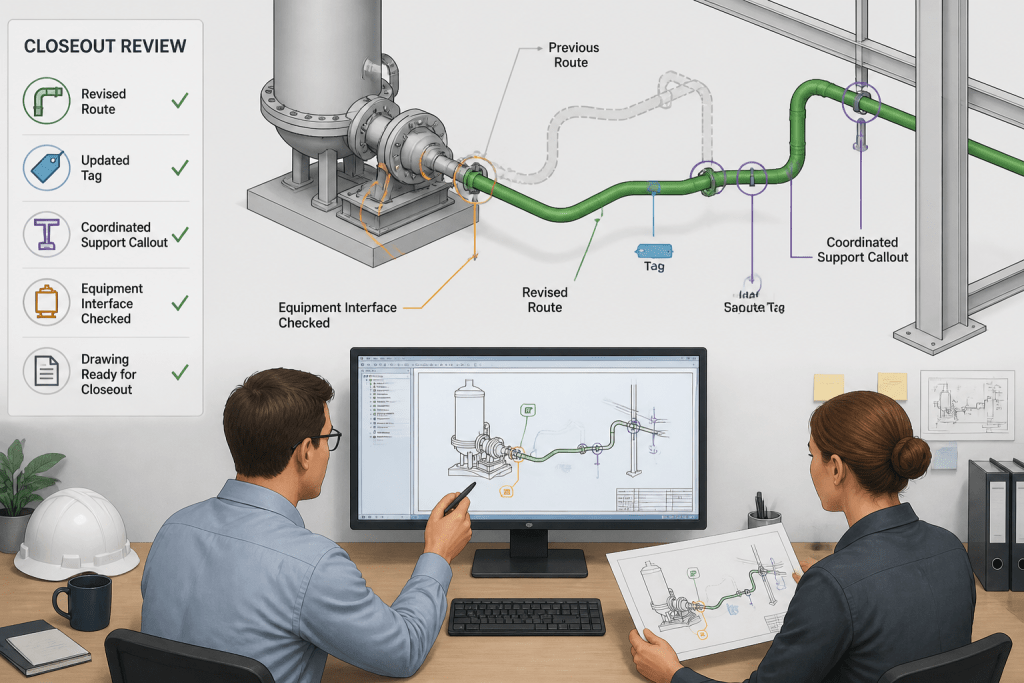
Closeout should not repeat the entire original review automatically. It should verify the comment-specific acceptance criteria and then check for obvious secondary effects.
For a geometry comment, inspect the revised route, connected components, clearances shown in the deliverable, and affected dimensions. For a data comment, compare the corrected attribute against the governing source and check every output that uses it. For a presentation comment, confirm that the new annotation is readable at the intended drawing scale and has not obscured another required item.
Comments that affect interfaces deserve special attention. A change near equipment, structures, supports, tie-ins, or vendor boundaries may require confirmation from the adjacent owner even when the local drawing now appears correct.
Build a review register that supports future work
The review register should be more than a list of redlines. Useful fields include a unique comment identifier, review date, document or model revision, location, category, description, owner, priority, response, status, verifier, and closure date. Where project practice permits, include a reference to the revised deliverable or decision record.
Do not use the register to replace authoritative design records. Its purpose is to show how review observations were handled. The model, drawing, line list, specification, and engineering records remain the places where the final technical information belongs.
Practical checklist for piping CAD comment closeout
- Can another person locate the issue without relying on the original markup?
- Is the comment classified as a design issue, data issue, drafting issue, constructability issue, or information request?
- Has the responsible technical owner been identified?
- Was the governing source checked before changing the CAD file?
- Does the response explain the decision rather than merely state that work is complete?
- Were connected drawings, tags, quantities, supports, or interfaces reviewed for secondary effects?
- Has an independent or designated verifier confirmed the closure?
- Is the final status unambiguous and retained with the correct revision record?
A disciplined comment process makes piping CAD reviews faster to understand and harder to misinterpret. It also protects design intent: observations remain connected to decisions, decisions remain connected to deliverables, and closed comments can be used as reliable project history rather than forgotten markup.
How to use a piping CAD review register effectively
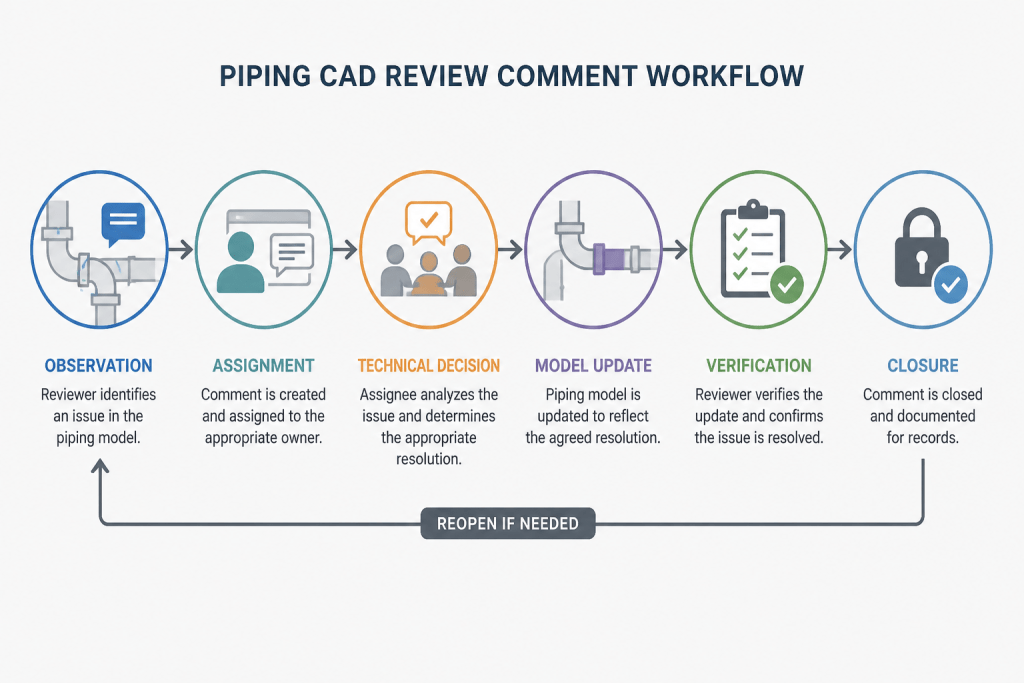
A review register works best when it is treated as a controlled decision trail rather than a simple redline log. The reviewer records the condition, the responsible owner evaluates it against the appropriate project information, and a designated verifier confirms that the response is visible in the relevant drawing, model, data record, or decision document.
This approach also helps separate different kinds of review work. A geometry concern may require model coordination, while a component-data concern may require checking a line list or material information. A presentation issue may be resolved in the drawing without changing the model, but it can still require a check that the annotation represents the underlying design correctly.
Why comment ownership matters
Ownership should follow the technical decision, not simply the person who first notices the issue. A CAD designer may be responsible for implementing a change, while an engineering or equipment owner may need to confirm the design intent. Naming the appropriate owner prevents comments from being closed by someone who can edit the document but cannot approve the underlying technical decision.
Why verification should be comment-specific
Effective closeout checks the acceptance evidence defined for that particular comment. This avoids both weak closure, where a comment is marked complete without proof, and unnecessary re-review, where the entire package is repeated without examining the affected outputs. The verifier should inspect the revised item and consider nearby or connected information that could have changed as a result.
Common failure patterns to avoid
- Using vague wording that forces the assignee to reconstruct the reviewer’s concern.
- Editing the CAD file before resolving a conflict between project information sources.
- Marking a comment closed because a response was entered, without checking the revised deliverable.
- Leaving interface-related changes for local review only.
- Recording a preference as a confirmed technical requirement.
When these failure patterns are controlled, review comments become more useful for coordination, revision management, and future design decisions. The existing workflow below can then be applied consistently across drawings, models, and supporting engineering records.
Frequently asked questions
What is a piping CAD design review comment?
It is a documented observation about a piping drawing, model, component, interface, or related record that requires investigation, decision, correction, or confirmation. A useful comment identifies the location, explains the concern, and defines what evidence can support closure.
Should every piping CAD comment result in a model change?
No. Some comments request information, confirm an existing condition, correct drawing presentation, or document a decision. The review team should determine whether the issue affects geometry, data, documentation, or only the review record before editing the model.
Who should close a piping CAD review comment?
Closure should be confirmed by the designated verifier or responsible technical reviewer identified by project practice. The person who implements the change may not be the person authorized to verify the technical decision.
What evidence is useful for closing a CAD review comment?
Useful evidence may include an updated drawing view, revised model information, a corrected tag, a coordinated detail, a checked calculation record, or a documented decision. The evidence should correspond to the issue and be traceable to the reviewed deliverable.
How should conflicting project documents be handled?
Do not silently choose one source and revise the CAD file. Record the conflict, identify the responsible decision owner, and update the affected documents after the governing information has been confirmed.
Why is “reviewed” a weak comment status?
“Reviewed” does not explain whether the issue remains open, was accepted as shown, will be changed, is outside scope, or has been verified. A status should communicate the actual decision and the state of the closeout process.