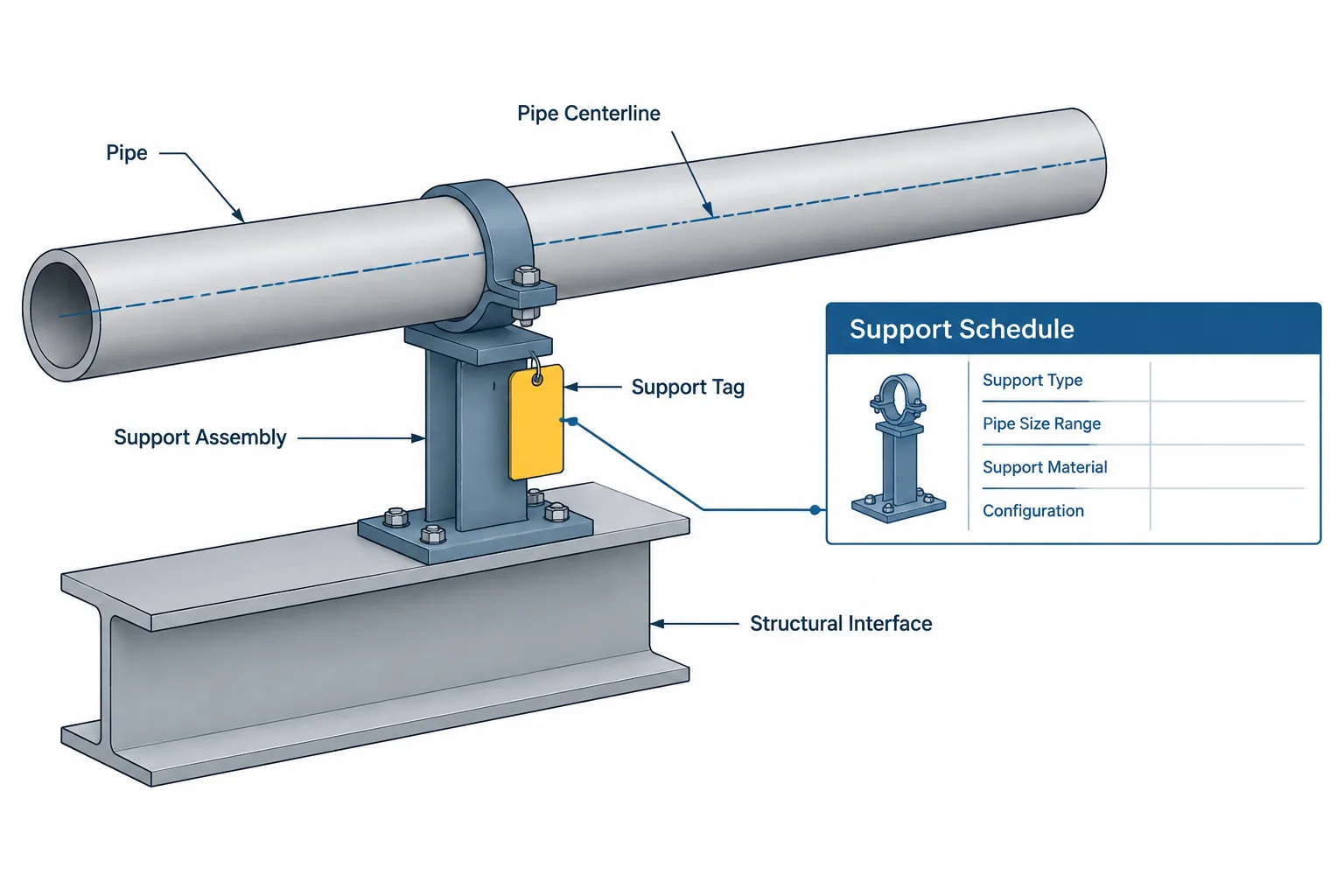
Piping support tags in CAD provide traceability between a modeled support location and the engineering, fabrication, and installation records that define it. Effective tagging helps project teams coordinate piping geometry, restraint intent, support details, structural interfaces, and load information without treating a visible label as the complete design.
This guide explains how support identifiers should function across models, isometrics, schedules, calculations, and field documents. It also highlights the distinction between a support location, functional restraint, reusable type, and complete physical assembly.
A piping support tag may look like a simple label, but it often connects several different project records. The same identifier can appear in a 3D model, piping isometric, support schedule, structural drawing, calculation package, material takeoff, and field installation record. If that identifier is missing, duplicated, or attached to the wrong object, the support may be difficult to design, fabricate, locate, or verify.
Support tagging is therefore more than annotation. It is a data-control method that links the pipe location to the physical support assembly and its engineering requirements. A useful tagging workflow must distinguish between identification, geometry, function, and calculated load data.
What a piping support tag identifies
A support tag is a project-assigned identifier for a support location or assembly. The exact format depends on the project, owner, and software environment. It may contain a sequence, area code, support type code, line reference, or other classification, but the meaning of each field must be defined by the project rather than assumed from appearance.
The tag normally identifies one controlled support record. That record may point to:
- The support location in the piping model.
- The supported pipe or pipes.
- A standard support type or a project-specific detail.
- The attached structural member, foundation, or equipment steel.
- Applicable loads, movements, and restraint directions.
- Fabrication and installation information.
- The current revision and approval status.
A tag does not, by itself, explain everything about the support. For example, a symbol that resembles a guide does not establish the guide gap, design load, attachment method, or suitability for a particular temperature. Those values must come from verified project data and engineering documents.
Support location, support type, and support assembly are different concepts
Confusion often starts when one identifier is expected to represent several different things. The support location is the point or region where the piping system is restrained or carried. The support type describes the general function or configuration. The support assembly is the complete physical arrangement installed at that location.
| Concept | What it describes | Typical CAD or document representation |
|---|---|---|
| Support location | Where the support acts on the pipe | Model point, coordinate, station, or tagged symbol |
| Support function | What movement or load is controlled | Rest, guide, line stop, anchor, spring, hanger, or other functional designation |
| Support type | A reusable configuration or detail family | Standard detail reference or catalog component |
| Support assembly | The complete installed combination of pipe attachment, steelwork, hardware, and foundation interface | 3D objects, support drawing, bill of materials, and fabrication detail |
| Support load case | The forces, moments, displacements, or other design actions used for evaluation | Stress-analysis output, support schedule, or calculation record |
Several support tags can use the same standard type while having different heights, orientations, loads, or attachment conditions. Conversely, one physical frame may carry multiple pipes and therefore contain several separately identified pipe-support locations. The project must define whether the frame receives its own structural identifier in addition to the piping support tags.

Where the tag should be attached in the model
A support tag should be associated with a stable model object or controlled location. Attaching the label only to loose text creates a risk that the text will remain after the support is moved or deleted. A data-bearing support object is preferable when the CAD system and project workflow allow it.
The modeled insertion point should also have a documented meaning. Depending on the support, it might represent the pipe centerline at the support station, the bottom of pipe, the contact point, the centerline of a hanger rod, or a structural attachment point. These locations are not interchangeable.
For a pipe shoe, the support station along the pipe may be the primary piping reference, while the bottom plate elevation and steel contact surface control the structural interface. For a hanger, the pipe attachment and upper attachment may be at different coordinates. A single unexplained point cannot reliably communicate both ends.
Useful model attributes
A support object may carry attributes such as:
- Unique support tag.
- Support type or detail reference.
- Associated line number.
- Nominal pipe size and applicable piping specification reference.
- Support station or model coordinates.
- Orientation and restraint directions.
- Host steel or foundation reference.
- Design status and revision.
- Load-data status.
- Notes concerning field verification or vendor coordination.
Not every field belongs in every drawing label. The model can store more information than is displayed graphically. Drawings should show the fields needed for their intended task without becoming crowded or conflicting with the controlled schedule.
Functional symbols are not complete support geometry
During early layout, designers may place simplified symbols to reserve locations and communicate restraint intent. This is useful, but a functional symbol should not be mistaken for a fabricated support.
A guide symbol may show that transverse motion is intended to be limited, yet the final assembly still depends on the pipe attachment, guide plates, gaps, wear surface, insulation condition, supporting steel, weld details, and expected movement. An anchor symbol identifies restraint intent but does not prove that the pipe, attachment, and structure can transfer the resulting loads.
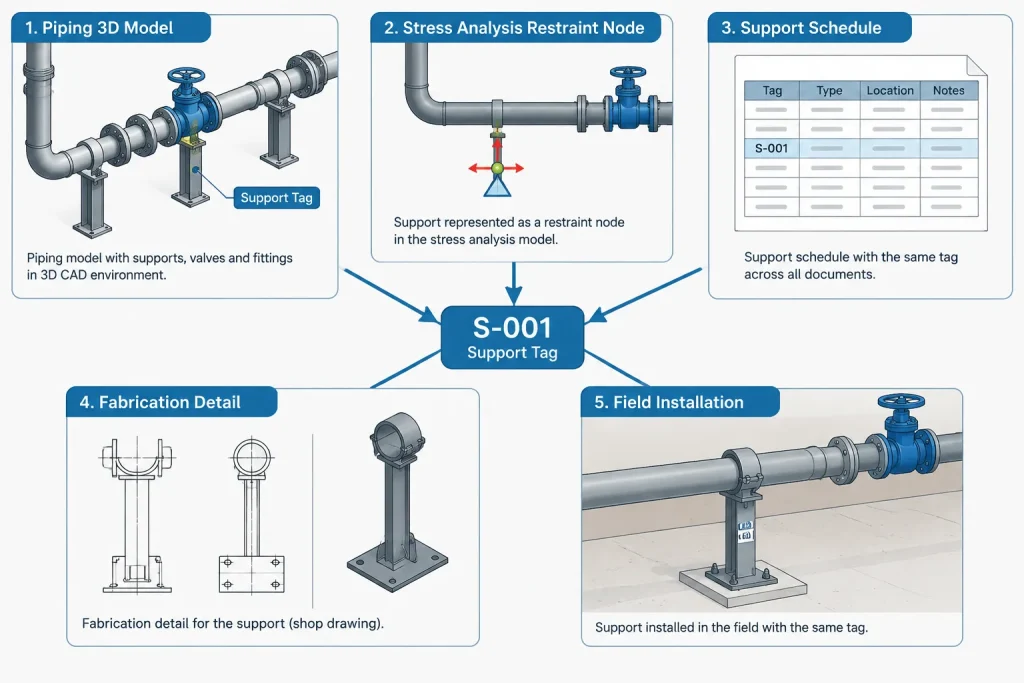
The model should make the level of definition clear. Common status distinctions include preliminary location, stress-analysis support, detailed support, approved-for-fabrication assembly, and field-verified installation. The names can vary, but mixing these states without visible control can lead users to treat placeholder geometry as finished design.
Connecting stress-analysis data to CAD
Stress-analysis software and plant-design CAD systems often represent supports differently. An analytical restraint may be an idealized point with directional behavior. The CAD model must translate that behavior into a buildable arrangement without unintentionally changing the intended restraint.
The transfer should account for more than force values. Important coordination items can include:
- The coordinate system and axis directions used by each application.
- The exact location of the analytical node relative to the physical attachment.
- Whether reported values are reactions, applied loads, or allowable capacities.
- The load case associated with each value.
- Expected pipe movement at the support.
- Active, inactive, one-way, or gap-dependent restraint behavior.
- The revision of the analysis model.
A load should not be copied into a support schedule without its context. A single maximum value assembled from unrelated load cases may not describe a physically simultaneous condition. The responsible engineer must determine how analytical results are converted into support design loads.
Coordinates and dimensions for locating supports
A support must be findable in both the model and the field. Coordinates can locate it globally, while dimensions on isometrics or support drawings relate it to nearby welds, fittings, equipment, or structural grids. The best method depends on the deliverable and construction workflow.
Model coordinates alone may be insufficient when existing steel is subject to field variation. A dimension from an unverified structural edge can be equally unreliable. Where interfaces depend on existing construction, the support record should identify the need for field verification rather than hiding uncertainty behind precise CAD coordinates.

Location dimensions should also identify the intended reference. A dimension to the center of a shoe, centerline of a hanger, edge of a clamp, or face of a structural member will produce different results. The drawing should not merely show a dimension; it should make the controlled point understandable.
Support tags on isometrics and drawings
On a piping isometric, the support tag usually serves as a reference rather than a complete detail. It can show where the support occurs and direct the reader to a schedule or support drawing. The isometric should remain coordinated with the model after routing, spool, or support-location changes.
A dedicated support drawing may include the pipe attachment, secondary steel, principal dimensions, weld information, materials, orientation, and interface elevations. Standard details can reduce repeated drafting, but only when their limits and variable dimensions are controlled. If a standard detail is modified beyond its defined options, it may need a separate detail or unique assembly designation.
A practical support-tagging workflow
- Define the numbering rules. Establish uniqueness, area boundaries, reserved sequences, and responsibility for assigning tags.
- Place support locations with known status. Distinguish preliminary restraint points from detailed assemblies.
- Associate each tag with the pipe. Verify the line number, size, service context, insulation condition, and model location.
- Coordinate with analysis. Match support identifiers, restraint directions, coordinates, movements, and load-data revisions.
- Select or develop the physical assembly. Confirm attachment geometry, structural interface, access, and constructability.
- Generate schedules and drawings from controlled data. Avoid manually retyping identifiers where data extraction is available.
- Run consistency checks. Find duplicate tags, missing details, orphaned symbols, unsupported pipes, and tags attached to deleted or superseded objects.
- Manage revisions. Record moved, added, deleted, or redesigned supports and communicate changes to affected disciplines.
Common tagging and coordination errors
- Duplicate identifiers: Two model objects receive the same tag even though they represent different locations.
- Orphaned annotations: A support is deleted or moved, but its drawing text remains.
- Type used as a unique tag: A generic detail code is mistaken for the identifier of a specific installed support.
- Uncontrolled renumbering: Tags change after drawings, calculations, or fabrication records have already referenced them.
- Wrong restraint direction: Guide or stop directions are interpreted in different coordinate systems.
- Missing host reference: The pipe support is detailed without confirming where it attaches to structural steel, concrete, or equipment.
- Load revision mismatch: The support drawing uses reactions from an older analysis model.
- False geometric precision: A highly detailed model implies that field interfaces have been verified when they have not.
What to check before issuing support information
Before issue, review support tags as connected records rather than isolated labels. Confirm that every required support location has a unique identifier, every identifier resolves to the correct detail or status, and the model position agrees with the drawings. Check restraint orientation, attachment elevation, insulation clearance, movement space, access, and the supporting structure.
Also confirm that deleted and relocated supports have been handled consistently across the model, isometrics, support schedules, calculations, and material records. A support may be a small part of the overall model, but errors at that interface can affect piping stress, structural design, fabrication, and field installation.
A reliable piping support tag tells users where to look, what record controls the assembly, and whether the available information is preliminary or verified. That traceability is the real value of the tag.
Managing the support tag as a controlled project key
The most reliable workflow treats the support tag as a controlled key shared by several records, not as descriptive text owned by a single drawing. The tag should resolve to the same support location even when its geometry, design status, load information, or drawing reference changes during development.
A support register can help teams manage that relationship. Depending on project procedures, the register may record the identifier, associated piping, model object, support status, detail reference, analysis reference, structural interface, and revision state. The register does not replace engineering documents; it provides a way to reconcile them.
Separate identity from changing properties
A support may retain its identity while its type, elevation, orientation, or attachment arrangement is revised. Embedding too much changeable information in the tag itself can make every design adjustment look like a new support. Conversely, retaining a tag after the support has moved to a materially different location can conceal the effect of the change. Project rules should define when a record is revised and when a new identifier is required.
Deleted or superseded tags should remain traceable in controlled records rather than being silently reassigned. This helps reviewers understand why an identifier appears in an earlier calculation, drawing issue, material record, or field document.
Defining the authority for each data field
Coordination improves when the project identifies which system controls each item of information. The plant model may control location and line association, the analysis model may control evaluated reactions and movements, the support drawing may control fabrication geometry, and the structural documentation may control the receiving member or foundation interface.
Copying these fields into another system creates a coordination obligation. Extracted or synchronized data should retain enough context to identify its origin and status. Manually entered duplicates require particular care because they can remain visible after the controlling record changes.
Status and revision answer different questions
Status describes the maturity or intended use of the information, while revision identifies a controlled change state. A recently revised preliminary support is not necessarily ready for fabrication, and an unchanged tag does not prove that its associated loads are current. Both concepts should remain visible to the users responsible for review and issue.
Practical reconciliation before handover
Handover checks should test relationships, not just confirm that tags are present. Reviewers should verify that each model object resolves to the expected drawing or standard detail, that each scheduled record points back to a valid location, and that analysis references correspond to the intended restraint behavior.
- Confirm that tag uniqueness applies across the defined project scope.
- Check that model, drawing, schedule, and calculation records use the same identifier.
- Verify that the support point and dimensional reference have an explicit meaning.
- Confirm that functional restraint directions agree across coordinate systems.
- Identify copied data whose controlling source has changed.
- Preserve the history of relocated, deleted, and superseded supports.
- Flag field-dependent interfaces that have not been verified.
This reconciliation turns the tag into a dependable navigation tool. It does not certify the support design by itself, but it helps each discipline find the controlling information and recognize unresolved interfaces.
Frequently asked questions
Is a support tag the same as a support type?
No. A support tag normally identifies a particular controlled location or assembly record. A support type identifies a reusable function, configuration, or detail family that may be applied at several locations.
Should the tag be attached to text or to the modeled support object?
Where the CAD platform and project workflow permit, the identifier should be associated with a controlled, data-bearing object or location. Loose text can become orphaned when geometry is moved, replaced, or deleted.
Can a support tag contain load data?
The support record may reference or store load information, but the identifier alone does not explain the load case, direction, coordinate system, analysis revision, or engineering interpretation. Those items must remain connected to their controlling source.
Does a support symbol define the fabricated assembly?
Not necessarily. A symbol can communicate location and restraint intent without defining attachments, clearances, structural interfaces, materials, or fabrication geometry. The model or drawing should indicate the level of design maturity.
What happens when a support is moved?
The project should evaluate whether the change is a revision to the existing support record or creates a new support location. The decision should be reflected consistently in the model, analysis, drawings, schedules, material records, and change history.
Who owns the support tag?
Ownership depends on the project execution plan. Regardless of which discipline assigns it, responsibility should be defined for uniqueness, model placement, analysis coordination, drawing references, revision control, and final reconciliation.
Can one structural frame have several piping support tags?
Yes. A shared frame may carry several separately controlled pipe-support locations. The frame may also have its own structural identifier if required by the project data and drawing system.