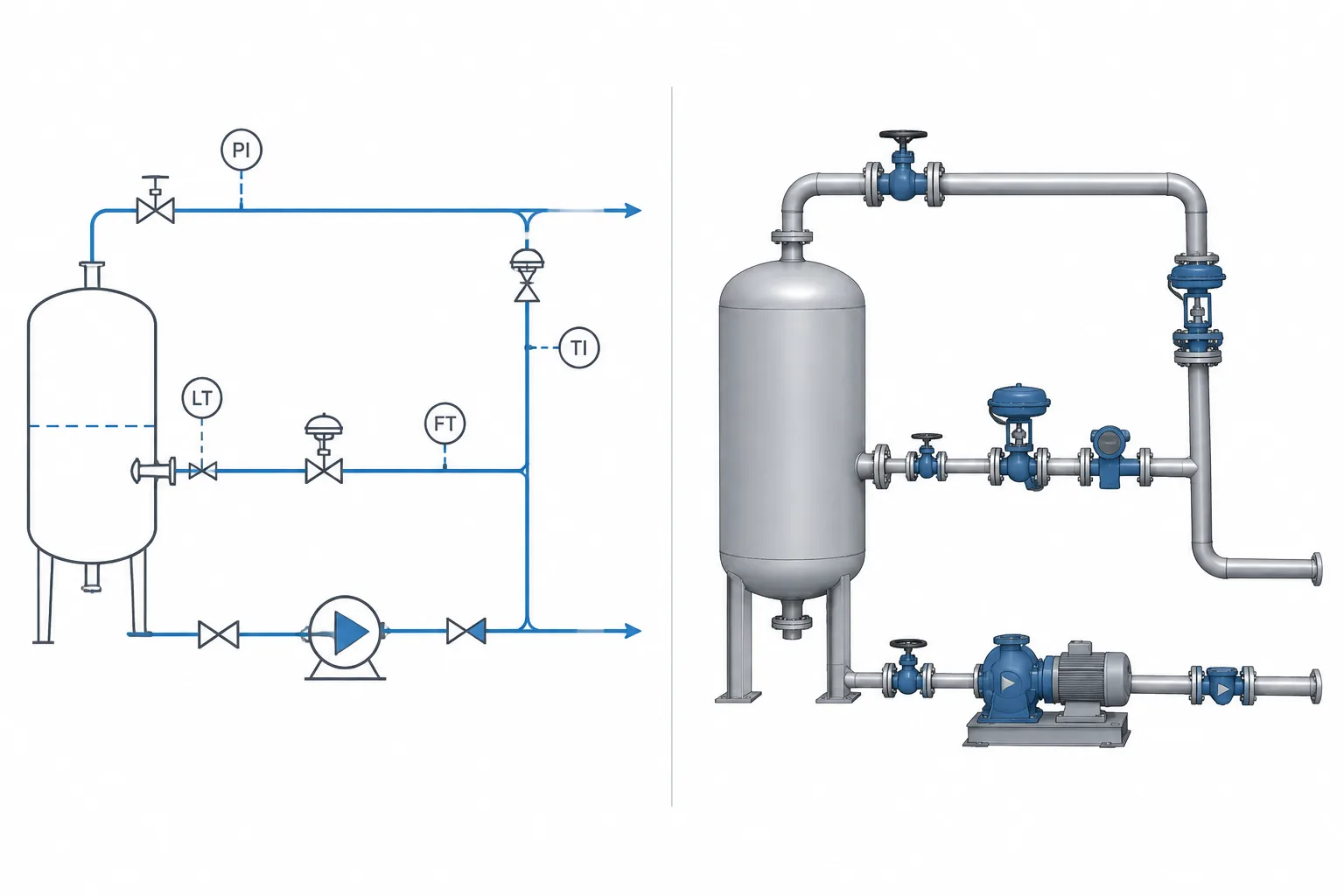
P&ID symbols and 3D piping models represent different layers of the same system. One organizes functional intent and logical relationships; the other develops installable geometry and physical interfaces. Understanding that division helps designers avoid selecting components by appearance, interpreting schematic spacing as actual routing, or assuming realistic geometry proves that a model is functionally correct.
This guide explains how to translate diagram information into model data, which project documents should answer different design questions, and what to examine when reconciling process intent with a physical piping layout.
A piping and instrumentation diagram and a 3D piping model may describe the same process system, but they do not describe it in the same way. The P&ID communicates process function, connectivity, control relationships, and isolation intent. The 3D model represents physical components, routing, orientation, space, and interfaces.
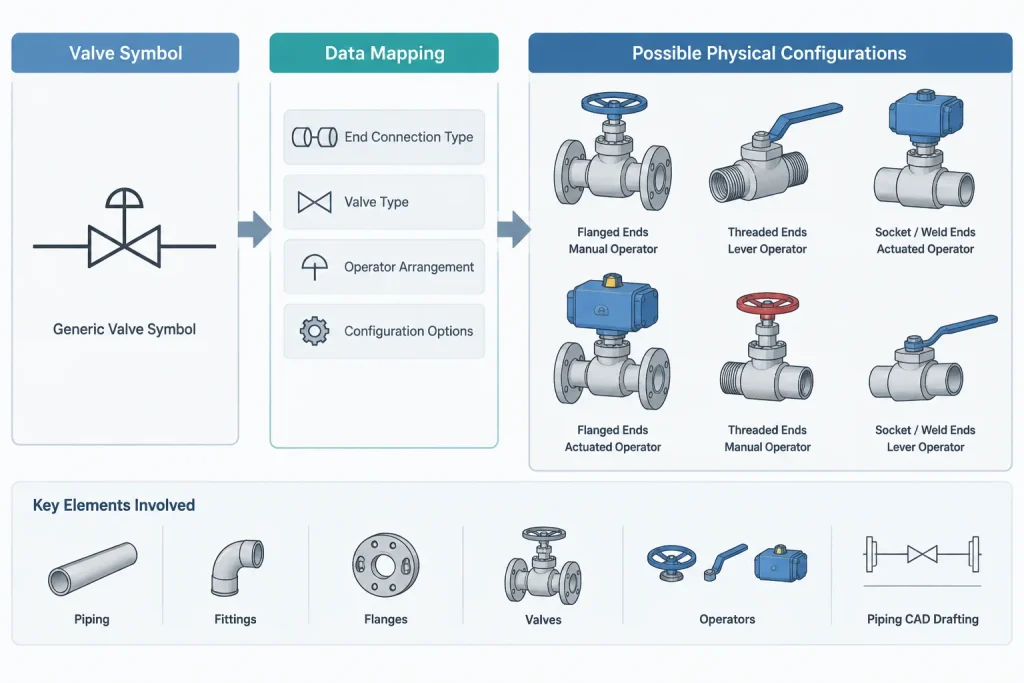
This distinction explains why a symbol should not be treated as a miniature picture of the installed component. A valve symbol may identify a functional valve type without showing its actual body length, end connection, operator arrangement, or maintenance envelope. Conversely, a detailed model can show realistic geometry while still being wrong if it is assigned to the wrong process function.
Effective coordination therefore requires more than matching visual shapes. Designers must connect functional information from the P&ID with the physical and specification data needed by the piping model.
What a P&ID Is Intended to Communicate
A P&ID is primarily a system document. It shows how equipment, piping, valves, instruments, and controls relate to one another. Its arrangement is usually schematic rather than spatial.
Depending on project practice, a P&ID may communicate:
- Process flow paths and branch connections
- Line identification and nominal size
- Piping specification or material-class references
- Valve function and identification
- Instrument connections and control relationships
- Normal operating states or fail actions when required
- Drains, vents, bypasses, sample points, and utility connections
- Equipment boundaries and system interfaces
The drawing may place components wherever they are easiest to read. A valve shown close to a vessel symbol is not necessarily close to the vessel in the plant. A long line on the diagram may represent a short field connection, while a short line may represent piping routed across multiple areas.
What the 3D Piping Model Is Intended to Communicate
The 3D model addresses the physical installation. It locates components in a coordinate system and represents the geometry needed for layout, coordination, drawings, and material reporting.
A piping model may control or support:
- Pipe centerlines, elevations, slopes, and routing
- Component sizes, end types, and dimensional records
- Flange face locations and equipment interfaces
- Valve body and operator orientation
- Fitting takeoff and pipe cut-length calculations
- Support placement and structural coordination
- Insulation, access, and maintenance envelopes
- Interference checking with other disciplines
- Isometric, spool, and material deliverables
The model must therefore contain information that cannot be inferred safely from a schematic symbol. Selecting a symbolically similar component is not enough; the modeled item must match the applicable piping specification, connection requirements, design data, and approved dimensional source.
Functional Identity Is Not Physical Geometry
A P&ID symbol answers a question such as, “What does this component do in the system?” A 3D model answers questions such as, “What is being installed, where is it located, and how does it connect?”
| Information | P&ID emphasis | 3D model emphasis |
|---|---|---|
| Process function | Primary | Carried as component data |
| Connectivity | Logical system connection | Physical port-to-port connection |
| Location | Usually schematic | Coordinate-based |
| Component dimensions | Normally not represented | Required for layout and fabrication outputs |
| End connections | May be simplified or noted | Must match adjoining components |
| Operator orientation | May indicate operator type or function | Must account for access and clearance |
| Maintenance space | Generally not shown | Evaluated around physical equipment |
| Control relationship | Explicitly shown | May exist as data but is not defined by geometry |
Neither representation is inherently more authoritative for every question. The controlling source depends on the information being checked. The P&ID may control process intent, while the piping specification controls component selection and the approved dimensional record controls model geometry.
Why One Symbol Can Map to Different Physical Components
A single functional symbol can correspond to multiple construction arrangements. For example, a generic manual valve symbol does not by itself establish whether the installed valve has flanged, threaded, socket-weld, or butt-weld ends. It also does not establish body pattern, port geometry, pressure class, material, operator size, or face-to-face dimension.
Likewise, an instrument connection shown as a simple branch may require several physical items in the model or bill of materials. The assembly could involve a branch fitting, root valve, tubing interface, flange, gasket, bolting, or other project-defined parts. The precise arrangement must come from the project specification, instrument details, hookup drawings, and approved vendor information.
The reverse can also occur: several modeled objects may collectively represent one functional item on the P&ID. A packaged assembly, specialty valve station, or instrument manifold may be represented by a simplified symbol because the schematic does not need to display every physical piece.
Common Coordination Errors
Choosing a component by symbol appearance
A designer may select the first library item whose thumbnail resembles the P&ID symbol. This can produce an incorrect valve family, connection type, dimensional record, or operator arrangement. Selection should be based on the component data and piping specification rather than icon similarity.
Using schematic spacing as layout guidance
The distance between symbols does not establish straight-pipe length, accessibility, or equipment clearance. Physical spacing must be developed from dimensional requirements, operability, maintenance needs, stress considerations, support strategy, and interdisciplinary coordination.
Assuming every schematic item must be a separate 3D object
Some diagram information is functional or documentary rather than physical. Control signals, interlocks, process notes, and some off-page relationships do not become modeled piping solids. The project should define which items require geometry, data-only records, or references to another discipline.
Modeling geometry without preserving identity
A visually accurate valve is still poorly coordinated if it loses its tag, line assignment, specification reference, or P&ID relationship. Geometry and data must remain associated so that reviews and deliverables can trace the modeled component back to system intent.
Ignoring changes between documents
A P&ID revision may add a bypass, change a valve type, relocate a specification break, or revise an instrument connection. A model revision may uncover a routing constraint that requires process review. Changes need a managed reconciliation workflow rather than informal assumptions about which document is newer.
A Practical P&ID-to-Model Workflow
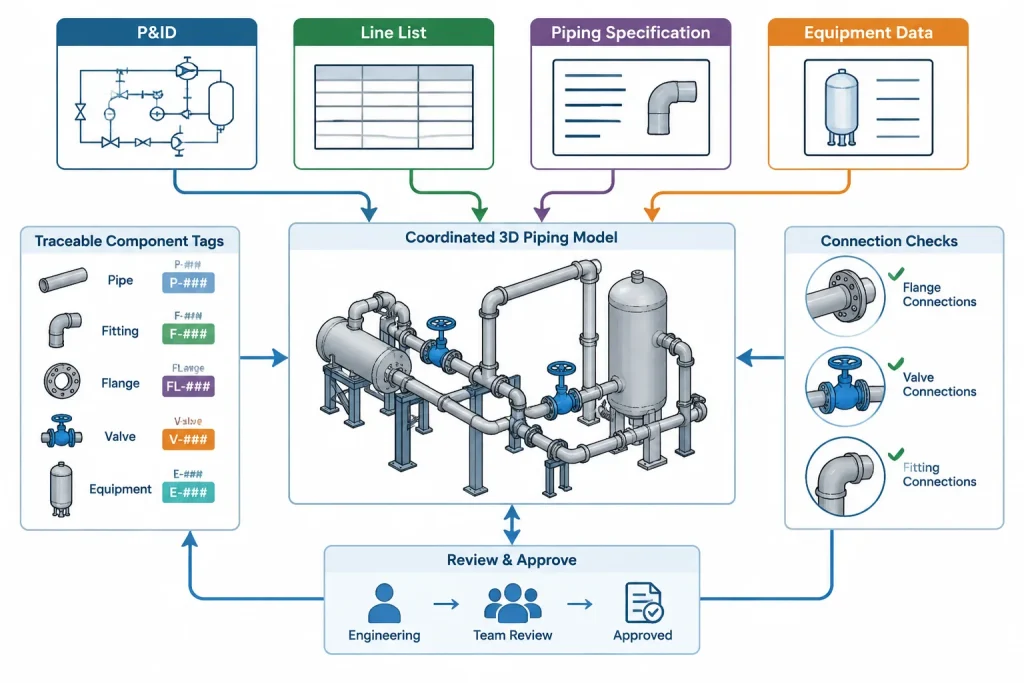
- Confirm the document basis. Use the current project-controlled P&ID, line list, piping specifications, equipment data, and relevant details.
- Trace each line logically. Identify its start and end points, branches, isolation devices, inline items, drains, vents, and interfaces.
- Resolve component identity. Map each applicable symbol to a permitted component type in the piping specification or approved component catalog.
- Check connection compatibility. Confirm nominal size, end type, facing or preparation, and compatibility with adjacent pipe, fittings, equipment, and specialty items.
- Use verified geometry. Apply the appropriate standard-based dimensional record or approved manufacturer data. Do not estimate critical dimensions from a schematic.
- Develop the physical arrangement. Route for access, drainage, support, flexibility, operation, maintenance, and coordination.
- Preserve tags and relationships. Maintain valve numbers, line numbers, equipment references, and instrument identifiers in model data where the project workflow requires them.
- Reconcile the result. Review the model against the P&ID and related documents, recording discrepancies instead of silently resolving uncertain information.
How to Review a Model Against a P&ID
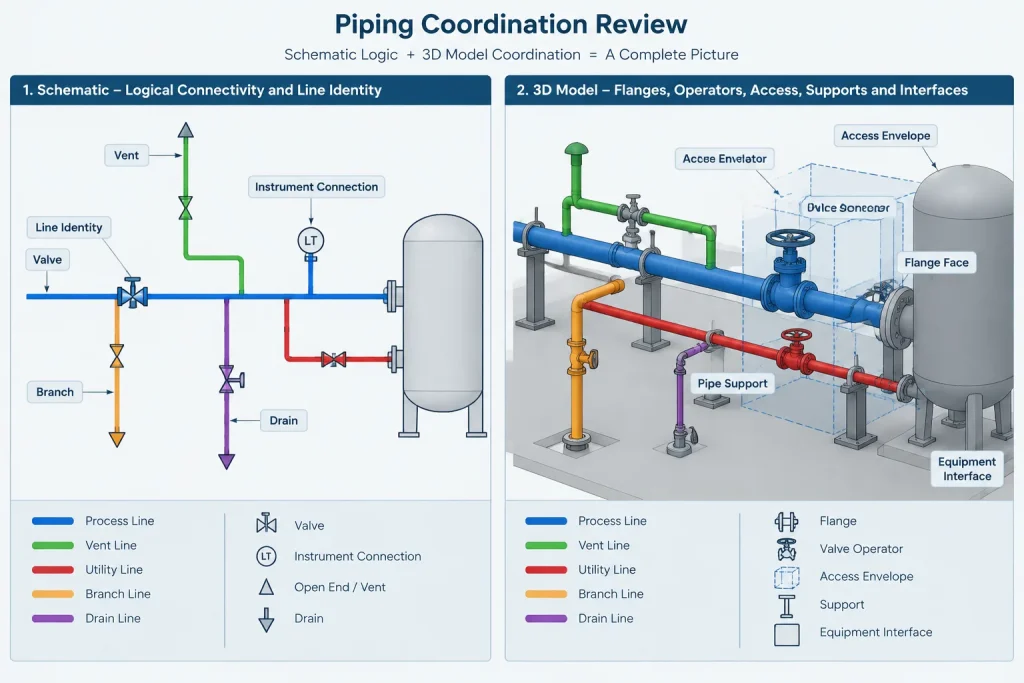
A useful review separates logical checks from physical checks. Logical checks confirm that the system represented by the model agrees with process intent. Physical checks confirm that the selected components can be installed and operated as arranged.
Logical review questions include:
- Are all required lines, branches, valves, and inline items represented?
- Do line numbers and nominal sizes agree with controlled project data?
- Are flow direction and valve function consistent with the diagram?
- Are specification breaks and package boundaries accounted for?
- Are vents, drains, bypasses, and instrument connections present where required?
Physical review questions include:
- Do component ends connect correctly?
- Are flange faces, weld points, and equipment interfaces located correctly?
- Can valves be operated and removed?
- Are specialty items oriented according to verified requirements?
- Have insulation, supports, access, and maintenance clearances been considered?
Use Each Deliverable for the Question It Answers Best
P&ID symbols and 3D piping models are complementary representations, not interchangeable ones. The diagram defines the functional system in a concise, readable form. The model develops that system into a physical arrangement using controlled component and dimensional data.
The safest workflow does not attempt to derive geometry from symbols or process intent from shapes alone. It links the P&ID, line data, piping specification, component catalog, equipment information, and model through traceable identifiers and disciplined review. That connection allows a simplified schematic and a detailed physical model to remain consistent without forcing either deliverable to perform the other’s job.
Establish Information Ownership Before Resolving a Conflict
When a P&ID and a model appear to disagree, the first task is to identify the type of information in conflict. Process connectivity, valve function, and control relationships normally require a functional review. Component construction, end preparation, and permitted material selection require the applicable piping specification or approved catalog. Physical dimensions require a controlled dimensional source, while location and orientation require layout coordination.
This approach avoids treating either deliverable as universally controlling. A model should not redefine process intent merely because its geometry looks complete, and a schematic should not be used to infer installation dimensions that it was never intended to communicate.
Use Traceable Data Instead of Visual Matching
Reliable coordination depends on identifiers and attributes that connect records across disciplines. Depending on project practice, these may include line identifiers, valve tags, equipment references, instrument tags, specification assignments, service descriptions, and package boundaries. The exact data structure can vary, but the purpose remains the same: reviewers should be able to trace a modeled object back to its functional requirement and approved selection basis.
Visual comparison remains useful for finding omissions, unexpected branches, or misplaced inline items. It should be treated as a screening method rather than proof that the component type, connection, or dimensional record is correct.
Record Unresolved Differences Explicitly
Some discrepancies cannot be resolved by the piping designer alone. A changed branch arrangement may require process confirmation, an inaccessible valve may require layout revision, and an unclear instrument connection may require an approved hookup detail. Recording the issue, its source documents, and the responsible discipline is safer than embedding an assumption in the model.
A disciplined reconciliation process also distinguishes confirmed changes from pending questions. This helps prevent temporary routing or placeholder components from being interpreted later as approved design decisions.
Review the Relationship, Not Just the Deliverables
The strongest review checks whether functional identity, specification selection, and physical geometry remain connected. A correct P&ID and a well-built model can still produce a coordination failure if tags, component records, or revision changes are not carried consistently between them.
For that reason, model review should include both document comparison and data verification. The goal is not to make the diagram resemble the model. It is to confirm that each representation answers its intended questions while describing the same controlled piping system.
Frequently Asked Questions
Should a P&ID symbol look like the installed valve or fitting?
No. A P&ID symbol primarily communicates functional identity and system relationships. It may omit body shape, connection details, operator arrangement, and installation geometry.
Can component dimensions be taken from a P&ID?
No. Schematic symbol size and spacing do not establish physical dimensions. Model geometry should come from the applicable approved dimensional record, component catalog, or manufacturer information used by the project.
Why can one P&ID symbol require several modeled parts?
A schematic may simplify an assembly to keep the system readable. The physical installation can require separate connection pieces, valves, interfaces, fasteners, or specialty components defined by project specifications and details.
Can several model objects represent one functional item?
Yes. A packaged assembly, valve station, manifold, or specialty arrangement may contain several physical objects while appearing as a simplified functional item on the diagram.
Which document controls when the P&ID and model disagree?
The answer depends on the disputed information. Functional intent should be checked against controlled process documents, component selection against the piping specification, geometry against approved dimensional data, and physical placement against coordinated layout requirements. The discrepancy should be documented when ownership or intent is unclear.
Does a clash-free model confirm agreement with the P&ID?
No. Interference checking evaluates physical relationships, not process correctness. A clash-free model can still contain missing branches, incorrect valve functions, wrong line assignments, or incomplete instrument connections.
What is the most reliable way to connect P&ID and model information?
Maintain traceable identifiers and controlled attributes across the P&ID, line data, specifications, component records, and model. Reviews should verify both logical connectivity and physical installation requirements.