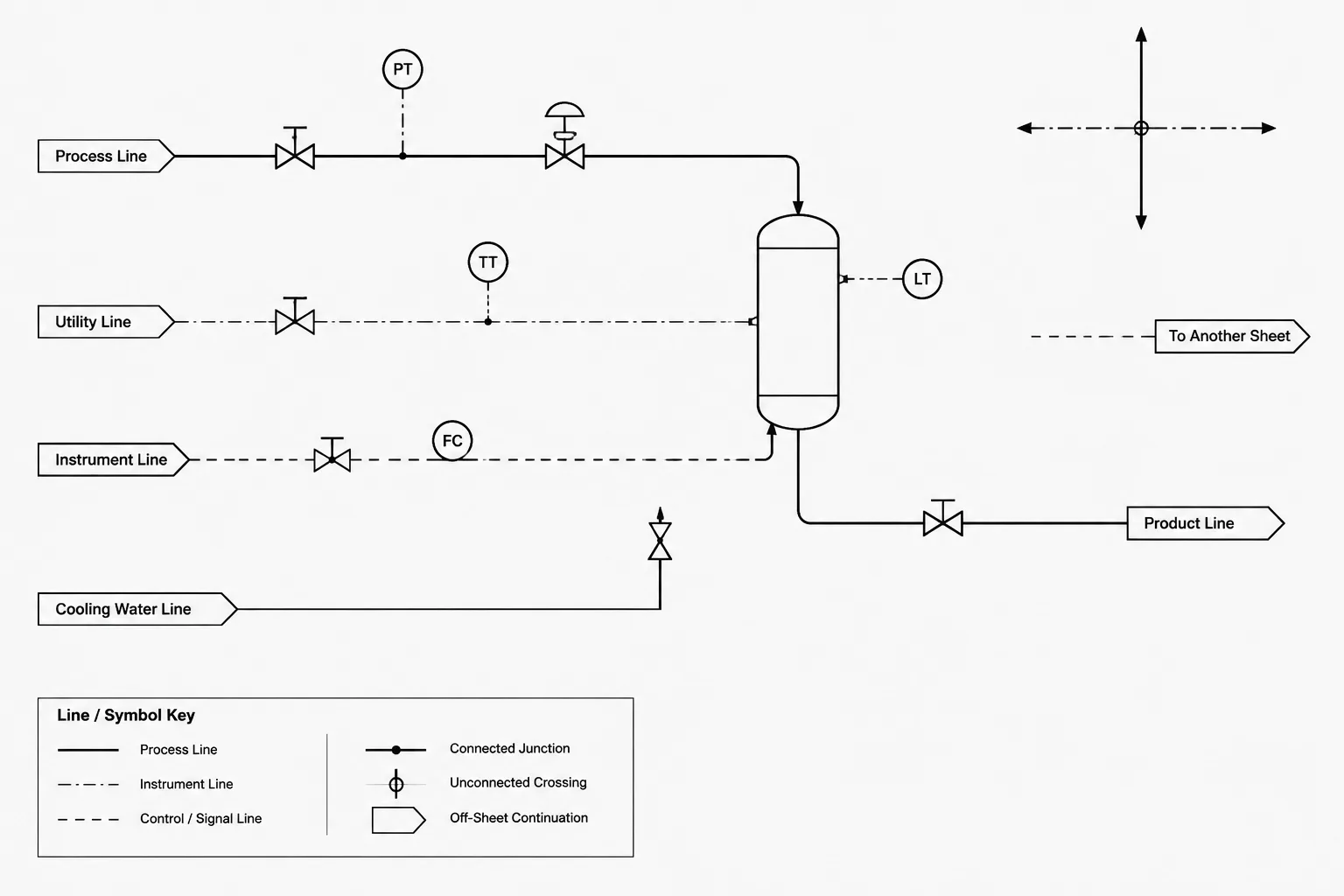
P&ID line crossings and connections must communicate design intent without forcing the reviewer to guess. A crossing may represent unrelated systems occupying the same drawing space, while a junction indicates an actual process, utility, signal, or data relationship. Small drafting errors can make these conditions appear identical.
This guide explains how to recognize ambiguous intersections, prevent false junctions during CAD editing, and verify that visible geometry agrees with any underlying P&ID data. Because symbols and crossing conventions vary, the project legend and approved drafting procedure remain the controlling references.
A piping and instrumentation diagram contains many lines, but those lines do not all mean the same thing. Process piping, utility piping, instrument signals, electrical connections, equipment boundaries, and annotation leaders may occupy the same drawing area. When two lines meet or cross, the graphics must make it clear whether they form a real connection.
This distinction is fundamental. An ambiguous crossing can create a false branch, hide an intended connection, or make an instrument signal appear connected to the wrong device. The problem becomes more serious when P&ID data is used for line lists, instrument indexes, valve schedules, design reviews, or intelligent diagram databases.
Good P&ID drafting therefore treats every intersection as a communication decision rather than a convenient arrangement of lines.
Crossing Is Not the Same as Connecting
Two lines can occupy the same point on a drawing without representing a physical or functional connection. One line may simply pass over or under another in the diagram. Conversely, lines that terminate at a common point may represent a branch, manifold, signal junction, or other connection.
The drafter must distinguish between these conditions:
- Unconnected crossing: Two graphical lines intersect, but their represented systems remain separate.
- Connected junction: Two or more lines share a defined process, utility, signal, or data connection.
- Apparent contact: Lines look as though they touch because of poor spacing, plotting, or object snapping, even though no connection was intended.
- Off-sheet continuity: A line stops on one drawing and continues elsewhere through a labeled reference rather than through a local junction.
A project drafting standard normally defines the accepted symbols for these conditions. The exact graphic convention should not be assumed from appearance alone, especially when reviewing diagrams received from another company or converted from legacy files.
Common Graphic Methods
P&IDs commonly use a combination of junction marks, line breaks, bridging graphics, and spacing to communicate connectivity. Practices vary, so consistency within the project is more important than choosing a convention based on personal preference.
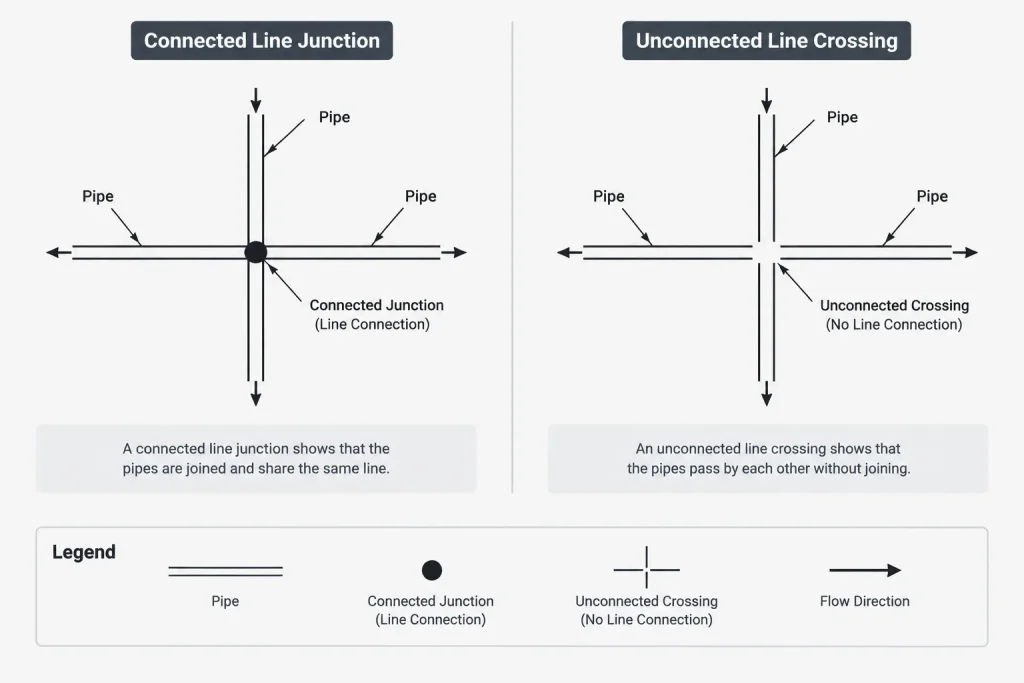
| Graphic treatment | Typical purpose | Primary review concern |
|---|---|---|
| Visible junction marker | Shows that intersecting lines connect | Confirm that the marker is intentional and belongs to the correct line types |
| Continuous lines crossing without a junction marker | May indicate no connection under the project convention | Check whether the convention is explicitly defined and remains clear when plotted |
| Break or bridge in one line | Emphasizes that one line passes across another without connecting | Ensure the break is not mistaken for a drafting gap or deleted segment |
| Lines terminating at a shared endpoint | May represent a branch or common connection | Verify endpoint coincidence and any required junction symbol |
| Continuation or off-page connector | Transfers a line to another location or drawing | Confirm matching identifiers, direction, and line data |
A junction symbol should not be added merely to make an intersection look tidy. It changes the meaning of the diagram. Likewise, removing a bridge or gap can accidentally convert a clear nonconnection into an ambiguous crossing.
Process Lines and Instrument Lines Need Separate Attention
A process branch represents a physical flow path. An instrument line may instead represent a pneumatic signal, electrical signal, software link, capillary connection, or process impulse connection. These line types should not be interpreted by geometry alone.
For example, an instrument signal line crossing a process line does not normally indicate that the signal connects to the pipe. A true process measurement connection should be represented using the project’s defined tap, connection, or instrument arrangement. Similarly, two signal lines crossing on the page do not necessarily share a signal path.
Line style, weight, symbol type, labels, and connection geometry work together. If the distinction disappears when a drawing is printed in grayscale or reduced in size, the graphic system is not robust enough for dependable review.
Why CAD Geometry Can Create False Junctions
In a basic CAD file, a visible line may be composed of separate segments. Two segments can appear connected while their endpoints are slightly separated. The opposite can also occur: objects may intersect geometrically even though the drawing convention says they are unrelated.
Common CAD causes of misleading intersections include:
- Endpoint snaps applied to the wrong object.
- Lines trimmed or extended during general cleanup.
- Junction symbols copied without their intended connection data.
- Blocks exploded into unrelated graphic elements.
- Different line types placed on incorrect layers.
- Overlapping duplicate lines that conceal gaps or branches.
- File conversion that changes line styles, masks, or draw order.
- Plot settings that make a small gap disappear.
A visual review at normal drawing scale is essential, but it is not sufficient for an intelligent P&ID. The underlying objects must also carry the correct relationship. A branch that merely looks connected may not be recognized by software as part of the same pipeline. Conversely, database-linked objects may be connected logically even if their displayed graphics have shifted.
Connected Graphics vs. Connected Data
Traditional CAD drawings primarily communicate through geometry and text. Data-centric P&ID systems add object relationships, line identifiers, component records, and connection logic. This creates two layers that must agree:
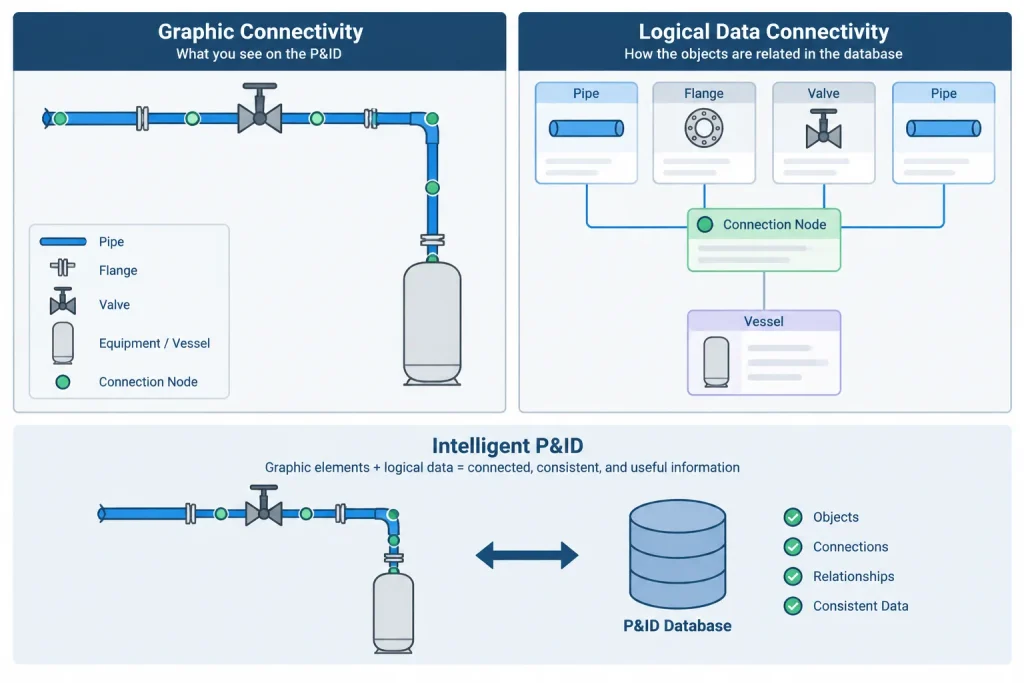
- Graphic connectivity: What a person sees on the drawing.
- Logical connectivity: What the project database or application recognizes.
Both layers matter. Correct data with misleading graphics creates review risk. Correct-looking graphics with broken data can affect reports, consistency checks, and downstream deliverables.
After moving a branch, replacing a symbol, or reconnecting a line, the drafter should verify both the visible result and the object properties. Copying geometry from another project is particularly risky because symbols may bring incompatible definitions or lose database associations.
Continuation References Are Connections Too
Not every connection is shown at a local intersection. A pipeline or signal may continue on another sheet, in another drawing area, or at a designated connector. The continuation symbol must provide enough information for a reviewer to find the matching endpoint.
Depending on project practice, the reference may include a drawing identifier, connector designation, line identifier, service description, or flow direction. The information should be coordinated at both ends. A continuation reference that exists on only one sheet leaves the diagram incomplete even if the pipeline itself is correctly identified.
Continuation connectors should also be distinguished from equipment connections and specification boundaries. A line continuing to another drawing does not necessarily indicate a physical break in the pipe.
A Practical Drafting Workflow
1. Confirm the project convention
Review the project legend, drafting procedure, and approved symbol library before editing intersections. Do not infer the meaning of a dot, bridge, or line break from another project.
2. Classify the intersecting lines
Determine whether each object represents process piping, utility piping, an instrument signal, an impulse line, an electrical function, a boundary, or an annotation. The correct treatment depends on what the lines mean.
3. Decide whether a real relationship exists
Use the process design information rather than visual convenience. If a branch exists, show it deliberately. If the systems are unrelated, preserve a clear nonconnection.
4. Check endpoints and object properties
Inspect for tiny gaps, overshoots, duplicate objects, incorrect layers, and broken intelligent connections. Avoid relying only on how the intersection looks at a high zoom level.
5. Test the plotted result
Review the diagram at its intended output size. Junction markers, gaps, and line styles must remain recognizable after plotting, reduction, or grayscale reproduction.
6. Review related deliverables
If the P&ID drives reports or databases, confirm that line and component records follow the intended connectivity. Resolve discrepancies before issuing the drawing.
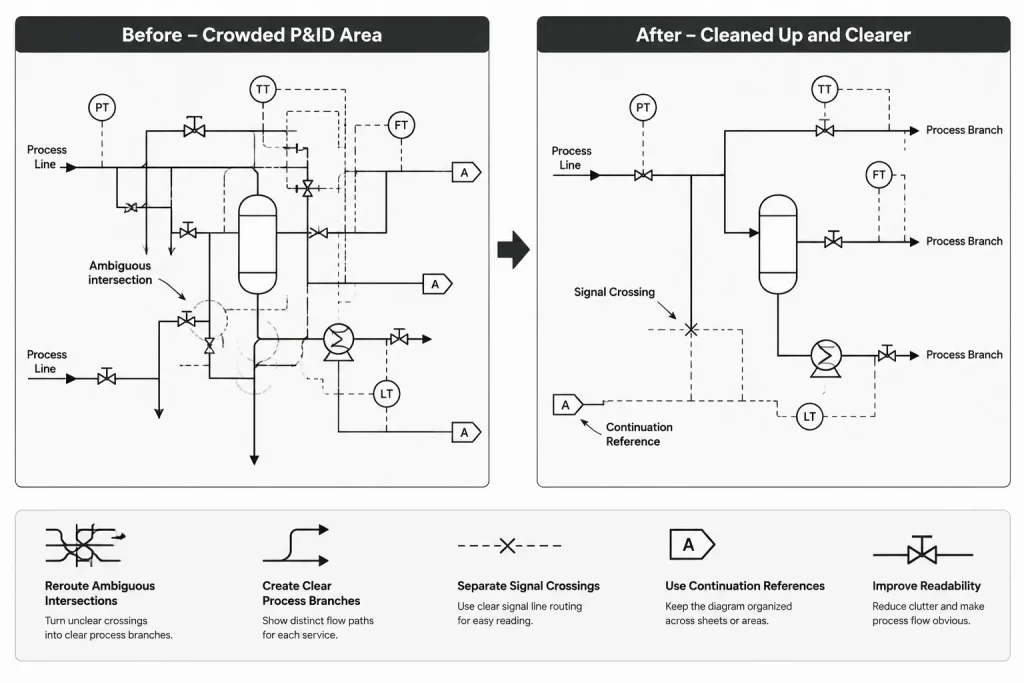
Review Questions for Crowded P&IDs
- Can every line intersection be classified quickly as connected or unconnected?
- Are process branches shown differently from unrelated signal crossings?
- Do junction markers remain visible at the issued drawing scale?
- Could an annotation leader be mistaken for a process or instrument line?
- Are continuation references paired and consistently labeled?
- Did file conversion alter gaps, bridges, line types, masks, or draw order?
- Do visible connections match the logical connections in the P&ID system?
- Have crowded intersections been rerouted for clarity rather than left ambiguous?
Clarity Is Better Than Graphic Compactness
Reducing the number of bends in a line is less important than making its meaning unmistakable. When several lines converge in a small area, adding spacing or rerouting a signal line is often safer than relying on a tiny graphic distinction.
A P&ID is not a scale piping layout, so a line may be rearranged for readability without implying a physical field route. That freedom should be used carefully to separate unrelated systems, expose intended branches, and keep labels associated with the correct objects.
The central rule is simple: every connection should look intentional, and every nonconnection should remain unmistakably separate. Applying that rule to both CAD geometry and underlying data helps prevent false junctions from becoming design, procurement, commissioning, or operating errors.
Managing Intersection Risk During Revisions
Line intersections deserve focused review whenever a P&ID is revised. Moving equipment, adding instruments, rerouting signal lines, or changing annotation can create new crossings even when the edited objects are not intended to connect. A revision check should therefore examine the surrounding drawing area, not only the item named in the change request.
Redlines should state the intended relationship whenever geometry alone could be misunderstood. Clear instructions such as connect as a branch, cross without connection, or continue by reference reduce the chance that a CAD operator will interpret a markup based on appearance.
Resolve Ambiguity Before Issue
If an intersection cannot be interpreted confidently from the legend, line type, identifiers, and process information, it should be treated as an unresolved technical question. Adding a junction mark or bridge based on visual preference can alter the represented design.
The appropriate discipline should confirm the intended relationship, particularly where process piping, instrument functions, electrical functions, and annotation occupy the same area. The resolved condition should then be applied consistently to the graphics, object data, and related deliverables.
Handoff Checks for CAD and Data-Centric P&IDs
- Source intent: Confirm that the approved markup or design information defines whether the lines connect.
- Visible geometry: Check endpoints, gaps, overlaps, junction graphics, line styles, and draw order.
- Object classification: Verify that each line and symbol belongs to the intended layer, class, or system.
- Logical relationship: Confirm that intelligent objects recognize the intended branch or nonconnection.
- Output clarity: Review the plotted or exported result rather than relying only on the editing display.
- Document coordination: Check continuation references and any reports affected by connectivity.
This review sequence helps separate drafting appearance from engineering intent. The objective is not merely a clean-looking diagram, but a P&ID whose graphics and data communicate the same relationship.
Frequently Asked Questions
Does every pair of crossing lines on a P&ID connect?
No. Lines may cross only because unrelated systems share the same drawing area. Connectivity must be determined from the project convention, line types, symbols, identifiers, and design intent.
Does a junction marker always mean a process pipe branch?
Not necessarily. A marker can indicate a connection within the represented line system, but that system may involve piping, an instrument function, or another defined relationship. The project legend determines its meaning.
Can CAD lines look connected without actually sharing an endpoint?
Yes. Small gaps, overlapping objects, plotting effects, and separate segments can create apparent contact. Endpoint geometry and object properties should be inspected rather than judged only from the screen image.
Why can an intelligent P&ID disagree with the visible drawing?
The graphic objects and database relationships may be edited independently or damaged during copying, replacement, conversion, or reconnection. A line can look correct while its logical relationship remains broken, or the data can remain connected while the display becomes misleading.
Should an unclear crossing be corrected during general CAD cleanup?
Only after the intended relationship is confirmed. Trimming, extending, joining, or adding a marker can change the technical meaning of the diagram. Ambiguous conditions should be referred to the responsible discipline or resolved through approved design information.
How should off-sheet continuity be checked?
Confirm that the references at both ends correspond, identify the intended continuation, and preserve the associated line or signal information. A continuation symbol represents document navigation and should not be mistaken for a local physical junction.