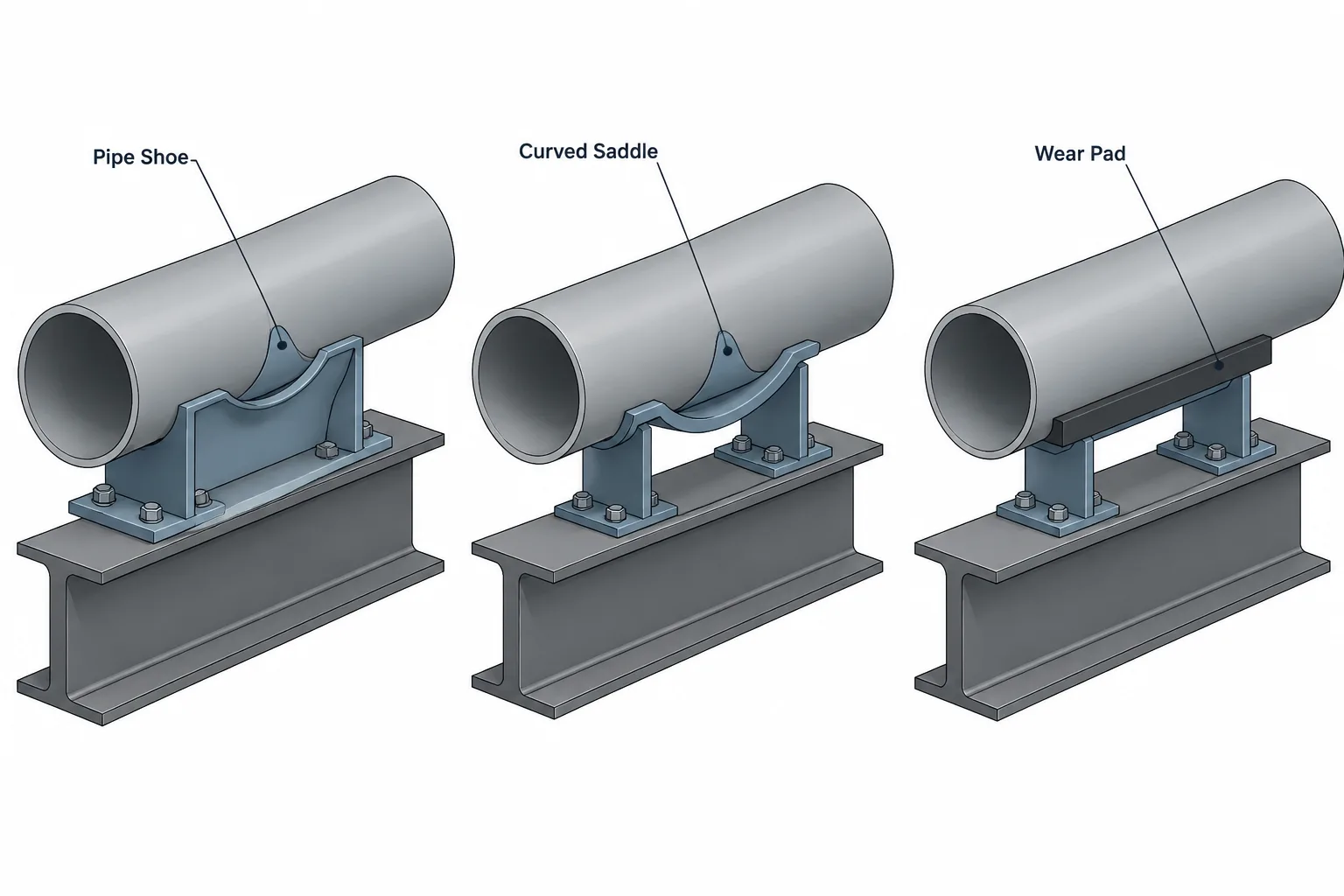
Pipe shoes, saddles, and wear pads may occupy similar locations in a piping model, yet they communicate different support functions. Correct classification helps CAD users coordinate pipe elevation, structural contact, insulation, movement, attachment geometry, and fabrication responsibility.
This reference explains how to represent these components without treating generic library geometry as an engineered support design. It also identifies the information that should pass between piping, stress, structural, support-design, and fabrication documents.
Pipe shoes, saddles, and wear pads all appear at the boundary between piping and its supporting structure, but they are not interchangeable terms. Each describes a different function, geometry, or load-transfer arrangement. Confusing them can produce incorrect material takeoffs, missed insulation clearances, ambiguous fabrication drawings, or a support model that does not represent the intended load path.
For CAD users, the challenge is not simply drawing something beneath a pipe. The model must communicate which component is attached to the pipe, which surface bears on the structure, whether sliding is expected, and which dimensions remain subject to support engineering or vendor confirmation.
What Is a Pipe Shoe?
A pipe shoe is an attachment that creates a defined support interface below a pipe. A common arrangement includes a curved or formed upper portion attached to the pipe and a lower plate or structural section that bears on a beam, support frame, slide plate, or guide assembly.
The shoe separates the pipe from the supporting steel and can provide:
- Clearance for insulation around the pipe.
- A flat bearing surface for sliding or resting.
- A controlled interface with guides, stops, or restraints.
- Distribution of support loads into the pipe attachment.
- Space between the pipe and structural steel for drainage, coatings, or access.
A shoe should not automatically be treated as a generic rigid support. Depending on the surrounding hardware, it may rest freely, slide in one or more directions, be guided laterally, or contact a line stop. The complete support assembly determines restraint behavior.
What Is a Pipe Saddle?
A pipe saddle is a curved support or attachment shaped to fit part of the pipe circumference. The term can describe a load-distributing component under the pipe, a fabricated attachment incorporated into a shoe, or a separate support element resting on another structure.
The word saddle is used differently among projects, fabricators, and support catalogs. It therefore should not be used as the only definition of the assembly. Drawings and model data should clarify whether the saddle is welded to the pipe, clamped around it, loose beneath it, or combined with a shoe plate or structural member.
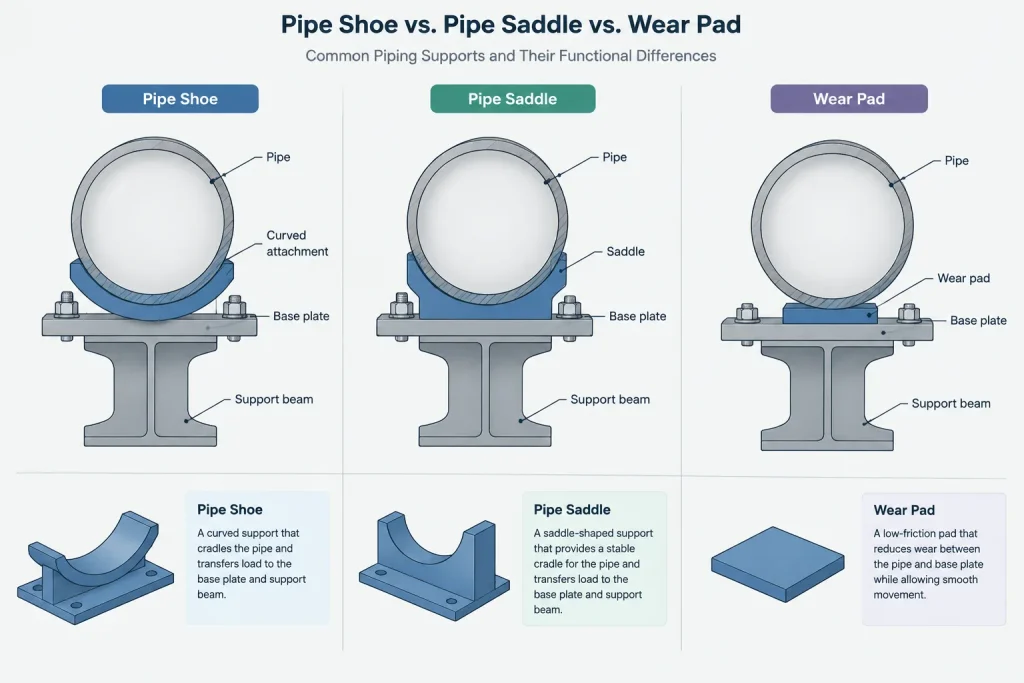
A saddle generally emphasizes the curved pipe-contact geometry. A shoe generally emphasizes the complete attachment and its bearing interface. A single support may contain both.
What Is a Wear Pad?
A wear pad is a plate fitted to the pipe surface at a support or contact location. It may be called a wear plate, reinforcing pad, or protection pad in project documentation, although those terms can carry different project-specific meanings.
The pad can help prevent direct rubbing against supporting steel, distribute local contact, or protect the pipe surface and coating. It does not necessarily establish the elevation or provide the same clearance as a pipe shoe. A pipe resting on a wear pad may still sit close to the supporting member.
A wear pad must also be distinguished from a branch reinforcement pad. Both may be curved plates attached to a pipe, but their locations and purposes differ. A branch reinforcement pad surrounds a branch opening as part of the branch connection design. A wear pad is associated with a support or contact interface.
Quick Comparison
| Term | Primary idea | Typical CAD concern |
|---|---|---|
| Pipe shoe | Complete support attachment with a defined bearing surface | Height, base length, movement direction, guide or stop interaction |
| Saddle | Curved component conforming to the pipe | Pipe contact, attachment method, circumferential extent, load distribution |
| Wear pad | Local plate protecting or distributing contact at the pipe wall | Pad extent, attachment limits, interference, inspection access |
These descriptions are functional rather than universal catalog definitions. Project support standards, calculations, drawings, and approved manufacturer information control the actual component.
Understanding the Load Path
A useful CAD model should make the support load path understandable. For a basic shoe assembly, the load may pass from the pipe wall into the curved attachment, through a web or structural section, into the shoe base, and finally into the support steel. A wear-pad arrangement may transfer load from the pipe through the pad directly onto the bearing member.
The visual presence of a support does not prove that its load path is valid. Attachment sizing, weld design, local pipe stress, bearing pressure, structural capacity, temperature effects, and restraint loads require engineering evaluation. CAD geometry should reflect approved design information rather than imply that a modeled shape has been calculated.
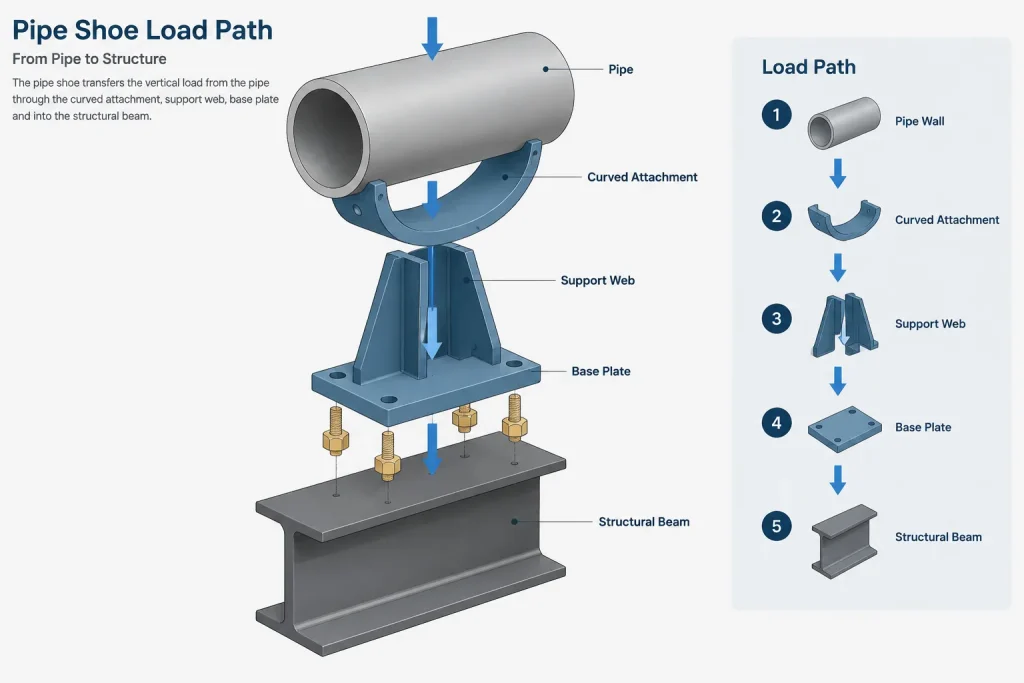
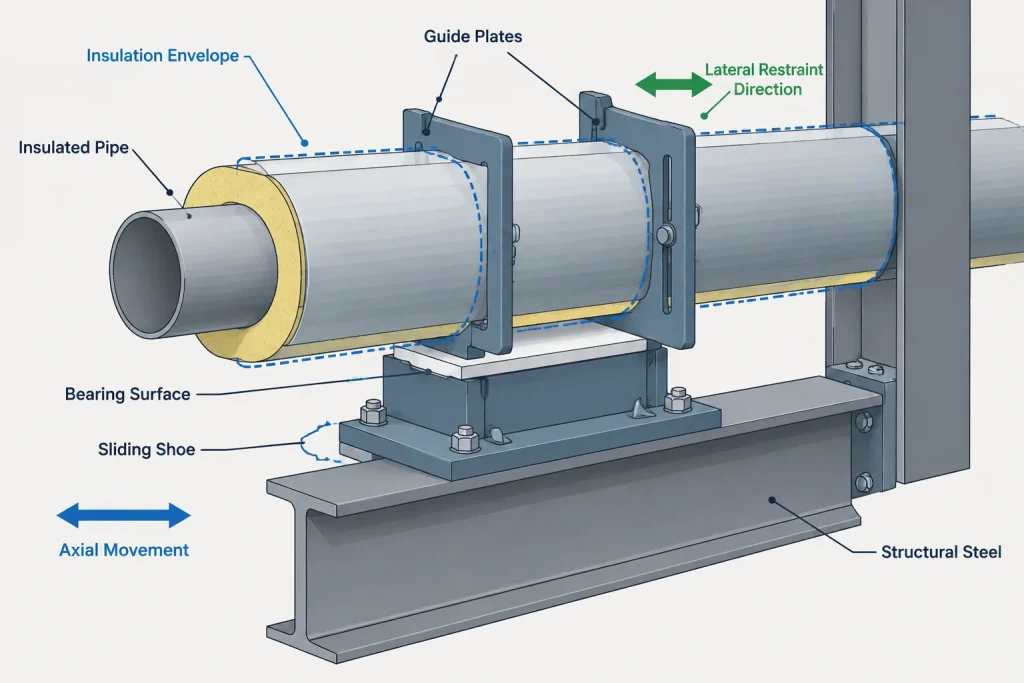
Designers should also differentiate vertical load support from directional restraint. A shoe resting on a beam may support weight while allowing axial movement. Guide plates may restrict lateral movement. A stop may resist movement in a selected direction. These functions should be identified separately in support data and drawings.
Critical Geometry to Control in CAD
Pipe Reference and Attachment Location
Locate the support from a defined project reference, commonly the pipe centerline, a structural grid, equipment datum, or a verified support coordinate. Avoid relying only on an approximate visual placement. The attachment location should remain coordinated among the model, support schedule, stress information, and drawings.
Shoe Height
Shoe height affects the pipe centerline elevation relative to the supporting steel. It may also provide room for insulation and its protective covering. Do not select the height solely because a generic CAD object looks appropriate. Confirm the project support detail and insulation requirements.
Bearing Length and Width
The shoe base needs a defined footprint. Its length influences how it remains supported as the pipe moves, while its width affects interaction with beams, slide plates, guides, and nearby steel. The supporting surface must accommodate the expected movement without the shoe running off an edge or contacting unintended obstructions.
Insulation Envelope
For insulated piping, model or check the outer insulation envelope independently from the steel pipe. The support arrangement may pass through the insulation, interrupt it, or incorporate a load-bearing insulation system. Weather barriers and removable insulation sections may also require space. A bare-pipe shoe block is not enough to validate insulated clearance.
Attachment and Weld Zones
Even when welds are not modeled in detail, the attachment region should be visible enough to support fabrication and interference reviews. Nearby branch connections, longitudinal seams, fittings, drains, instrument taps, and other attachments may limit where a shoe or pad can be installed.
Sliding and Restraint Clearances
A shoe intended to move requires sufficient bearing surface and clearance around guides or stops. The model should represent the relevant movement envelope when that information is available. A support shown only in its nominal position can conceal interference at an operating or installation position.
How Much Detail Should Be Modeled?
The required level of detail depends on the project phase and deliverable. Early routing models may use a symbolic support object with a reliable connection point and approximate space claim. Coordination models may need the actual shoe height, base footprint, insulation envelope, guide plates, and movement clearance. Fabrication deliverables may require project-approved component geometry and attachment details.
Small weld beads, edge preparations, drain holes, or fabrication tolerances do not always belong in the general plant model. However, omitting them from the model does not remove the need to define them in the appropriate support or fabrication document.
Recommended CAD Data Fields
Useful support metadata can reduce dependence on appearance alone. A pipe shoe or pad object may carry:
- Support tag or unique identifier.
- Support type and functional description.
- Associated line number.
- Pipe size and applicable material class reference.
- Attachment type, such as welded, clamped, or loose.
- Nominal support location or coordinate reference.
- Shoe height and bearing footprint when verified.
- Insulation condition.
- Movement or restraint function.
- Design status, revision, and approval state.
- Reference to the controlling support detail or calculation.
Terms should follow the project support standard. If the project distinguishes among standard shoes, insulated shoes, anchors, guides, line stops, and special supports, the CAD classification should preserve those distinctions.
Common Modeling and Documentation Errors
- Using a wear pad as a shoe: A thin curved pad does not automatically provide the required pipe elevation or sliding surface.
- Modeling only the pipe attachment: Missing guide plates, slide surfaces, or structural interfaces can hide clashes and movement restrictions.
- Ignoring insulation: A shoe that clears bare pipe may conflict with insulation or weatherproofing.
- Assuming all shoes slide: The assembly may be guided, stopped, anchored, or otherwise restrained.
- Copying a support to a different pipe without review: Changes in pipe geometry, material, temperature, load, or insulation can require a different design.
- Scaling a catalog object: Scaling changes appearance but does not establish valid attachment dimensions, plate thicknesses, welds, or capacity.
- Leaving movement direction ambiguous: Guides and stops need a clear relationship to the piping axis and expected displacement.
A Practical Review Workflow
- Confirm the pipe line, support location, insulation condition, and required support function.
- Identify whether the pipe-side component is a shoe, saddle, wear pad, clamp, or special engineered attachment.
- Verify the controlling project support detail rather than relying on the CAD library name.
- Place the component from a defined pipe and structural reference.
- Check the full bearing footprint against supporting steel.
- Review insulation, guide gaps, movement envelopes, nearby welds, and access.
- Coordinate the support tag and status with support schedules, stress information, drawings, and material reports.
- Mark unverified dimensions or special details as pending instead of presenting them as final.
Key Takeaway
A pipe shoe creates a bearing interface, a saddle conforms to and distributes contact around the pipe, and a wear pad protects or reinforces a local support contact area. One assembly may include more than one of these elements. Effective CAD documentation must show not only the shape beneath the pipe, but also the attachment method, load path, insulation relationship, movement function, and controlling design reference. Generic library geometry is useful for coordination, but final support suitability depends on verified project engineering and fabrication details.
Turning CAD Geometry Into a Clear Support Definition
A support object should communicate more than its visible shape. Reviewers need to understand where the pipe-side attachment ends, where structural bearing begins, and whether the interface permits movement or provides restraint. If those functions cannot be understood from geometry alone, use model properties, support tags, notes, and controlling detail references to remove ambiguity.
Separate Physical Components From Support Functions
A shoe, saddle, or wear pad describes physical geometry, while terms such as resting support, guide, stop, and anchor describe behavior within the piping system. These categories should not be substituted for one another. A shoe can participate in several restraint arrangements depending on the surrounding plates, stops, clamps, and structural connections.
Document Design Maturity
Preliminary support geometry should be identified as preliminary. This is especially important when attachment configuration, movement allowance, insulation treatment, or structural interface remains unresolved. A visually complete model can otherwise be mistaken for an approved fabrication definition.
When verified information becomes available, update both the geometry and its associated data. Changing the model without revising the support schedule or controlling drawing can create conflicting deliverables.
Define Interface Responsibility
Support assemblies often cross discipline boundaries. Piping documentation may define the pipe attachment and required movement, while structural documentation defines the supporting member. A support specialist or fabricator may control the detailed assembly. The project should identify which document governs each interface rather than leaving users to infer responsibility from the model.
Check the Support in Context
- Confirm that the bearing surface remains compatible with the supporting steel throughout the expected movement condition.
- Review the insulation and weather-barrier envelope separately from the pipe surface.
- Check access for inspection, coating, insulation removal, welding, and maintenance.
- Verify that nearby fittings, branches, seams, drains, and instruments do not conflict with the attachment zone.
- Ensure the support tag, classification, and approval status agree across model reports and drawings.
These checks improve coordination, but they do not replace support calculations, local pipe-stress review, structural verification, or approved fabrication details.
Frequently Asked Questions
Can a pipe shoe include a saddle?
Yes. A fabricated shoe may use a curved saddle as its pipe-contact component and a separate base or structural section as its bearing interface. The drawing should identify the complete assembly rather than relying on a single component name.
Is a wear pad considered a restraint?
Not by itself. A wear pad primarily defines a protected or load-distributing contact area at the pipe wall. Restraint behavior depends on the full assembly, including guides, stops, clamps, friction assumptions, and structural interfaces.
Should CAD users model a support weld?
The answer depends on the deliverable. Detailed weld geometry may be unnecessary in a coordination model, but the attachment zone and weld requirements still need to be defined in the appropriate support or fabrication documentation.
How should an unverified support be shown?
Use controlled preliminary geometry and clearly identify its status in the model data or drawing notes. Do not present assumed attachment dimensions, clearances, or restraint behavior as approved information.
Why is the CAD library name not enough?
Library names may reflect internal naming conventions rather than the project’s support classification. The controlling support detail, functional description, attachment method, and model metadata provide a more reliable definition.
Can the same support object be copied to another pipe?
It may be reused as a starting object, but suitability must be checked again. Pipe configuration, insulation, movement, loading, material requirements, nearby attachments, and structural conditions can differ even when two supports appear similar.