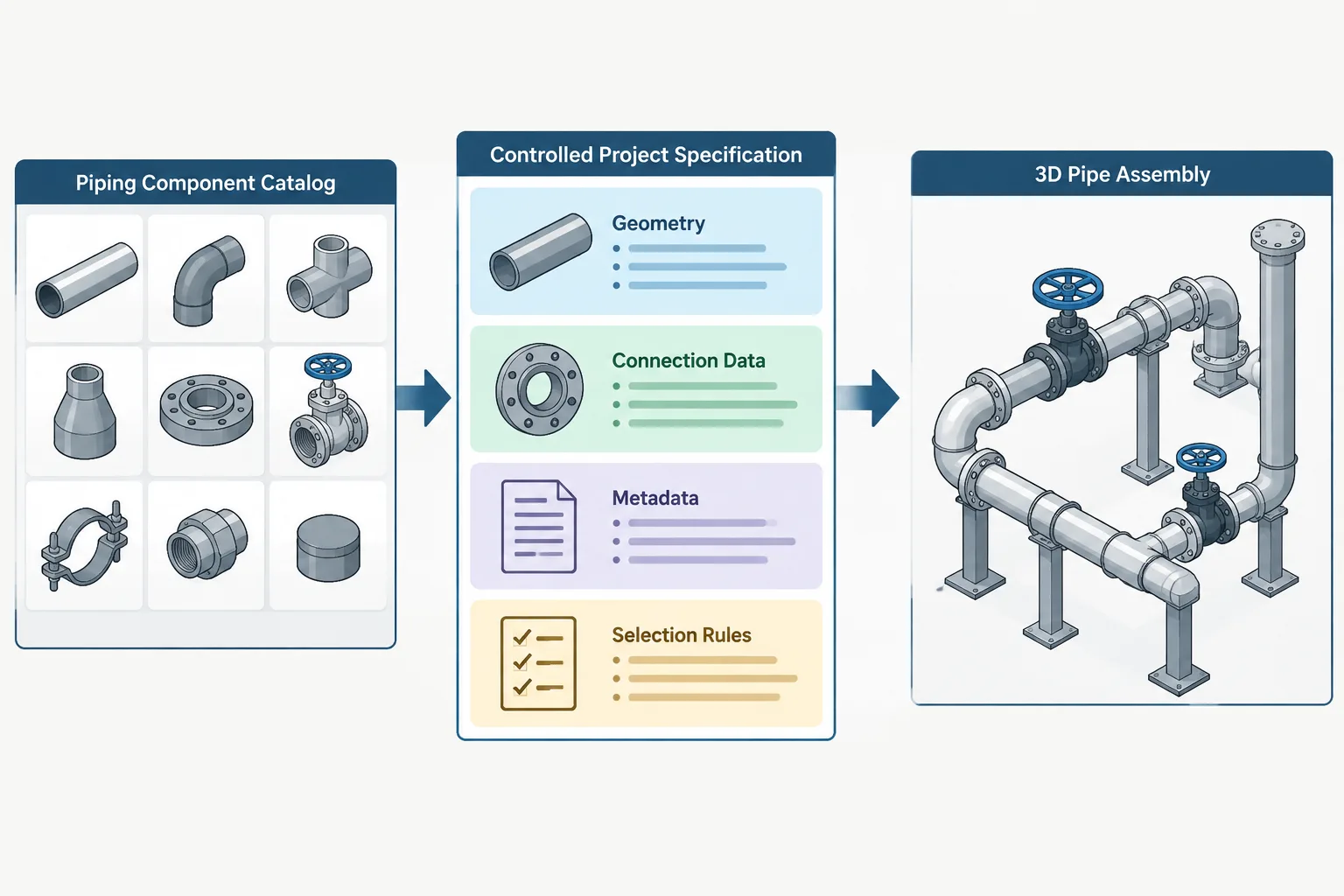
Piping CAD catalogs and project specifications are closely connected, but they are not interchangeable. Catalog records provide components that the design system can recognize and place; project specifications control which records are permitted for the applicable service and design basis.
Understanding this separation helps prevent a common modeling error: treating an available component as an approved component. The discussion below explains how geometry, connection intelligence, metadata, selection rules, and vendor information should remain coordinated without being treated as the same source of authority.
A piping component appearing in a CAD catalog does not automatically make it acceptable for a project. The catalog may contain usable geometry, connection definitions, nominal sizes, and descriptive fields, while the project specification determines which of those components may actually be selected for a particular service.
This distinction is important for designers, engineers, catalog administrators, and anyone reviewing model data. If catalog content and project rules are treated as the same thing, a model can look complete while containing components with the wrong material, end connection, pressure designation, wall basis, facing, or procurement description.
The safest approach is to treat the CAD catalog as a controlled source of component definitions and the project specification as a controlled set of selection rules. Both require verification, but they perform different jobs.
What Is a Piping CAD Catalog?
In piping design software, a catalog is generally a structured collection of component records. Depending on the system and level of development, a record may include:
- Component type, such as pipe, elbow, tee, reducer, flange, valve, or branch fitting
- Nominal size or a range of available sizes
- End-connection definitions
- Dimensional parameters used to create or place geometry
- Connection points, centerlines, face planes, and orientation references
- Material or descriptive properties
- Commodity codes, short descriptions, and long descriptions
- Weight, manufacturer, or procurement fields when verified data is available
The term catalog can also refer to a manufacturer’s commercial product listing. That is not necessarily the same as a software component catalog. A manufacturer catalog describes products offered for sale, while a CAD catalog converts selected information into data and geometry that the design system can use. The source and meaning of each field should therefore be clear.
What Does the Project Specification Control?
A project piping specification, often implemented in software as a piping class or selectable spec, narrows the available catalog content. It identifies the components permitted under defined project conditions and services.
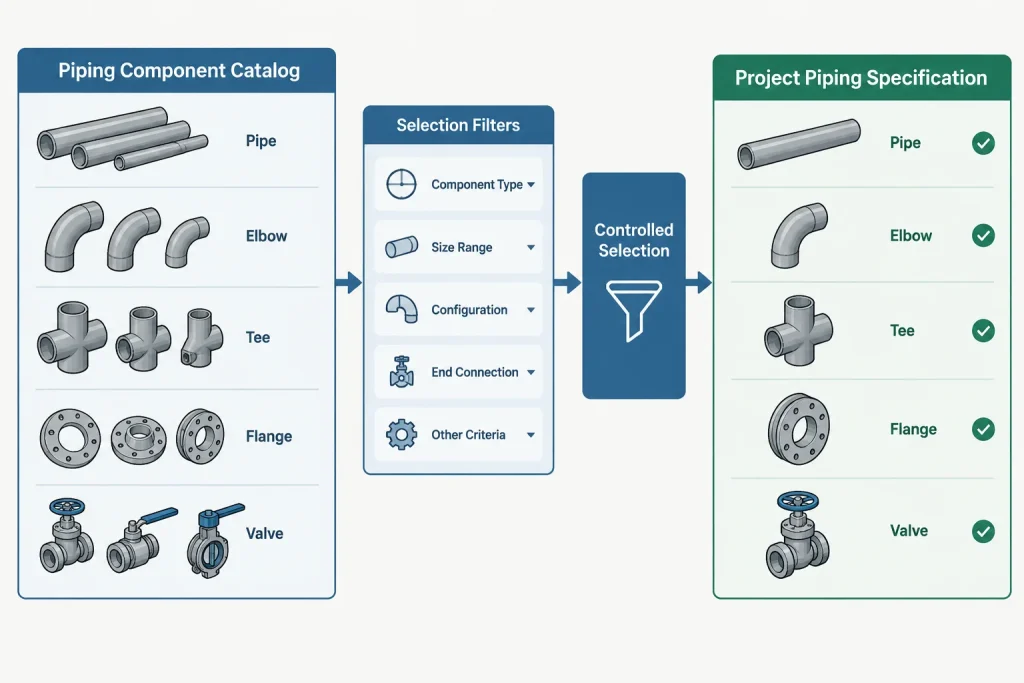
Selection rules may address:
- Permitted materials and product forms
- Pipe wall or schedule selection by nominal size
- Fitting type and end connection
- Flange type, facing, and class designation
- Valve type, body material, trim description, and end connection
- Branch connection method
- Gasket and bolting requirements
- Size limits, service restrictions, and project notes
The project specification is not merely a convenient menu. It is part of the project’s technical control system. Its contents should agree with the approved engineering basis, procurement descriptions, line classes, and related documentation.
Catalog Availability Is Not Selection Approval
A broad corporate catalog may support many projects, industries, materials, and connection systems. It can contain components that are unsuitable for the current service but valid elsewhere. Keeping reusable component definitions in a shared catalog can be efficient, provided project users only receive approved choices through controlled specifications.
Problems occur when users search the full catalog and place an item simply because its nominal size and visible shape appear correct. Two components can have similar external geometry while differing in properties that matter to engineering and procurement. A flange with the correct outside profile, for example, may still have the wrong facing, bore basis, material description, or bolt pattern definition.
Likewise, substituting a generic valve body for a verified project valve may be acceptable for early space planning only if the model clearly indicates its preliminary status. It should not silently become the source for final face-to-face dimensions, operator clearance, weight, or purchase information.
How Geometry, Metadata, and Rules Differ
| Information layer | Primary purpose | Typical risk if incorrect |
|---|---|---|
| Geometry | Represents component shape, length, connection locations, and space claim | Misaligned piping, incorrect cut lengths, clashes, or insufficient access |
| Connection intelligence | Defines compatible ports, nominal sizes, end types, and orientation | Invalid joints or components that connect visually but not technically |
| Metadata | Identifies material, description, code, weight, manufacturer, and other properties | Incorrect bills of material, reports, tags, or procurement records |
| Project selection rules | Limits which catalog items may be used for a service or piping class | Technically prohibited components entering the design |
| Vendor data | Defines product-specific dimensions and characteristics | Generic geometry being mistaken for the purchased item |
These layers are related but should not be assumed to validate one another. Accurate geometry does not prove that the metadata is correct. A complete description does not prove that connection points are positioned correctly. Placement through a project spec does not prove that preliminary vendor dimensions have been replaced.
Generic Components and Manufacturer-Specific Components
Generic catalog components are useful when dimensions are governed by an applicable dimensional basis and the project does not require a specific manufacturer’s shape. They can support layout, reporting, and standard component selection when the underlying data has been checked.
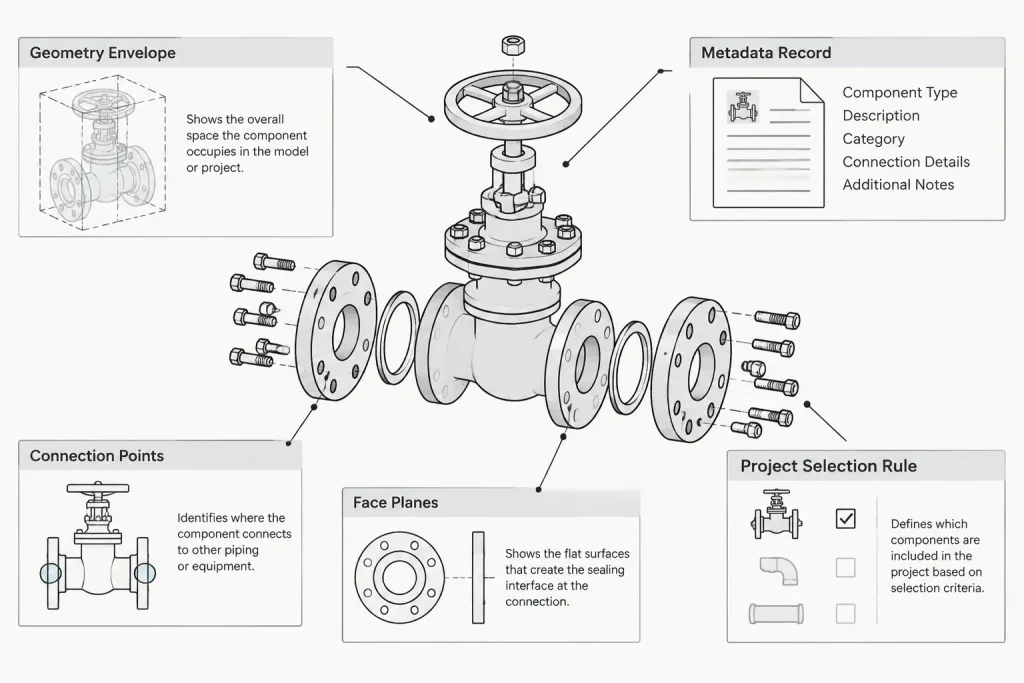
Manufacturer-specific components are often needed when the purchased product controls important dimensions or clearances. Common examples include valves, strainers, specialty joints, instruments, actuators, and proprietary inline equipment. Relevant product data may include overall length, body envelope, operator orientation, maintenance access, weight, connection details, and center of gravity.
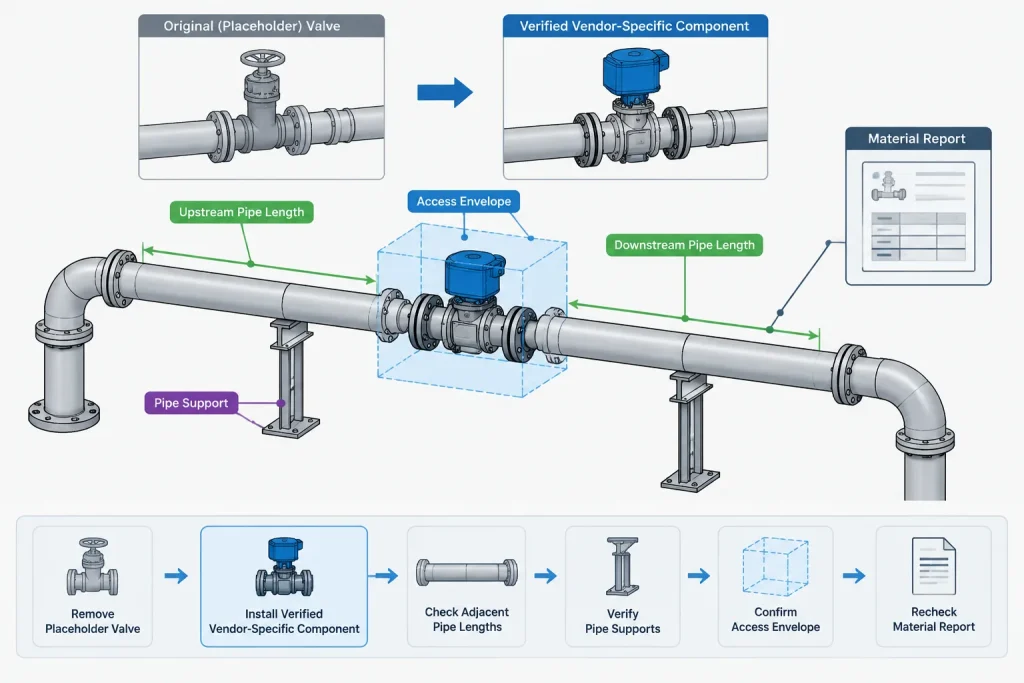
A generic placeholder should be identified as such. Replacing it later is not just a graphical task. The team should check connection locations, adjacent pipe lengths, support loads, access zones, component descriptions, and report outputs after substitution.
A Practical Catalog-to-Spec Workflow
1. Establish the data authority
Identify which approved documents control material selection, dimensions, descriptions, and vendor-specific information. Do not use an unverified web image, legacy model, or block library as the sole dimensional authority.
2. Build or verify the catalog record
Check component type, size range, dimensional parameters, port locations, end connections, descriptions, and other required properties. Where values are unknown, use an explicit hold or incomplete status rather than filling the field with an assumption.
3. Add the component to the correct project specification
Apply the permitted size range, schedule or wall basis, material, end preparation, rating designation, and branch or connection rules required by the project. Avoid adding broad alternatives merely to make modeling easier.
4. Test representative placements
Place the component in straight runs and relevant connection arrangements. Confirm orientation, face planes, center-to-end or end-to-end behavior, size transitions, and joint compatibility. Review both graphical output and reported properties.
5. Test deliverables
Check how the item appears in material reports, isometrics, plans, sections, and other project outputs. A component that looks correct in a 3D view may still generate an incorrect description, quantity, identifier, or connection note.
6. Control revisions
Record catalog and specification changes through the project’s revision process. Determine whether existing model instances must be updated, replaced, or reviewed. A corrected source record does not always guarantee that previously placed items have inherited the correction.
Common Failure Modes
- Using shape as identity: A visually similar fitting is placed even though its technical properties differ.
- Scaling a component: Geometry is stretched to fit another nominal size instead of selecting a verified size-specific record.
- Copying from another project: A component retains descriptions or rules belonging to a different material class or service.
- Overwriting controlled fields: Users edit descriptions locally, causing the model instance to disagree with the catalog or specification.
- Mixing generic and vendor data: A generic body is combined with an unverified operator or connection length, creating a model that represents no actual product.
- Ignoring reporting behavior: Correct geometry produces an incorrect material takeoff because commodity codes or size fields were mapped improperly.
- Leaving placeholders unmarked: Preliminary components become indistinguishable from verified design items.
What Designers Should Check Before Placement
Before accepting a component from a project menu, the designer should review more than its displayed name. A practical check includes nominal size, component type, end connection, material class, wall or bore basis where relevant, flange facing or valve end style, and any project note affecting selection.
For specialty and vendor-controlled items, also confirm the dimensional status. The component may be suitable for conceptual routing but not for final fabrication dimensions. If that distinction affects downstream users, it should be visible through model properties, notes, status fields, or the project’s hold process.
What Reviewers Should Ask
- Was the component selected through the approved project specification?
- Is its geometry generic, standards-based, vendor-specific, or preliminary?
- Do its connection definitions match the adjoining components?
- Are descriptions and commodity identifiers controlled and reportable?
- Are size-dependent options correctly limited?
- Will replacement with the purchased item affect pipe length, supports, access, or clashes?
- Have revisions been applied to existing model instances?
The Key Distinction
A piping CAD catalog answers, “What component definitions are available to the system?” A project specification answers, “Which of those definitions may be used here?” Vendor data may then answer, “What are the final characteristics of the item being purchased?”
Reliable piping models keep these roles separate while maintaining traceability between them. The goal is not merely to place a recognizable shape. It is to create a controlled component instance whose geometry, connections, properties, and selection basis are appropriate for the project and whose unverified information remains clearly identified.
Assigning Data Ownership
Reliable catalog and specification management starts with clearly assigned responsibility. The exact roles vary by organization, but ownership should cover each information layer rather than leaving the entire record under an undefined group.
- Catalog administration: Maintains component definitions, dimensional parameters, ports, orientation behavior, and controlled base properties.
- Specification engineering: Defines permitted component combinations, material requirements, connection rules, service restrictions, and selection limits.
- Vendor-data coordination: Tracks purchased-item information, dimensional status, document review, and replacement of preliminary representations.
- Design: Selects components through the approved project environment and reports missing, ambiguous, or unsuitable options.
- Model and data review: Checks geometry, connectivity, properties, deliverables, and the effect of revisions on existing instances.
Assigning ownership does not isolate these activities. Catalog corrections can affect specifications, model instances, drawings, reports, and procurement descriptions, so changes need coordinated review.
Managing Status and Traceability
A component record should communicate whether its information is generic, verified against an approved dimensional basis, based on reviewed vendor data, or still preliminary. The status should be understandable to downstream users and should not depend only on the component’s appearance.
Useful traceability can include the controlling data source, approval status, revision reference, responsible discipline, and any hold affecting final use. These fields should follow the project’s established data-control method. They should not be populated with assumptions simply to make a record appear complete.
Evaluating the Effect of a Change
When catalog or specification content changes, review more than the edited source record. The change may affect:
- Previously placed component instances
- Connected pipe lengths and joint behavior
- Specification-driven replacement or substitution
- Material reports and procurement descriptions
- Isometric, plan, section, and model output
- Clearance, access, support, and clash reviews
- Interfaces with vendor-controlled equipment
The software’s update behavior should be tested rather than assumed. Some changes may propagate to existing instances, while others may require replacement, synchronization, or a targeted model review.
A Practical Acceptance Test
A component is ready for controlled project use only when its visible geometry and reported data have both been checked. A practical acceptance review should confirm that the correct item is available through the intended project specification, connects as expected, carries the approved properties, and produces usable downstream output.
This approach treats the model as an engineering data environment rather than a collection of shapes. It also makes preliminary information easier to identify and reduces the risk that an unverified placeholder will be mistaken for a final purchased component.
Frequently Asked Questions
Can geometrically accurate catalog content still be unsuitable for a project?
Yes. Geometry may correctly represent a component family while the material, end connection, facing, wall basis, rating designation, description, or service restrictions do not satisfy the project specification.
Should the project specification duplicate the entire CAD catalog?
Not necessarily. A project specification normally filters or references approved catalog definitions according to the software’s data structure. The important requirement is that users receive controlled selections without relying on unrestricted catalog availability.
Can a generic component be used before vendor data is available?
It can support preliminary layout when the project permits that practice and its status is clearly identified. The team should avoid treating generic dimensions, weight, operator clearance, or connection details as final vendor information.
Why can a component look correct but produce an incorrect material report?
Geometry and reporting properties are separate data layers. Incorrect commodity mapping, descriptions, size fields, material properties, or local overrides can create reporting errors even when the model shape appears correct.
Does correcting a catalog record automatically fix existing model components?
That depends on the design system, project configuration, property behavior, and type of change. Existing instances should be checked to determine whether they updated, retained old data, or require controlled replacement.
What should be verified when replacing a placeholder?
Review connection locations, adjacent pipe lengths, component envelope, operator orientation, maintenance access, support effects, properties, descriptions, and downstream deliverables. Replacement should be treated as a data and design change, not only a graphical update.