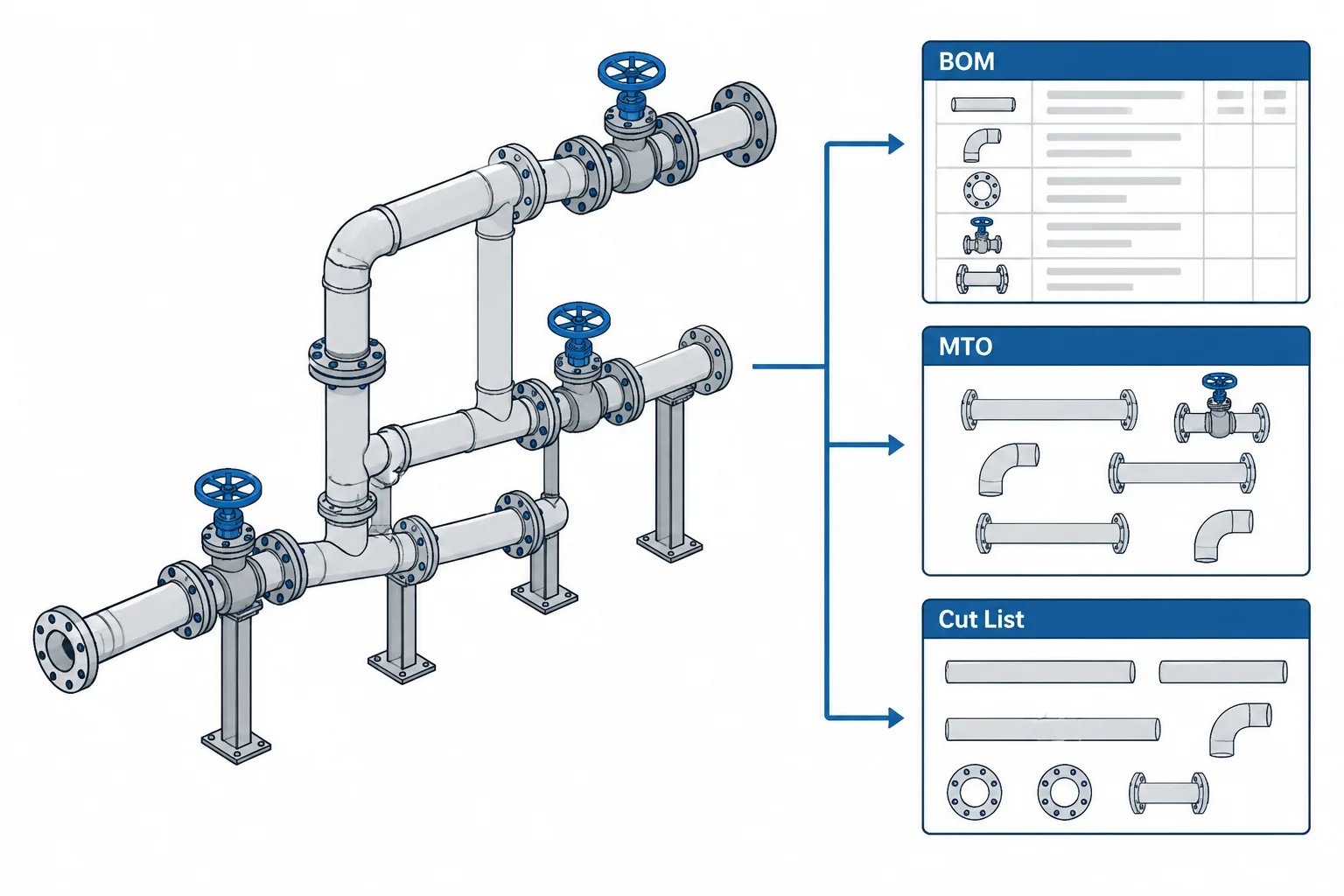
Piping BOM vs. MTO vs. cut list is not merely a terminology question. Each deliverable presents material data for a different decision: defining assembly content, consolidating supply requirements, or directing piece-level fabrication.
This guide explains how to recognize the intended authority of each document, review its data basis, and prevent quantities from being used outside their approved scope. Because company practices differ, project-specific document definitions and status rules should always take precedence over assumptions based on the document name alone.
A piping bill of material, material takeoff, and cut list may all contain quantities, but they are not interchangeable documents. Each supports a different stage of engineering, procurement, fabrication, or construction. Confusing them can lead to duplicate purchasing, missing components, incorrect pipe cuts, and disagreements over which document controls.
The exact names and formats vary by company, project, and fabrication shop. Some organizations use BOM and MTO almost synonymously, while others maintain a strict distinction. The practical approach is to define each deliverable by its purpose, source, level of detail, and revision process rather than relying on the acronym alone.
The Basic Difference
A bill of material, commonly abbreviated BOM, is usually associated with a specific drawing, spool, assembly, or modeled scope. It identifies the components required to build what that document represents.
A material takeoff, or MTO, summarizes material quantities for estimating, procurement, planning, or project-wide control. It may combine data from many drawings, models, or preliminary engineering assumptions.
A cut list tells the fabrication shop how stock material is to be cut into individual pieces. For pipe, it normally identifies piece-level cut requirements rather than merely reporting the total length needed.
| Deliverable | Primary purpose | Typical scope | Typical users |
|---|---|---|---|
| BOM | Identify components belonging to a drawing or assembly | Isometric, spool, assembly, or defined model area | Designers, checkers, fabricators, material control |
| MTO | Summarize quantities for estimating or supply | System, area, line group, package, or project | Estimators, procurement, planners, project controls |
| Cut list | Direct stock cutting and piece preparation | Fabrication batch, spool set, or shop work package | Fabricators, shop planners, production control |
What a Piping BOM Usually Contains
A drawing-level piping BOM commonly lists items such as pipe, fittings, flanges, valves, gaskets, bolting, branch components, and selected specialty items. Entries may include a position number, description, nominal size, material designation, end connection, schedule or wall designation, quantity, and unit of measure.
The BOM should reflect the physical scope represented by its parent document. On a spool drawing, that scope may include only items assigned to the spool. On an isometric, it may include the full line segment shown, subject to the project’s rules for field materials, supports, fasteners, and specialty components.
A BOM is not automatically a complete purchasing document. For example, a drawing may identify a valve by tag or component code while procurement relies on a separate datasheet or requisition for the full technical description. Similarly, bolting and gaskets may be listed per joint, supplied as bulk materials, or excluded from a spool BOM under project-specific rules.
Questions to Resolve Before Generating a BOM
- Does the BOM cover shop-installed items, field-installed items, or both?
- Are gaskets and bolting counted by individual item, joint set, or bulk quantity?
- Are valves and specialty items purchased from the BOM or only referenced by tag?
- Are pipe supports included, or are they controlled by separate support documents?
- How are loose items, shipment items, and installation accessories identified?
- What happens to deleted or superseded position numbers after a revision?
What Makes an MTO Different
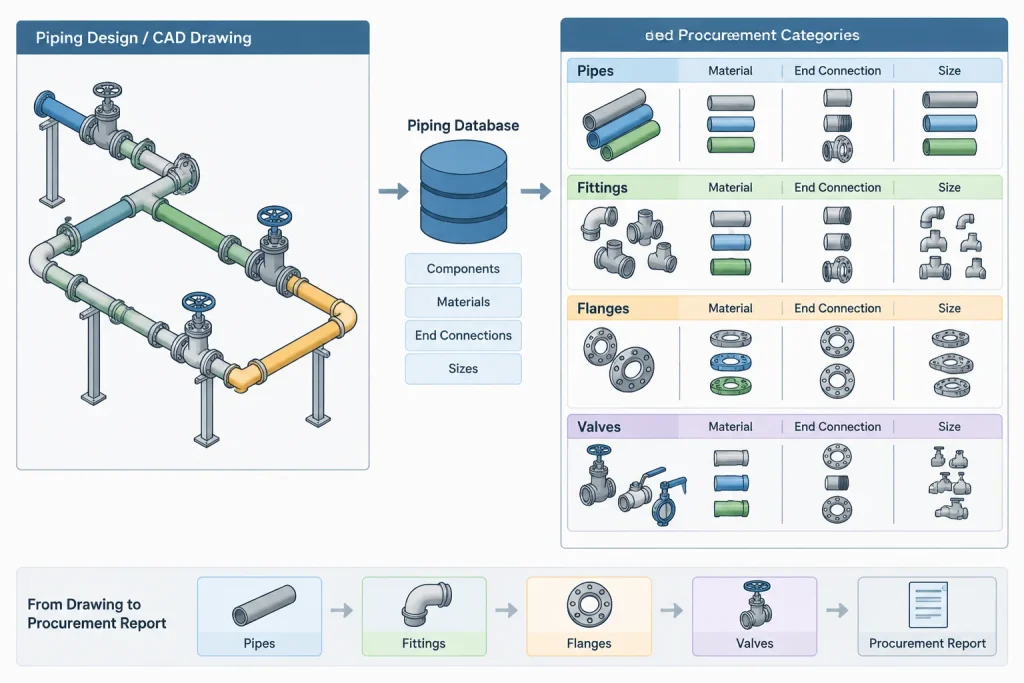
An MTO is organized around quantity control rather than assembly identity. It may consolidate repeated components from hundreds of drawings into common purchasing descriptions. The same elbow appearing on several isometrics can become one summarized MTO line, provided its size, material, wall designation, end type, rating-related description, and other procurement attributes are truly compatible.
MTOs also exist at different design stages. An early estimate may be based on preliminary routes, typical fitting allowances, or incomplete model data. A later model-derived MTO may identify discrete components and measured pipe lengths. A final construction MTO may incorporate approved changes and field requirements. These documents should not be treated as equivalent merely because they use the same column headings.
Every MTO should therefore communicate its basis. Useful status information includes the model or drawing revision used, included areas, excluded systems, treatment of contingency, and whether reported quantities are estimated, issued for purchase, or reconciled against fabrication.
Aggregation Can Hide Important Differences
Grouping rules require care. Components with the same nominal size are not necessarily the same purchasing item. Differences in material, schedule, pressure class, facing, end preparation, branch size, fitting pattern, valve trim, or specification requirements may prevent consolidation.
Free-text descriptions are especially risky because similar wording may conceal different component identities. A controlled catalog code or validated specification identifier can make aggregation more reliable, but the code still needs to be checked against the current project specification.
Why a Cut List Is a Fabrication Document
A pipe quantity in a BOM or MTO does not tell a shop how to cut individual pieces. A cut list breaks the required pipe into piece-level instructions tied to spools, welds, or fabrication marks.

Depending on the workflow, a cut-list record may identify the spool, piece mark, nominal size, material, schedule, required cut length, end preparations, and the components attached at each end. It may also distinguish shop cuts from field-trimmed pieces.
Cut length must not be taken casually from the visible centerline length in a CAD model. The required value can depend on fitting takeouts, flange dimensions, valve face-to-face dimensions, branch geometry, socket insertion rules, threaded makeup assumptions, weld preparation, and approved fabrication allowances. These inputs must come from verified project data and applicable component definitions.
Stock optimization is another separate step. A cut list states what finished pieces are required. A nesting or stock-cutting plan determines how those pieces will be arranged across available stock lengths while considering kerf, unusable ends, traceability, and shop practice.
How the Three Deliverables Relate
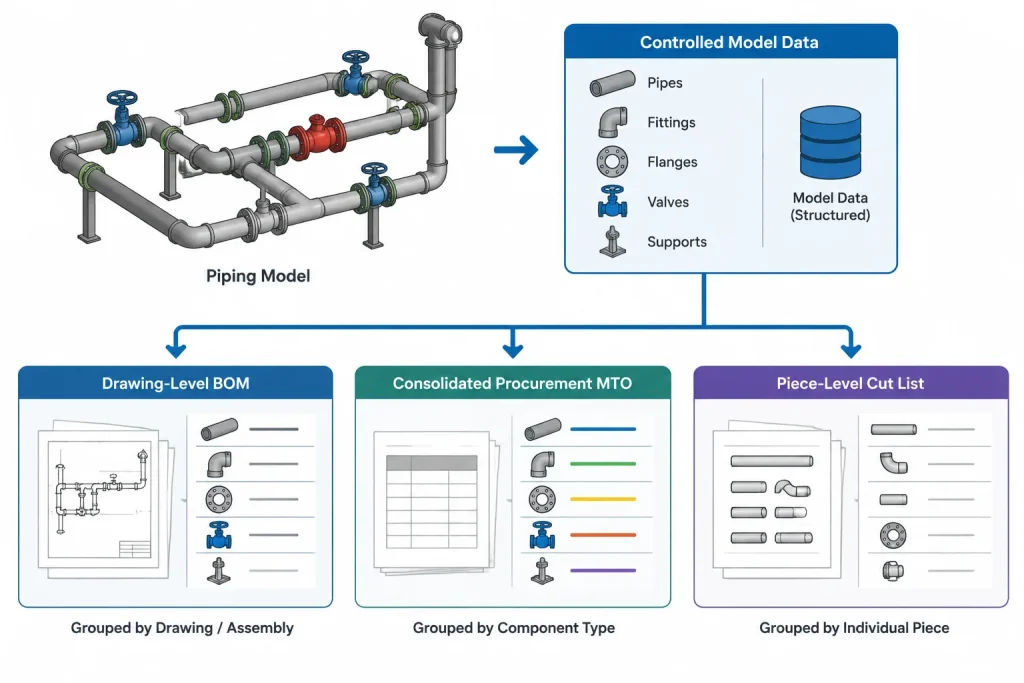
In a coordinated digital workflow, all three outputs can originate from the same controlled piping model or component database, but they are filtered and grouped differently:
- The BOM groups material by drawing, spool, or assembly.
- The MTO groups material by procurement or estimating identity.
- The cut list expands pipe into individual fabrication pieces.
This common-source approach reduces manual transcription, but it does not eliminate the need for checking. A geometrically correct model can still produce incorrect reports if component properties, scope flags, commodity codes, or installation categories are wrong.
A Practical Data Flow
- Confirm line, component, and piping-class data before detailed reporting.
- Model or document components using verified size and dimensional definitions.
- Assign drawing, spool, fabrication, and installation scope attributes.
- Generate drawing-level BOMs and check them against the visible geometry.
- Aggregate eligible items into an MTO using controlled grouping fields.
- Calculate piece-level pipe requirements from approved fabrication geometry.
- Reconcile revisions so deleted, added, and changed quantities remain traceable.
Common Coordination Failures
Double-Counting Across Drawing Boundaries
A component near an isometric break, match line, or spool boundary may appear graphically on more than one document. Only one scope should normally own its material quantity unless the project deliberately uses another convention.
Counting Pipe by the Wrong Unit
Pipe may be tracked by length, stock item, piece, or another purchasing unit. Mixing these units during aggregation creates misleading totals. Reports should preserve both the quantity and its unit of measure.
Including Reference Geometry as Material
Equipment nozzles, existing piping, vendor components, temporary graphics, and continuation items may be modeled for coordination without belonging to the purchasing scope. Report filters must distinguish physical context from supplied material.
Using the BOM as a Cut List
A BOM may provide a total pipe length but omit individual piece lengths and end conditions. Fabrication should not infer cuts from an aggregate quantity when controlled piece data is required.
Failing to Reconcile Revisions
If a spool changes after material has been purchased or cut, simply issuing a replacement total is not enough. The team needs to identify additions, deletions, reusable material, and pieces that can no longer be used.
CAD and Model Review Checklist
- Verify that every reportable component has a valid size, specification, and material identity.
- Check that reducers, reducing branches, and other multi-size items use the correct size order.
- Confirm that end connections and flange attributes are not lost during aggregation.
- Separate existing, demolition, temporary, vendor-supplied, and new construction scope.
- Review valves and specialty items against their tags and supporting documents.
- Check pipe lengths using the intended fabrication basis, not only graphical measurements.
- Confirm ownership at spool breaks, match lines, battery limits, and package interfaces.
- Compare report revisions and investigate unexplained quantity changes.
- State whether allowances, contingency, or waste factors are included and where they are applied.
Choosing the Controlling Document
No universal hierarchy makes the BOM, MTO, or cut list authoritative for every decision. The controlling source depends on the question being asked. A drawing BOM may control assembly content, an approved procurement MTO may control purchasing quantities, and a released cut list may control shop cutting. The project execution plan should define these roles and the process for resolving differences.
The most reliable workflow treats these deliverables as related views of controlled piping data, not as independent spreadsheets. Clear scope rules, stable component identities, verified dimensions, and disciplined revision tracking allow the BOM, MTO, and cut list to support their respective users without contradicting one another.
Using These Deliverables in Document Control
A report should be identified by more than its title. Its header, transmittal, or accompanying procedure should establish the represented scope, source revision, issue purpose, responsible discipline, quantity basis, and applicable exclusions. Without that context, users may compare reports that were generated for different decisions.
Resolve Differences by Tracing the Data Basis
When a BOM, MTO, and cut list disagree, begin with the underlying component records rather than manually forcing the totals to match. Determine whether the difference comes from scope, grouping, units, fabrication status, field allocation, procurement allowances, or revision timing.
- Scope difference: Confirm whether each report includes the same lines, areas, spools, loose items, and installation categories.
- Identity difference: Check whether unlike components were merged under a broad description or separated by specification attributes.
- Quantity-basis difference: Verify whether pipe is represented as aggregate length, stock material, or individual fabricated pieces.
- Status difference: Identify whether the report is preliminary, approved for purchasing, released for fabrication, or updated after a change.
- Revision difference: Compare additions, deletions, substitutions, and retained material rather than comparing only the latest totals.
Record Authority by Business Decision
A useful project procedure assigns authority according to the activity being controlled. The drawing or spool BOM can define assembly membership, the approved MTO can control procurement demand, and the released cut list can direct pipe preparation. That division does not make any report universally superior; it establishes which source answers a particular question.
Exceptions should be documented through the project change process. Informal spreadsheet edits can disconnect purchasing and fabrication records from the engineering model, making later reconciliation difficult.
Handoff Checks for Engineering, Procurement, and Fabrication
- Confirm that the receiving group understands the report’s purpose and issue status.
- Preserve component identifiers when quantities are consolidated for purchasing.
- Keep units of measure visible during export, import, and spreadsheet processing.
- Separate procurement allowances from modeled or drawing-derived quantities.
- Identify owner-supplied, vendor-supplied, field-supplied, and shop-supplied material consistently.
- Do not release piece-level cutting information until the required geometry and component definitions have been checked.
- Retain revision history so purchased, issued, cut, returned, and reusable material can be reconciled.
Frequently Asked Questions
Are a piping BOM and an MTO the same document?
Not necessarily. A BOM commonly identifies material belonging to a drawing, spool, or assembly, while an MTO commonly consolidates quantities for estimating, procurement, or planning. Some organizations use the terms differently, so the documented purpose and scope are more reliable than the acronym.
Can procurement buy directly from a drawing BOM?
Only when the project procedure designates that BOM as a purchasing basis and its descriptions contain the required procurement information. Tagged valves, specialty items, bulk materials, and supporting requisitions may be controlled elsewhere.
Can a cut list be generated from an MTO?
An aggregate MTO is generally insufficient by itself. A controlled cut list requires piece-level geometry, fabrication ownership, end conditions, and verified component definitions that summarized purchasing quantities may not retain.
Why can total pipe quantity differ between an MTO and a cut list?
The reports may use different scopes, units, allowances, status dates, or fabrication rules. The cut list may describe finished pieces, while the MTO may represent purchasing demand or summarized material. The data basis must be compared before treating the difference as an error.
Which document controls after a piping revision?
The project execution and document-control procedures should define that authority. The relevant released document may control its own activity, but affected BOMs, MTOs, cut lists, purchase records, and fabrication records still need coordinated revision or reconciliation.
What should be checked before comparing report totals?
Check scope boundaries, report status, source revision, units of measure, commodity grouping, installation responsibility, exclusions, and the treatment of allowances or waste. Totals are meaningful only when these bases are compatible.