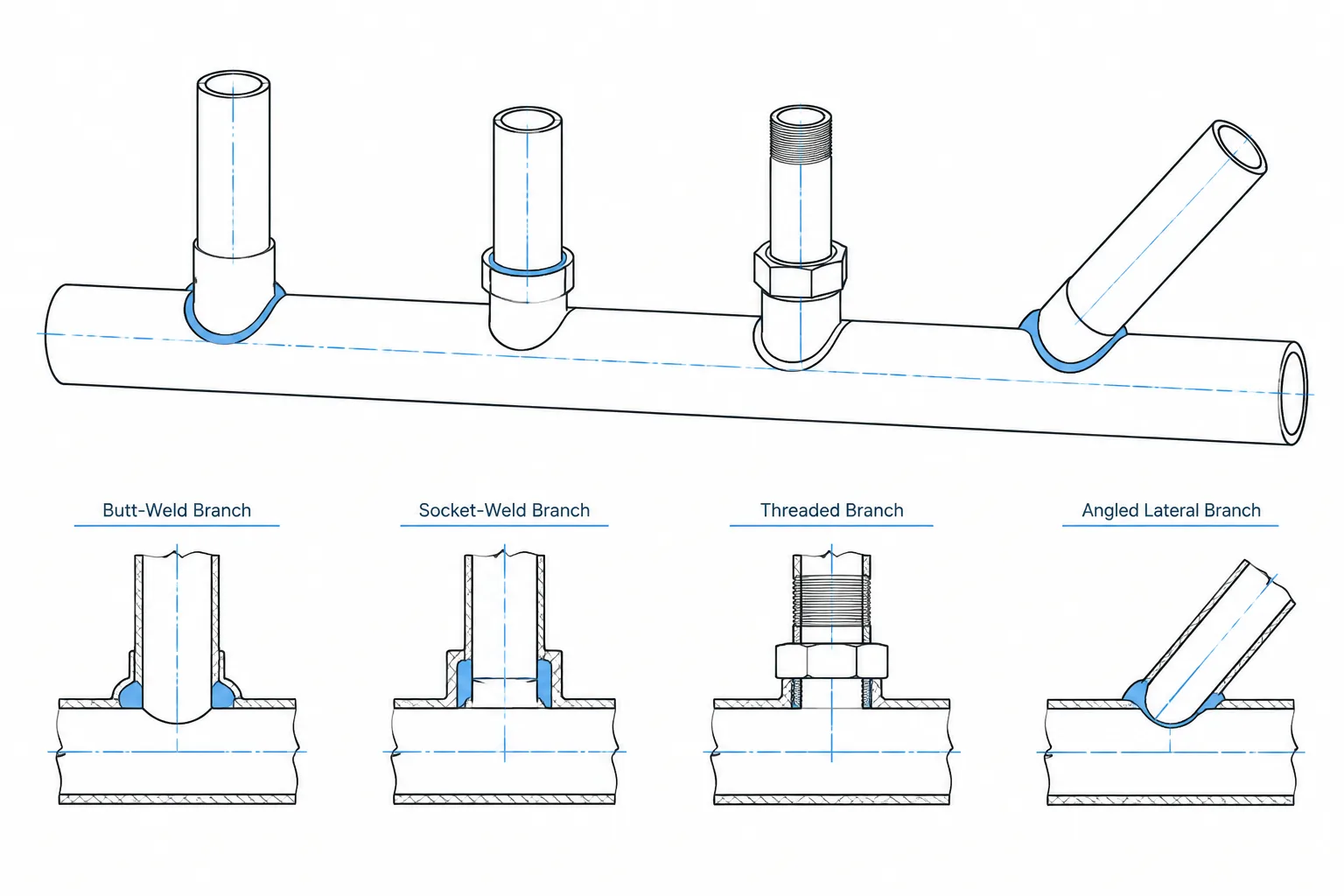
Branch outlet fittings in piping CAD require more than a connected run and branch centerline. The model must preserve the identity of the outlet, its parent surface, branch-end connection, orientation, and fabrication interfaces. These distinctions affect routing, material reporting, weld tracking, isometric output, and branch cut-length control.
This guide explains how to represent outlet assemblies without treating them as generic tees or relying on visually plausible geometry. It also identifies which details belong in the design model and which require confirmation from the piping specification, engineering documents, manufacturer information, or fabrication workflow.
Branch outlet fittings provide a compact way to connect a smaller branch to a pipe, elbow, or other compatible run component. They are common where a conventional tee is unnecessary, unavailable in the required configuration, or less practical for the layout. Although the finished connection may occupy little space, it carries several design and fabrication variables that must be represented correctly in CAD.
A reliable model must distinguish the outlet fitting from the opening in the run pipe, the branch-end connection, and any separate branch piping. Treating the assembly as a generic tee can obscure weld locations, material requirements, branch orientation, and cut-length information.
What Is a Branch Outlet Fitting?
A branch outlet fitting is a contoured component attached to the outside of a run pipe or another permitted parent component. Its base is shaped to fit the supporting surface, while its outlet provides the connection for the branch. Depending on the selected type, the branch connection may be butt-welded, socket-welded, threaded, or supplied in another project-approved form.
The fitting and the opening in the run work together as an assembly. The run is cut or prepared, the fitting is positioned over the opening, and the fitting is attached using the required weld detail. The fitting may also contribute reinforcement around the opening, but its suitability cannot be determined from appearance alone. Selection must follow the piping specification, design conditions, applicable design rules, material requirements, and verified manufacturer data.
Common Outlet Types and Their CAD Implications
| Outlet description | Typical branch connection | Important CAD consideration |
|---|---|---|
| Butt-weld outlet | Branch pipe is butt-welded to the outlet end | Show the outlet fitting separately from the branch pipe and identify both weld locations |
| Socket-weld outlet | Branch pipe enters a socket and is fillet welded | Account for insertion geometry and the project-required assembly condition |
| Threaded outlet | Branch component engages internal threads | Do not infer visible assembled length from nominal component length alone |
| Nipple-style outlet | Extended neck connects directly to downstream piping or a component | Verify whether the neck is integral to the outlet or a separate nipple |
| Lateral outlet | Branch departs at an oblique angle | Control the true branch axis, rotation, and developed opening location |
| Elbow outlet | Outlet is attached to an elbow where permitted | Model the actual elbow surface and verify the approved attachment location |
Terms such as weldolet, sockolet, and threadolet are widely used as shorthand in industry, but naming conventions can vary among specifications, catalogs, and project databases. A component description should communicate the connection type rather than relying only on an informal family name.
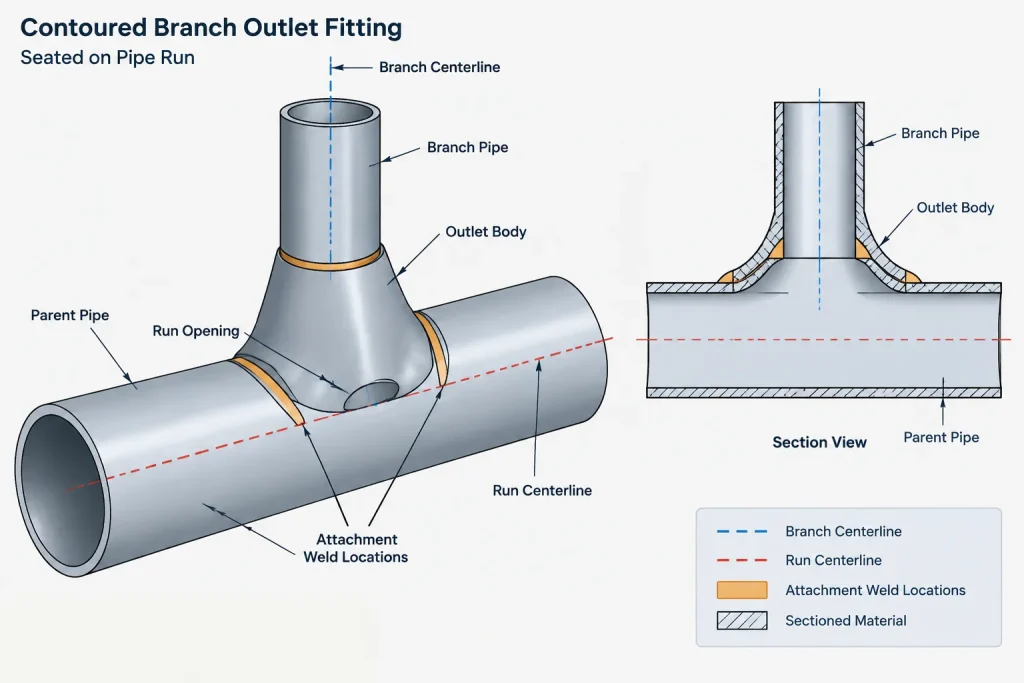
The Geometry That the Model Must Control
Run centerline and branch centerline
The branch axis normally points toward the run axis for a radial outlet. That relationship should be established by geometry, not by visually placing the fitting against the outside surface. If the run size, branch size, or fitting family changes, a loosely placed component may no longer remain centered.
A lateral outlet is different. Its branch axis intersects the run at a specified angle and must also be clocked around the run. Both the angle and circumferential orientation are necessary to locate it fully.
Contoured base
The outlet base is shaped for a particular parent surface. A fitting modeled for one run diameter should not be stretched to fit another. Scaling can distort the body, weld interface, outlet bore, and end geometry. Use verified geometry for the selected run and branch combination, or use an intentionally simplified symbol linked to correct catalog data.
Outlet projection
The distance from the run centerline or outside surface to the branch-end connection affects routing and branch cut length. This projection is not safely derived from a generic envelope. It should come from an approved dimensional source associated with the actual fitting selection.
Run opening
The opening in the run is fabrication information, not merely a visual hole in the model. Its shape and preparation can depend on the fitting, parent surface, welding procedure, and fabricator practice. CAD users should not invent a cutout by matching the visible outlet bore. When opening dimensions are needed, obtain them from controlled fabrication or manufacturer information.
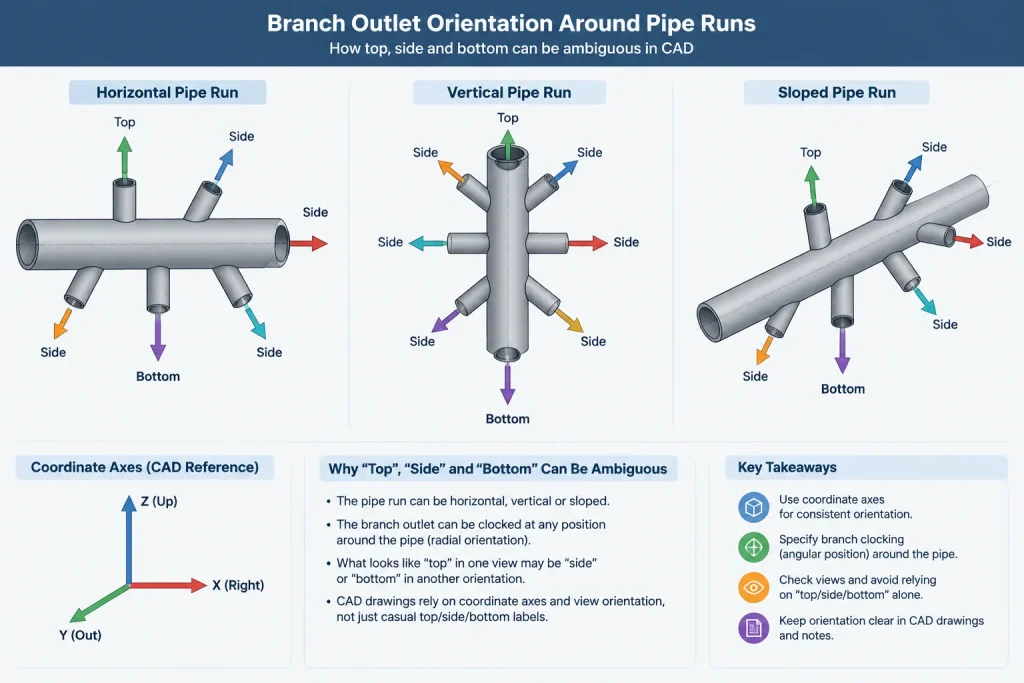
Orientation and Clocking
For a straight horizontal run, descriptions such as top, bottom, and side may be sufficient during early layout. They become ambiguous on sloped, vertical, or skewed piping. Production documentation should use a method that can be checked independently, such as coordinates, a branch centerline direction, an angular orientation tied to a defined reference, or dimensions from established datums.
Orientation also affects more than appearance. The designer may need to consider:
- Drainability or venting intent;
- Access to a threaded or socket-weld branch component;
- Clearance for insulation and welding;
- Interference with nearby outlets, seams, supports, or attachments;
- Space for inspection and examination activities;
- Branch loads and any required support close to the connection.
A CAD model can expose spatial conflicts, but it does not establish that the branch connection is structurally acceptable. Loads, reinforcement, attachment placement, and parent-pipe suitability remain engineering checks.
How to Represent the Assembly at Different Levels of Detail
In an early routing model, an outlet may be represented by a branch node, an approximate envelope, and connection metadata. This can be sufficient for line routing and preliminary clash review if the simplification is clearly understood.
A detailed design model should normally distinguish the parent pipe, outlet fitting, branch pipe, and connected valve or instrument item. Connection ports should identify the run-side attachment and branch-side end type. The component record should carry the data needed by the material workflow without embedding unverified dimensions in manually drawn solids.
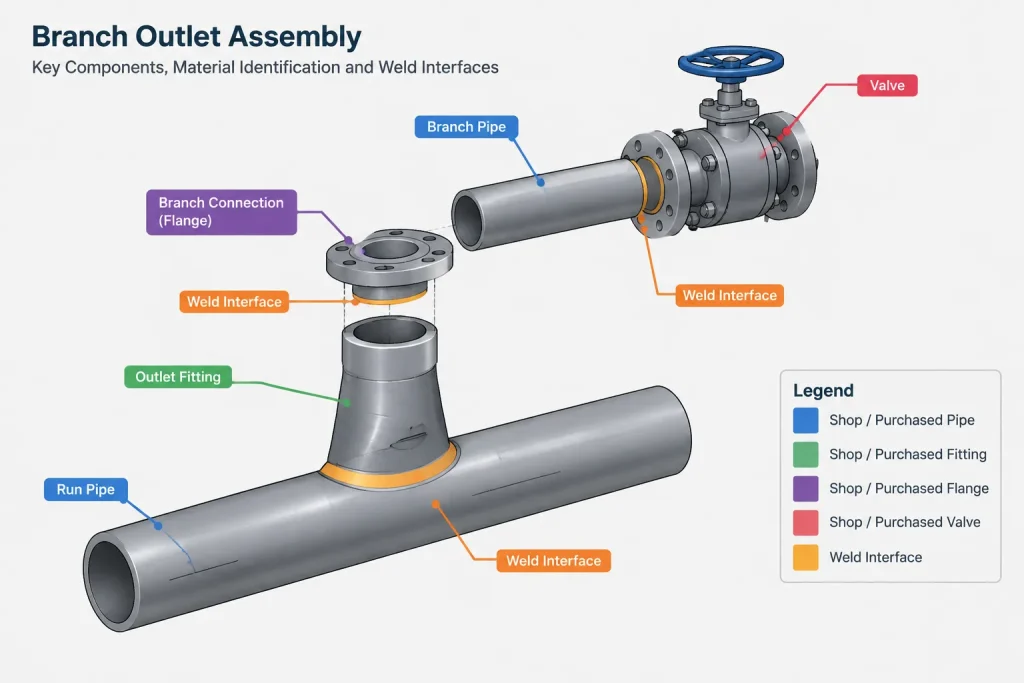
A fabrication model may also show weld locations, end preparation, insertion relationships, spool ownership, and the controlled opening. Whether those features belong in the design model or in fabricator-developed documentation depends on the project handoff process.
Isometric and Drawing Documentation
An isometric should make it possible to identify what is purchased, what is cut, and what is welded. For an outlet branch, review the drawing for the following:
- The outlet fitting is listed as a separate material item when it is separately purchased.
- The run-to-outlet attachment is not confused with the branch-end weld.
- The branch connection type agrees with the piping specification.
- The outlet location is controlled along the run.
- The branch orientation can be reconstructed without measuring the drawing pictorially.
- The branch pipe cut length uses the correct fitting projection or insertion basis.
- Shop and field responsibilities are identified consistently with the spool plan.
- Any required special fabrication note is linked to approved information.
On a single-line isometric, the fitting symbol will not describe its complete physical shape. The item callout, end-connection data, bill of materials, and weld information therefore carry much of the technical meaning.
Frequent Modeling and Detailing Errors
- Substituting a tee: A tee may produce a connected centerline model, but it changes component identity, takeout, weld arrangement, and material reporting.
- Using the wrong parent diameter: The fitting may touch the pipe graphically while its contoured base is incompatible with the selected run.
- Ignoring end connection: Butt-weld, socket-weld, and threaded outlets create different branch assembly conditions.
- Scaling a generic block: Uniform scaling does not preserve verified fitting geometry or connection metadata.
- Placing the branch by eye: Small angular errors can move the remote end of the branch and cause coordination problems.
- Double-counting components: An extended-neck outlet may be mistaken for an outlet plus a separate nipple.
- Inventing the opening size: A visually plausible hole is not controlled fabrication information.
- Omitting weld distinctions: The run attachment and branch connection may require separate weld records and inspection tracking.
A Practical CAD Review Workflow
- Confirm that an outlet fitting is permitted by the line specification and branch connection rules.
- Verify the parent component, run size, branch size, material, and branch-end connection.
- Select verified component geometry or a controlled simplified representation.
- Place the outlet using the run axis, branch axis, and a defined orientation reference.
- Check the fitting projection and resulting branch cut-length basis.
- Review nearby welds, fittings, supports, insulation, and access requirements.
- Confirm that the isometric symbol, item description, weld records, and bill of materials agree with the model.
- Flag any run-opening detail that requires manufacturer, engineering, or fabricator confirmation.
Key Takeaway
Branch outlet fittings should be modeled as connection assemblies, not as decorative lumps on a pipe. The important controls are component type, compatible parent surface, branch-end connection, centerline relationship, orientation, projection, weld identity, and material data. When those elements remain synchronized, the CAD model can support routing, isometric generation, purchasing, fabrication planning, and review without pretending to replace the engineering checks behind the branch connection.
Model Data and Geometry Should Agree
A geometrically convincing outlet can still be incorrect if its catalog record, connection ports, or material description identifies a different component. Review the graphical model and component data together. The parent association should point to the actual run component, while the branch port should reflect the specified end connection.
This relationship is especially important when a project uses simplified solids. A simplified body can support routing and drawing production when its metadata remains controlled, but detailed-looking geometry should not be accepted as evidence that the fitting selection or run opening has been verified.
Define Responsibility at the Design-to-Fabrication Handoff
The project workflow should identify who controls the outlet selection, opening detail, weld preparation, branch cut length, and spool assignment. If the design model does not contain fabrication-level information, its drawings and data exports should avoid implying that unresolved details are approved.
Useful handoff notes distinguish between confirmed design information and details that remain subject to engineering, manufacturer, or fabricator review. This reduces the risk of an approximate model feature becoming an uncontrolled shop instruction.
Final Coordination Checks
- Component identity: Confirm that the outlet type shown in CAD matches the material description and branch connection.
- Parent association: Verify that the outlet is attached to the intended pipe, elbow, or other approved run component.
- Axis control: Check branch direction and clocking from defined model references rather than from the drawing appearance.
- Physical access: Review space for welding, assembly, insulation, examination, and operation of nearby components.
- Drawing consistency: Compare the model, isometric callout, bill of materials, weld information, and spool assignment.
- Unresolved fabrication data: Clearly flag opening geometry, preparation, or projection information that has not been verified.
These checks improve drawing reliability, but they do not replace engineering review of reinforcement, loads, material compatibility, design conditions, or compliance with the governing piping requirements.
Frequently Asked Questions
Is a branch outlet fitting the same as a piping tee?
No. Both can create a branch, but they are different components with different geometry, material reporting, weld arrangements, and cut-length implications. Substituting a tee symbol or model can conceal the actual assembly.
Should the opening in the run pipe match the visible outlet bore?
Not by assumption. The controlled opening can depend on the selected fitting, parent surface, weld preparation, manufacturer information, and fabrication practice. A CAD user should not derive fabrication geometry solely from the visible bore.
How should branch outlet orientation be documented?
Use a reproducible reference such as a branch centerline direction, coordinates, established datums, or an angular orientation tied to a defined project reference. Descriptions such as top or side may become unclear when piping is sloped, vertical, or skewed.
Can a generic outlet model be scaled for another pipe size?
Generic scaling is not a reliable substitute for verified component geometry. It can distort the contoured base, body, bore, projection, and connection features. If exact geometry is unavailable, use a controlled simplified representation linked to verified component data.
Does a detailed CAD model prove that the branch is structurally acceptable?
No. CAD can represent the selected assembly and reveal spatial conflicts, but it does not by itself verify reinforcement, branch loads, parent-pipe suitability, material requirements, or compliance with applicable design rules.
What information should remain distinct in the model?
The parent run, outlet fitting, run opening, branch pipe, branch-end connection, and weld interfaces should remain identifiable where required by the project workflow. Keeping them distinct supports material lists, weld tracking, fabrication planning, and drawing review.