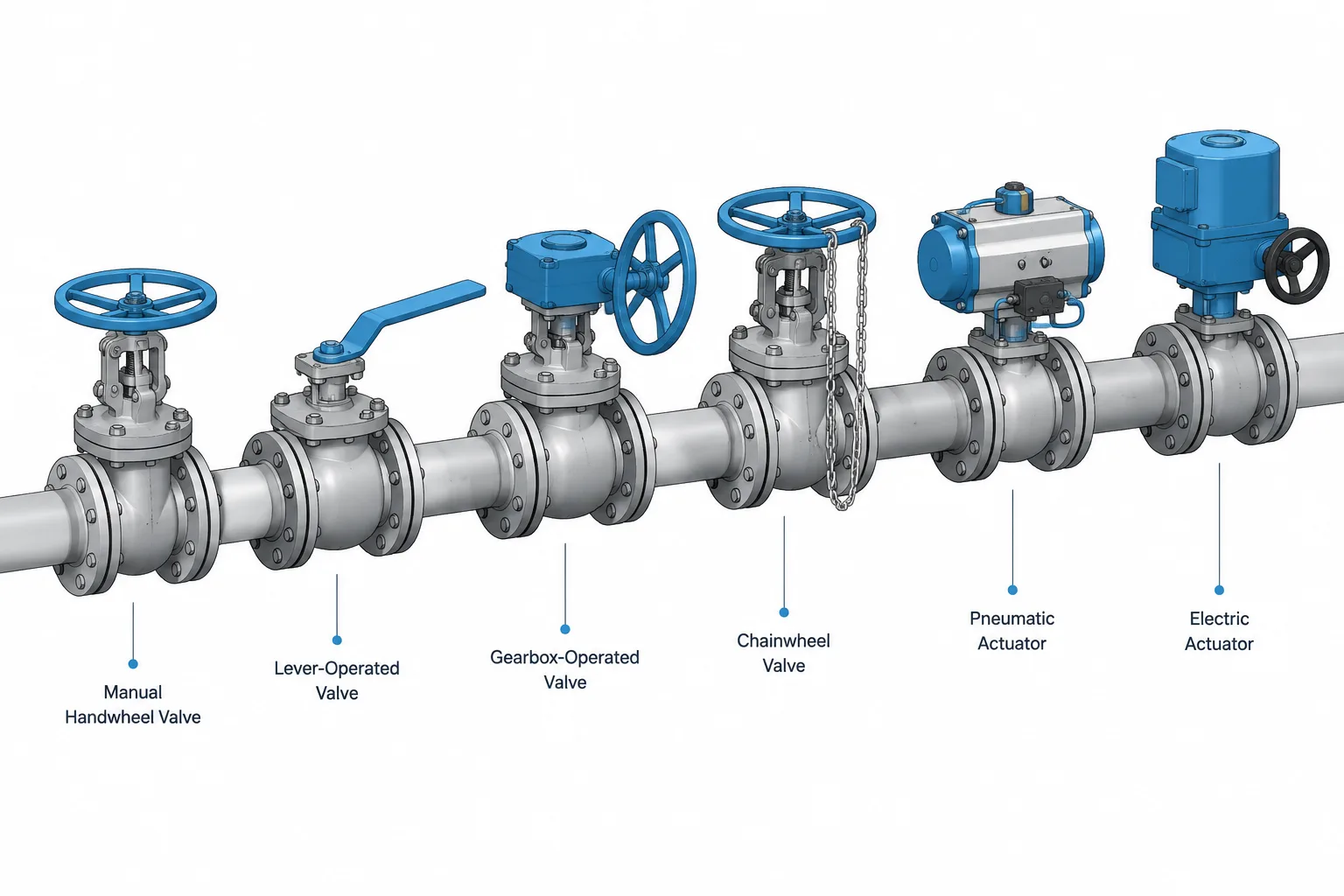
Valve operator types in piping CAD must be represented as functional parts of the assembly rather than decorative additions. The selected operator affects the equipment envelope, movement clearance, operating access, maintenance space, and coordination with structural, electrical, and instrumentation work.
This reference explains how handwheels, levers, manual gearboxes, chainwheels, and powered actuators differ from a piping-layout perspective. It also shows why preliminary CAD envelopes should remain distinguishable from verified supplier geometry and controlled valve data.
A valve body controls the process flow, but the operator determines how a person or control system moves the valve. That distinction matters in piping CAD. Two valves with similar bodies and end connections can require very different space, support, access, power, and documentation because their operators are different.
A generic valve envelope may be adequate during early routing, but it should not be mistaken for final equipment geometry. Handwheels, levers, gear operators, chainwheels, and powered actuators each introduce different design questions. The model must communicate enough information for layout and coordination without implying that unverified generic geometry represents a purchased valve.
Operator, actuator, and valve body are related but different
The valve body contains the flow passage and pressure boundary. Its type may be gate, globe, ball, butterfly, plug, diaphragm, or another design. The operator is the mechanism used to move the valve closure member. In general piping usage, the term may include both manual operating devices and powered actuators.
An actuator converts an external energy source into mechanical valve motion. Pneumatic, electric, and hydraulic actuators are common categories. A manual handwheel or lever provides human input instead.
Accessories are separate again. Limit switches, solenoid valves, position transmitters, air-filter regulators, local control stations, and valve positioners may be mounted on or near an actuated valve. These items can govern the real assembly envelope even when they are not part of the basic actuator shape.
Common valve operator types
| Operator type | Typical CAD concern | Documentation concern |
|---|---|---|
| Handwheel | Hand access, stem movement, and clearance around the wheel | Orientation and whether the stem rises or remains externally stationary |
| Lever | Swept operating arc and interference at intermediate positions | Open and closed positions, locking feature, and handle orientation |
| Manual gearbox | Gear housing, input handwheel, shaft projection, and maintenance access | Gear operator identity and mounting orientation |
| Chainwheel | Chain drop path, operator reach zone, and nearby obstructions | Chainwheel arrangement, operating elevation, and chain management |
| Pneumatic actuator | Actuator envelope, tubing connections, accessories, and removal space | Actuation method, action, control accessories, and required operating state |
| Electric actuator | Motor and gearbox envelope, cable entry, local controls, and removal access | Power and control interface, orientation, and vendor data status |
| Hydraulic actuator | Cylinder or rotary actuator envelope, piping interfaces, and support effects | Hydraulic connections, operating action, and package boundaries |
Handwheels
Handwheels are often associated with multi-turn valves, although the exact operating arrangement depends on the valve design. The visible wheel is only part of the layout problem. Designers may also need to account for the stem, yoke, bonnet, gear mechanism, and the operator’s hand and body position.
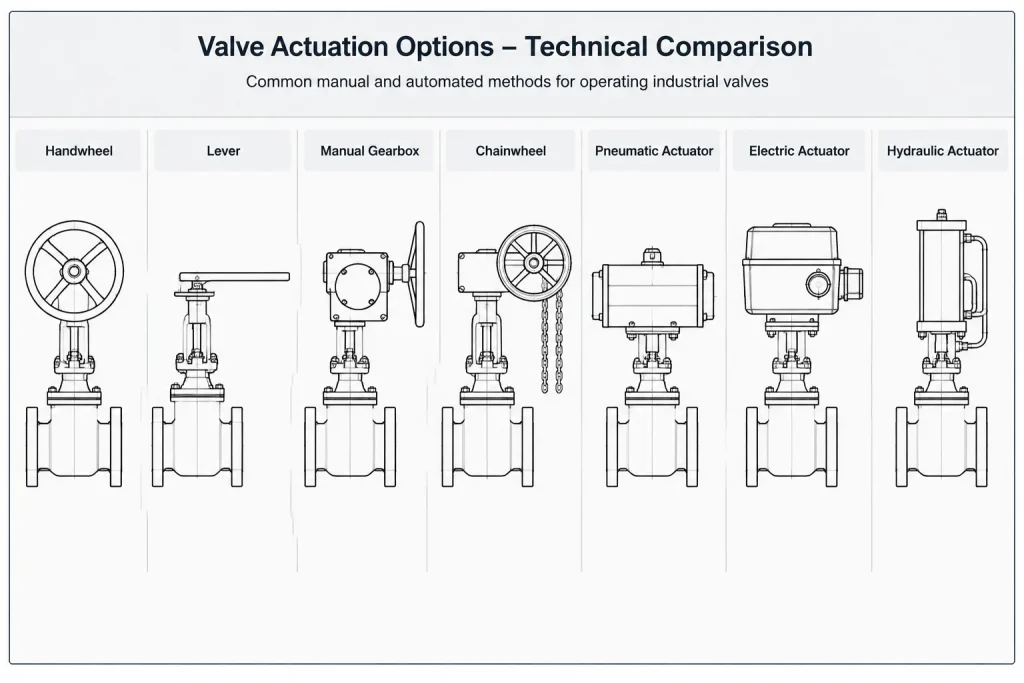
A rising-stem valve can require space beyond its closed-position envelope as the valve changes position. Modeling only the valve in one state may therefore hide an interference. The relevant travel or maintenance envelope should be represented separately from permanent solid geometry when practical.
Levers
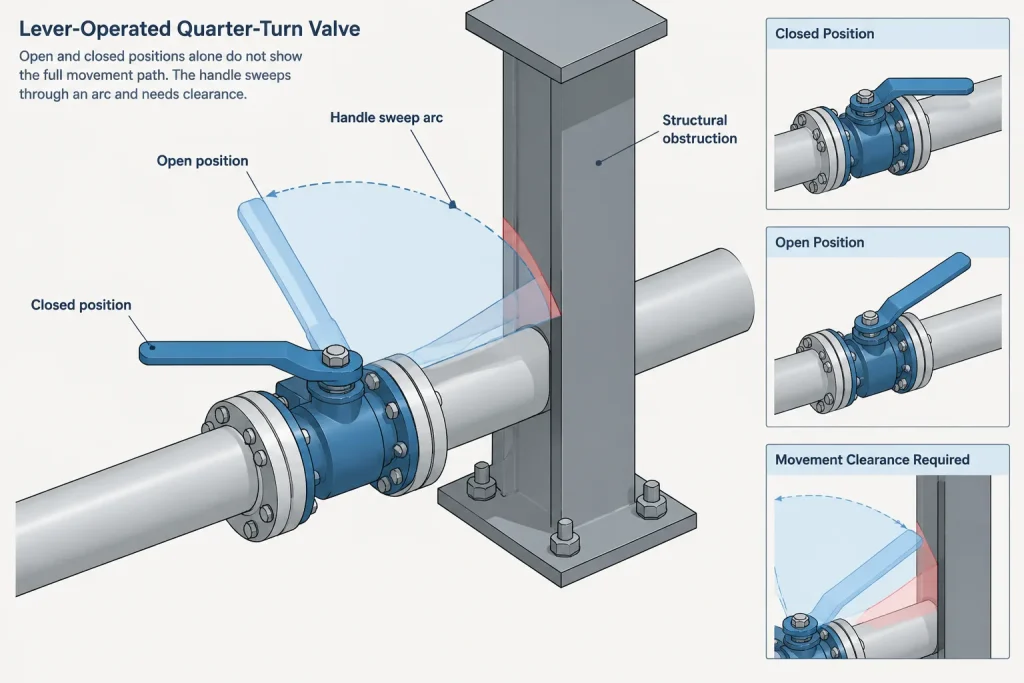
Levers are common on manually operated quarter-turn valves. Their most important layout characteristic is usually the swept path between operating positions. A handle that clears adjacent pipe while fully open may strike the same pipe during movement.
The lever direction can also provide a useful visual indication of valve position, but drawings should not rely on appearance alone. The documented valve state must remain clear even when a plan view, simplified symbol, or congested model makes the handle orientation ambiguous.
Manual gear operators
A gearbox reduces the manual effort needed to operate a valve and changes the assembly geometry. The gear housing may be offset from the valve centerline, while the handwheel can project in a different direction from the valve stem or shaft.
Do not create a gear-operated valve by attaching an arbitrary box and wheel to a bare valve model. That may be acceptable as a clearly identified conceptual envelope, but final layout should use verified assembly dimensions and mounting orientation. The gearbox can affect insulation clearance, access platforms, structural steel coordination, and valve removal.
Chainwheels
A chainwheel allows a manually operated valve to be controlled from below or from another accessible elevation. It does not eliminate access planning. The chain needs a clear hanging path, a usable operating position, and a method of preventing it from interfering with walkways, equipment, or nearby piping.
CAD models should distinguish the valve handwheel or chainwheel from the flexible chain envelope. Modeling every chain link is rarely useful for plant layout. A simplified hanging path or clearance zone can communicate the coordination requirement more effectively.
Powered actuators
Powered actuators are not interchangeable boxes. Their proportions, connection points, accessories, and removal requirements vary by actuation method and supplier. A pneumatic diaphragm assembly, pneumatic piston actuator, electric motor operator, and hydraulic cylinder can have substantially different envelopes even when mounted on the same nominal valve size.
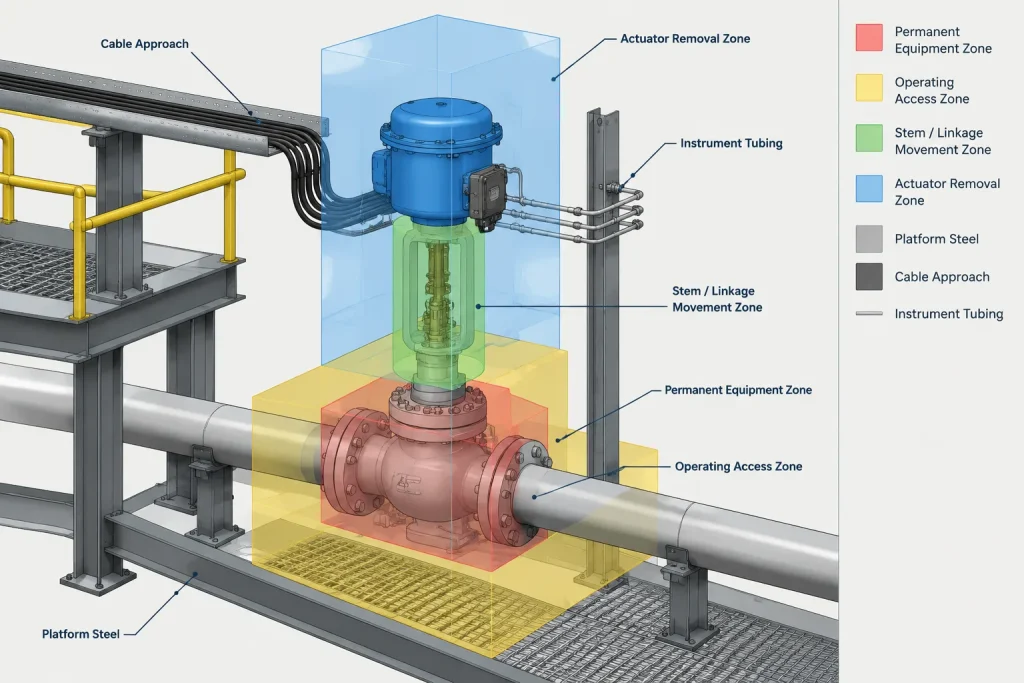
The actuator may also create interfaces outside the piping discipline. Pneumatic units can require instrument air tubing and control accessories. Electric units can require cable routing and electrical access. Hydraulic units can require supply and return connections. These interfaces should be coordinated without assuming that a preliminary actuator selection is final.
What should be represented in the CAD model?
The correct detail depends on the model’s purpose and project stage. A useful operator representation generally includes the features that affect routing, access, interfaces, and removal.
- Permanent physical envelope: valve body, bonnet, yoke, operator housing, handwheel, motor, cylinder, and major mounted accessories as applicable.
- Movement envelope: lever sweep, rising-stem travel, actuator linkage movement, or other moving geometry.
- Operating access: space for a person to grip, turn, pull, observe, or locally control the operator.
- Maintenance envelope: space needed to remove the actuator, bonnet, gearbox, motor, or other serviceable component.
- Discipline interfaces: tubing, cable entry, hydraulic connections, local panels, or structural support requirements.
These categories should not necessarily be combined into one solid object. Separate CAD layers, object classes, properties, or clearance objects make it easier to distinguish installed equipment from reserved space.
Operator orientation is an assembly property
The operator’s direction should not be treated as an incidental rotation made only to improve drawing appearance. Orientation can determine whether the valve is operable and maintainable. It can also affect drainage, environmental protection, accessory arrangement, cable approach, tubing runs, and the loads applied to the valve assembly.
A valve model should use a consistent insertion point and axis system so that the operator can be rotated intentionally. If the operator orientation is not yet confirmed, mark it as preliminary rather than presenting an arbitrary direction as final. Once vendor information is available, check the complete assembly rather than replacing only the body dimensions.
Information that belongs in data rather than geometry
CAD geometry cannot communicate every operating requirement. The component record, valve list, instrument data, or project database may need to carry information such as:
- manual or powered operation;
- actuation energy source;
- valve tag and service identity;
- normal operating position and required failure response;
- local or remote operation;
- position indication or feedback requirements;
- locking, interlocking, or restricted-operation status;
- operator and accessory data status;
- manufacturer and model information when selected.
A visible handwheel does not prove that a valve is intended for routine manual operation, and an actuator-shaped solid does not define its control function. The geometry and the controlled data should agree, but neither should be used as an unsupported substitute for the other.
A practical CAD review workflow
- Identify the valve function and body type. Confirm that the selected valve concept is consistent with the process documents and piping specification.
- Assign the operator category. Record whether operation is by lever, handwheel, gearbox, chainwheel, pneumatic actuator, electric actuator, hydraulic actuator, or another defined arrangement.
- Use an appropriate preliminary envelope. Keep generic geometry visibly classified as preliminary or unverified.
- Set a deliberate orientation. Check the operator against pipe, steel, equipment, platforms, insulation, and nearby valves.
- Review movement and access. Test lever arcs, stem travel, hand access, local control visibility, and maintenance removal paths.
- Coordinate external interfaces. Reserve practical approaches for tubing, cable, controls, and supporting items.
- Update from verified supplier information. Replace or revise the preliminary assembly while preserving its tag, connection points, and data relationships.
- Check affected deliverables. Review plans, isometrics, valve lists, material reports, and discipline coordination views after the change.
Avoid treating the operator as decorative geometry
The operator is a functional part of the valve assembly, not merely a symbol that helps the model look complete. Its type affects how the valve is moved, while its geometry affects routing, operation, maintenance, and multidisciplinary interfaces. A good piping CAD workflow separates generic assumptions from verified dimensions, models the clearances that matter, and keeps operating data aligned with the physical assembly.
How to use this valve operator reference
Begin by identifying what the model must communicate. A routing study may need only a conservative preliminary envelope, while a coordinated plant model may need verified operator orientation, accessory locations, movement zones, and removal space. The level of geometric detail should support the design decision without suggesting more certainty than the available information provides.
Separate installed geometry from reserved clearance
The physical valve assembly and the space needed to operate or maintain it are not the same thing. Keep lever sweeps, stem travel, chain paths, hand-access zones, and component-removal envelopes separate from permanent solids. This makes clash reviews easier to interpret and prevents reserved space from being mistaken for supplied equipment.
Check the complete assembly
Changing the operator can alter more than the visible device above or beside the valve body. Review the bonnet or mounting interface, gearbox position, actuator accessories, local controls, tubing or cable approach, insulation relationship, and nearby access route. A body that fits between adjacent components does not prove that the complete operated valve will fit.
Control preliminary status
Generic operator geometry should carry a clear preliminary or unverified status in the model data. When supplier information becomes available, compare the complete assembly envelope and interfaces rather than updating only the valve body. Preserve the component identity and project data relationships while revising the geometry.
Review drawings as well as the model
An operator that appears understandable in a model view may become ambiguous in a plan, elevation, isometric, or simplified symbol. Confirm that orientation, operating method, valve identity, and relevant status information remain clear across the project deliverables that depend on the model.
Frequently asked questions
What is the difference between a valve operator and an actuator?
A valve operator is the mechanism used to move the valve closure member. The term can include manual devices such as handwheels, levers, gear operators, and chainwheels. An actuator specifically converts an external energy source into mechanical valve motion.
Should a generic valve CAD model include the operator?
It should include enough operator geometry to support the current routing and coordination task. Any generic shape should be identified as preliminary and should not be presented as verified supplier geometry.
Why should movement envelopes be separate CAD objects?
Movement envelopes represent temporary occupied space rather than permanent material. Separating them allows reviewers to recognize lever travel, stem movement, linkage motion, and similar clearance requirements without confusing those zones with the installed assembly.
Does a chainwheel remove the need for valve access planning?
No. A chainwheel changes where manual operation can occur, but the chain still needs a clear path and a practical operating location. Its relationship to walkways, equipment, structures, and adjacent piping must be reviewed.
Can the valve operator be rotated to resolve a clash?
Only after checking whether the proposed orientation is permitted for the complete assembly. Rotation can affect access, accessory positions, environmental exposure, cable or tubing approaches, maintenance activities, and other discipline interfaces.
What information should remain in valve data instead of CAD geometry?
Items such as operating method, energy source, valve identity, normal position, required failure response, control function, feedback requirements, and data verification status are generally better managed as controlled attributes. Geometry should support those records, not replace them.
When should preliminary operator geometry be updated?
Update it when verified assembly information is available or when a design change affects the operator, mounting arrangement, accessories, or interfaces. Recheck clearances and dependent deliverables after the update.