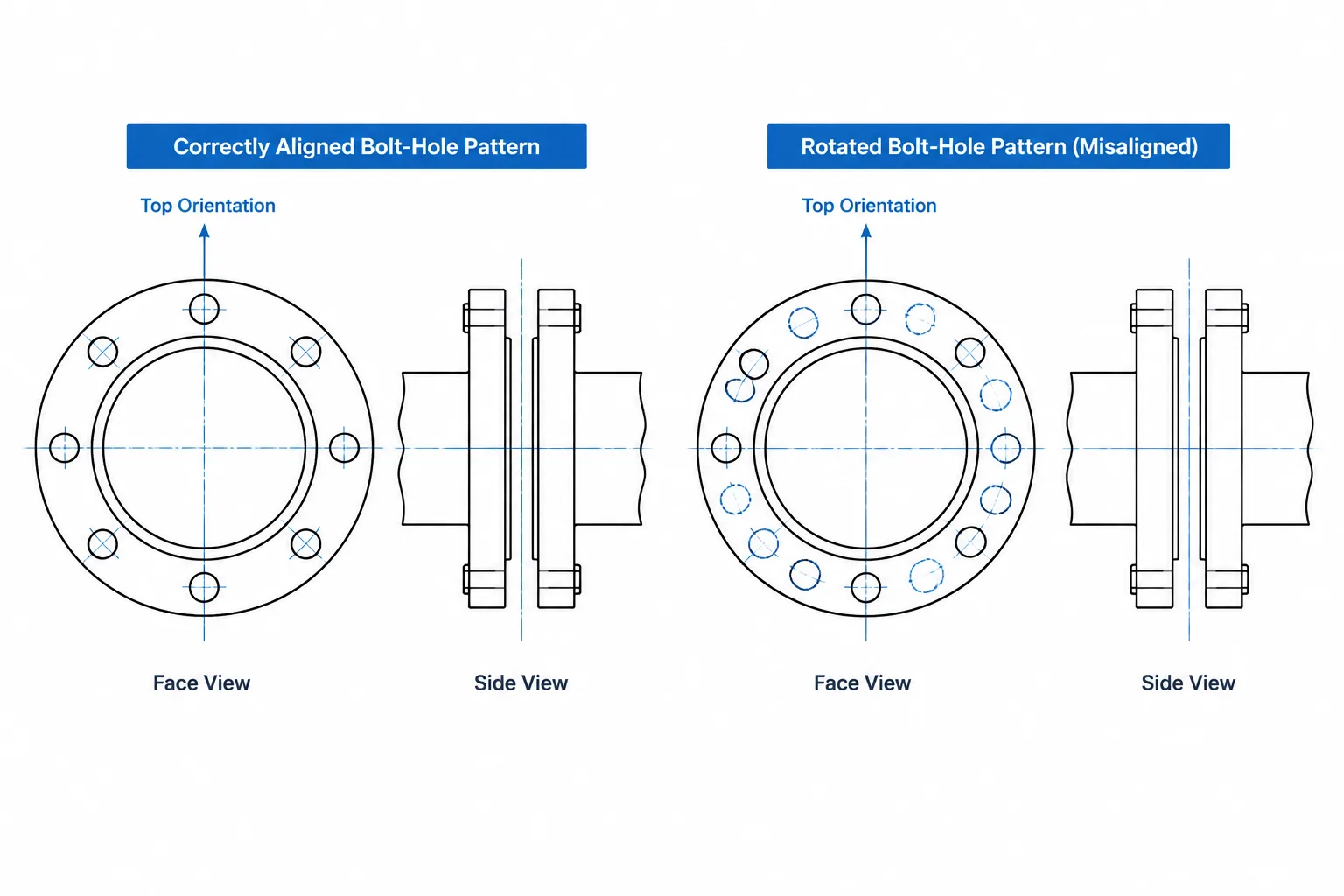
Flange bolt-hole orientation is an angular fit-up requirement, not merely a drafting preference. A flange may have the correct drilling pattern and face location while remaining incompatible with its mating connection because the pattern has been rotated around the pipe or nozzle axis.
This guide explains how to distinguish radial drilling data from clocking, interpret a requirement to straddle a centerline, establish an unambiguous face-view direction, and carry orientation intent from the CAD model into fabrication or field documentation. These checks are especially important at fixed equipment interfaces, valve assemblies, fabricated spools, and existing tie-ins.
A flange can have the correct nominal size, pressure class, facing, bolt-circle diameter, hole count, and hole diameter yet still be modeled incorrectly for the intended assembly. The missing variable is often flange bolt-hole orientation, also called bolt-hole clocking.
Clocking describes the angular position of the hole pattern around the flange axis. It becomes important when a project requires holes to straddle a centerline, when a flanged component has a fixed body orientation, or when piping must mate with equipment that has already been fabricated. A generic circular flange may look rotationally symmetrical in a simplified model, but the installed assembly may not be interchangeable at every angular position.
What flange clocking controls
A complete flange drilling pattern has both radial and angular characteristics. These should not be treated as one dimension.
- Bolt-circle diameter locates the hole centers radially from the flange axis.
- Hole count determines how many holes are distributed around the circle.
- Hole diameter or slot geometry affects bolt clearance and compatibility.
- Angular spacing distributes the holes around the circle.
- Clocking rotates the entire pattern relative to a selected reference direction.
Two flanges can therefore use the same basic drilling geometry but fail to align if one pattern is rotated relative to the other. CAD users should verify both the pattern definition and its angular reference.
What it means to straddle a centerline
When bolt holes are described as straddling a centerline, the reference centerline passes midway between two adjacent holes. A hole center does not lie directly on that reference line.
This differs from an on-center orientation, where a hole center is placed directly on the horizontal, vertical, or other designated reference axis. For an evenly spaced pattern, the difference between these conditions is a half-pitch rotation. The angular pitch is the full circle divided by the number of holes.
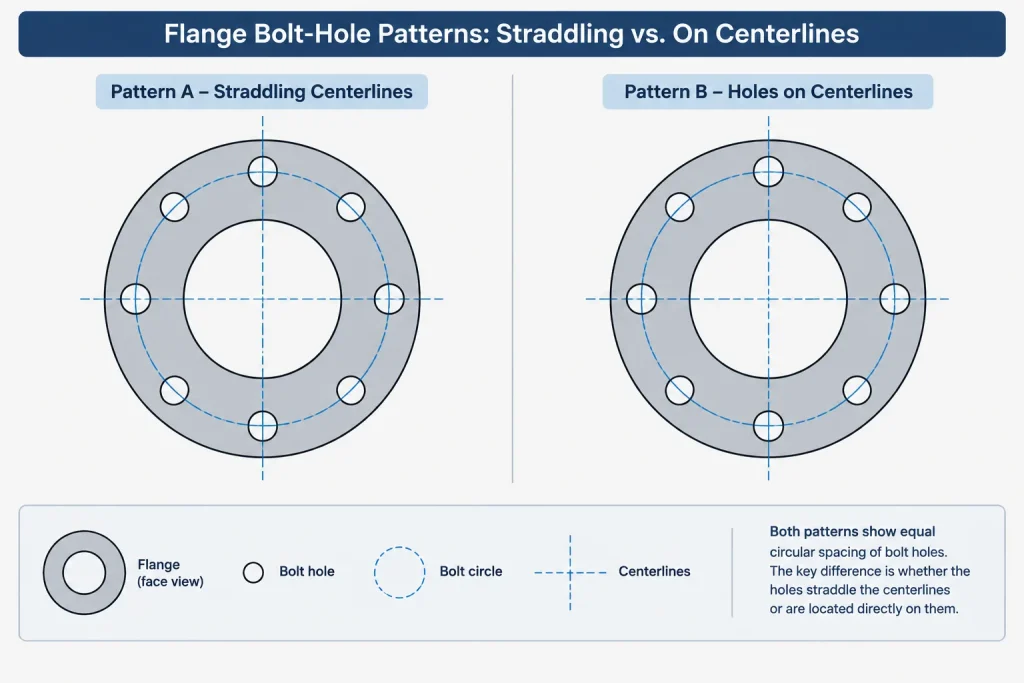
Straddling must always be connected to a defined reference. Depending on the application, that reference may be:
- the vertical centerline through a horizontal pipe;
- the horizontal centerline through a vertical nozzle;
- plant north or a project grid direction;
- the centerline of a valve body or operator;
- an equipment nozzle orientation line; or
- a vendor-defined datum shown on a certified drawing.
A note that simply says “straddle centerline” can remain ambiguous if the relevant centerline and viewing direction are not identified.
Why face-view direction matters
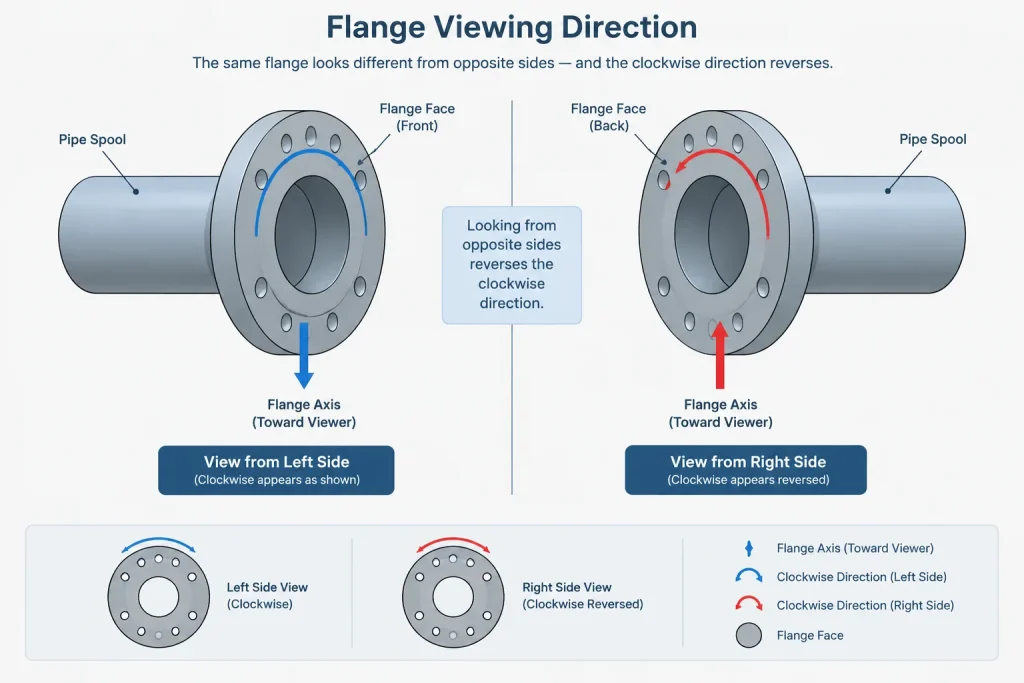
Clockwise and counterclockwise descriptions reverse when a flange is viewed from the opposite side. This is a common source of mirrored bolt patterns in shop drawings, spool details, and exchanged CAD models.
A useful orientation instruction should state whether the observer is looking:
- toward the flange face from outside the component;
- along the direction of flow;
- against the direction of flow; or
- from a named plan, elevation, or equipment reference direction.
For digital models, the same information can be defined with a flange-axis vector and a secondary orientation vector. The axis identifies the direction normal to the face. The secondary vector establishes angular zero. Together, they prevent a component from being placed correctly along the pipe while remaining incorrectly rotated around it.
Where bolt-hole orientation becomes critical
| Situation | Why clocking matters | Recommended control |
|---|---|---|
| Equipment nozzle connection | The mating nozzle may already have a fixed drilling orientation. | Use the approved vendor or field-verified nozzle orientation rather than a generic library default. |
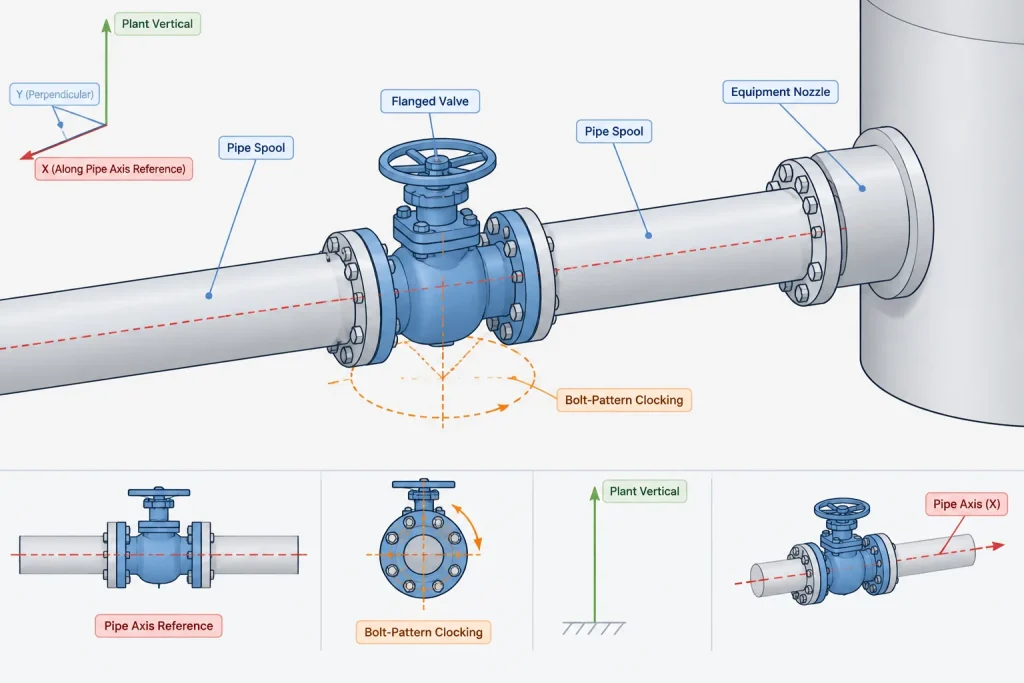
| Flanged valve | The bolt pattern may be related to the valve body, stem, operator, or access direction. | Check the component drawing and model the valve as an oriented assembly. |
| Wafer or lugged component | Body lugs, through-bolts, and operating features can limit permissible rotation. | Confirm the actual connection pattern and installation orientation. |
| Instrumented flange assembly | Taps or other functional features may have a required relationship to the line. | Control the complete assembly orientation, not only the flange holes. |
| Field tie-in | Existing holes may not match an assumed project convention. | Record the actual hole clocking during field verification. |
| Fabricated spool | Several fixed flanges can create a rotational fit-up constraint. | Dimension or otherwise define orientation from a common spool datum. |
Generic flanges versus orientation-sensitive components
A loose flange component in a conceptual model may not need individually modeled holes. Its centerline, face location, outside envelope, and connection data may be enough for routing and preliminary coordination. That does not mean clocking is irrelevant; it means the detail is being deferred.
By contrast, equipment nozzles, flanged valves, specialty items, and fabrication spools may require explicit angular control. For these items, treating every flange as a freely rotatable generic part can hide an installation problem.
The appropriate level of detail depends on the deliverable. A P&ID normally expresses connection type and process intent rather than physical drilling orientation. A general arrangement drawing may show only the overall component orientation. A fabrication isometric, spool drawing, or equipment interface detail may need enough information to reproduce the required clocking.
A practical CAD workflow
1. Identify the governing interface
Determine whether the flange mates with another shop-fabricated spool, a valve, an equipment nozzle, an existing connection, or a vendor-supplied item. The least flexible side of the interface usually deserves the earliest verification.
2. Obtain the correct drilling definition
Use the applicable project specification, recognized dimensional reference, manufacturer information, or verified field measurements. Do not infer a bolt pattern from the flange outside diameter or scale a block created for another size or class.
3. Establish an orientation datum
Select a stable datum such as plant vertical, a grid direction, an equipment centerline, or a local spool axis. Avoid using an arbitrary CAD screen direction because view rotation can make it meaningless.
4. Define the face-view convention
Add a clear view arrow or written viewing direction wherever clockwise angles or hole positions are documented. This is especially important when information passes between plan views, elevations, isometrics, and fabrication details.
5. Place the component by ports and orientation
A reliable component definition needs more than an insertion point. It should include connection ports, face planes, an axial direction, and an angular reference. This allows the part to be replaced or updated without losing its intended rotation.
6. Check the mating pair
Compare hole-center locations in a face-normal view. If detailed holes are not modeled, compare the stored clocking parameters or temporary construction geometry. Do not rely solely on the visual appearance of circular flange solids.
Representing clocking without overmodeling
Full bolt-hole geometry can increase model complexity without adding value to every project stage. Several lighter representations are available:
- store a clocking angle or orientation state as component data;
- include a nonplotting orientation line in the component definition;
- show one reference hole and indicate that the remaining pattern is equally spaced;
- use a face-view detail only at controlled interfaces; or
- place a note identifying the verified mating-component orientation.
The chosen method should remain visible to downstream users. Hidden metadata is useful only when the software workflow preserves it and the drawing or fabrication process can consume it.
Common drafting and modeling mistakes
- Using flange OD as the only geometry: the model appears connected but provides no drilling or clocking control.
- Mirroring a flange detail: the hole pattern or associated taps can reverse when the view direction is not reconsidered.
- Assuming all project flanges use one orientation rule: vendor equipment and existing installations may differ from the general convention.
- Rotating a valve to align holes: this may put the operator, stem, flow arrow, drain, or body in an unacceptable position.
- Dimensioning from an unstable reference: screen-horizontal or sheet-horizontal directions may not correspond to plant coordinates.
- Leaving field tie-in clocking unverified: nominal flange identification alone does not establish the actual angular position of existing holes.
Review checklist
- Is the flange size, class, facing, and drilling source verified?
- Is the angular reference direction clearly defined?
- Does the pattern straddle the intended centerline, or is a hole intended to lie on it?
- Is the stated face-view direction unambiguous?
- Do both mating components use the same coordinate and viewing convention?
- Has component rotation been checked against operators, taps, drains, and access requirements?
- For existing work, is clocking based on field information rather than assumption?
- Can the fabrication deliverable reproduce the orientation without opening the design model?
Flange bolt-hole orientation is a small geometric detail with a direct effect on fit-up. The safest workflow separates drilling dimensions from angular clocking, defines the viewing direction, and checks the mating interface as an assembly. Where the orientation has not been verified, the model and drawing should say so rather than presenting a generic CAD pattern as fabrication-ready information.
Turning clocking intent into usable design information
An orientation requirement is complete only when another user can reproduce it without guessing. The flange axis establishes the direction normal to the face, but a secondary datum is still needed to control rotation around that axis. That datum should relate to a stable project, equipment, or spool reference rather than the current screen or sheet orientation.
Keep model and drawing conventions consistent
A model may store clocking as component data, construction geometry, or an orientation vector. A drawing may communicate the same requirement with a face view, centerlines, a view arrow, or a written datum reference. Whichever method is used, the model and drawing must describe the same viewing side and angular reference.
Mirrored views deserve particular attention. A pattern that appears clockwise from one side appears counterclockwise from the other. Simply copying an angle note between opposite face views can therefore reverse the intended orientation even when the underlying drilling pattern is unchanged.
Treat the mating connection as the acceptance check
The practical question is not whether an isolated flange looks correct. It is whether the mating hole centers coincide when both components are evaluated from a common datum and a clearly defined face-normal view. Associated features such as valve operators, body orientation, taps, and access space should be reviewed at the same time because rotating the component to solve one conflict may create another.
Document uncertainty instead of hiding it
When equipment information or field measurements are incomplete, a generic clocking assumption should not appear as verified fabrication geometry. Mark the interface for confirmation and identify the information still required. This preserves the distinction between a routing model, an orientation-controlled assembly, and a fabrication-ready detail.
Frequently asked questions
What is flange bolt-hole clocking?
Clocking is the rotation of the complete bolt-hole pattern around the flange axis relative to a selected datum. It is separate from the bolt-circle diameter, hole geometry, and angular spacing within the pattern.
What does it mean for flange holes to straddle a centerline?
It means the specified centerline passes between adjacent hole centers rather than through a hole center. The note must identify which centerline applies and from which side the flange is being viewed.
Why is a face-view direction necessary?
Viewing a flange from the opposite side reverses the apparent clockwise and counterclockwise directions. A face-view arrow, flange-axis direction, or named observation direction prevents mirrored interpretations.
Do all flange holes need to be modeled in CAD?
Not at every design stage. A lightweight component may use stored orientation data or reference geometry instead. Detailed holes become more useful where clocking affects fabrication, equipment mating, valve placement, or field fit-up.
Can a valve be rotated to make its flange holes align?
Not without checking the entire valve assembly. Rotation can change the position of the body, stem, operator, flow indication, drains, or required access. The connection and functional orientation must be reviewed together.
How should existing flange clocking be handled?
Use verified field information rather than assuming the existing pattern follows the project convention. Record the observation direction and datum along with the measured or documented orientation so the result cannot be misread later.